TL;DR
Keep your finished picture locked. Build a separate audio timeline from licensed files, make a short pause before the main payoff, export the mix, and attach it to the original video using video stream copy. Check the delivered MP4, including its video frames and encoded audio, before sharing it.
The downloadable example was actually run on a 1080 × 1920 fishing animation containing 1,010 native 60 fps frames. It preserves that picture while building music from 13.10 seconds, leaving a 300 ms music-only pause at 14.35–14.65, and adding an accent at 14.65. The encoded reconstruction measured −16.59 LUFS integrated and −4.24 dBTP. Compressed video hashes and every decoded frame hash matched before and after audio replacement.
This is a D2-style reconstruction, not the original D2 soundtrack: it omits the original mechanical/sand stem and dependence on an earlier mix. No audible audition or subjective balance verification was performed. Four CC0 effect samples, tested Python scripts, editable cue configuration, real analysis-report screenshots, and measured results are included. You supply your own permitted video and music. Raw Mixkit music and music-only renders are excluded.
Download the tested tutorial and evidence pack and follow the input and setup steps below.
Table of contents
- Decide what stays unchanged
- Read the case-study evidence correctly
- Choose a simple sound hierarchy
- Build an asset and license manifest
- Select reusable sound effects
- Choose and document a music source
- Prepare the project and run the tested scripts
- Inspect the video before editing
- Read the exact cue sheet
- Build the final musical payoff
- Understand the measured music-only pause
- Prepare and place individual effects
- Build the audio separately
- Use Python as a reproducible coordinator
- Attach the audio without re-encoding the picture
- Measure the actual delivered file
- Verify that the picture stayed unchanged
- Review the sound by listening
- Read the real screenshots and reports
- Understand what the download does and does not contain
- Troubleshooting
- Frequently asked questions
- Reproduction checklist and next steps
1. Decide what stays unchanged
A finished Short often needs another sound pass after its picture has already been approved. Perhaps a reaction feels weak, the final surprise needs a larger accent, or the background music competes with the joke. Rebuilding the entire picture for those changes introduces an avoidable problem: you can accidentally change timing, frame rate, color, or visual quality while trying to improve only the sound.
Start by writing a narrow editing contract. For this workflow, the picture is locked. Its sequence of frames, their intended timing, its crop, and its visual treatment should remain the same. The work happens in a new soundtrack. If a proposed improvement requires extending the final reaction, cutting a shot, adding a title, or changing playback speed, that becomes a separate picture-edit decision rather than a quiet side effect of audio work.
Keep an untouched source file. Give revisions meaningful names, and keep the cue sheet beside each output. A name such as fishing_audio_d2.mp4 is more useful than a succession of files called final, final2, and final_really_done. Names alone do not prove provenance, but they make it much easier to connect a review comment to the correct timeline.
FFmpeg supports this separation through stream copy. The video packets can be passed into a new container while the replacement audio is encoded separately. A changed MP4 checksum is expected because the audio and container have changed. It does not, by itself, mean the pictures were recompressed. Conversely, a file that merely looks similar is not enough to prove the video was preserved. The official FFmpeg stream-copy documentation explains the underlying operation and its container limitations.
2. Read the case-study evidence correctly
The example uses an actual existing production video, not a synthetic test pattern. Its dimensions are 1080 × 1920, its frame-rate value is 60/1, and its reported duration is 16.833333 seconds. Both the input and output decoded to 1,010 frames. The report also found 1,010 unique output frame hashes, so the result is not merely a smaller set of repeated pictures padded to a desired count.
The soundtrack is a clean reconstruction designed to make the workflow portable. It reuses the production D2 arrangement’s licensed-track source blocks, thirteen effect-cue definitions, and ending concept. It does not include the original mechanical/sand effects stem or preserve the earlier D mix before 13.10 seconds. Its gain handling and final fades also differ. Therefore, neither its audio bytes nor its loudness numbers should be described as those of original D2.
The measured reconstruction reached −16.59 LUFS integrated loudness, −4.24 dBTP and 6.10 LU loudness range in the encoded file. The report records zero full-scale or nonfinite samples in the floating-point final mix and in decoded AAC. These are technical checks, not an audition. They do not establish source-vocal absence, reference-audio matching, artistic balance, or freedom from every kind of distortion.
The music-only pause has a maximum absolute sample value of 0.0 across 14,400 samples per channel at 48 kHz. Effects may continue through it. Encoded audio duration was 16.833 seconds versus 16.833333 seconds for the video, a difference of about 0.333 ms. Keep that distinction rather than rounding both streams into an unsupported claim of sample-exact duration identity.
The evidence is included in evidence/test_results.json. The screenshots below show generated analysis reports based on those saved results. They are real browser captures of the reports, not an audio editor’s interface.
3. Choose a simple sound hierarchy
Before collecting files, decide what the audience should hear first. A short comedy sequence can quickly become crowded when every movement receives an effect, every reaction receives a voice, and the music keeps building beneath all of it. More layers create more opportunities for competing accents. They do not automatically make the joke clearer.
Use a small hierarchy. The most important layer is the narrative cue: the sound that tells the viewer what happened or makes the payoff readable. A second layer can support motion or anticipation. Background music can establish energy and connect the sequence, but it should leave room for events that carry the story. A decorative effect earns its place only if removing it makes the edit less clear or less enjoyable.
For the fishing case, plan the final cue first. Then work backward to decide which earlier sounds set it up. If the last surprise is already visually obvious, the soundtrack may need contrast rather than a louder hit. A brief reduction in energy before the payoff can create more space than stacking another impact on top of the existing mix.
This is a design proposal, not a claim that a particular combination has been auditioned. The eventual review should compare a restrained version with a denser version at similar playback loudness. Otherwise, the louder mix can seem more exciting simply because it is louder. Keep notes in terms of observable issues: a cue is late, a reaction is obscured, or an ending is abrupt. Those observations lead to more useful revisions than “make it pop.”
4. Build an asset and license manifest
A reusable audio workflow needs two inventories: what each file does in the edit, and where the right to use it comes from. Combine them in a manifest so the connection survives renaming, trimming, and conversion. Record a short internal identifier, original title, creator, source page, license, date checked, local filename, and any processing performed.
A source URL should point to the actual item wherever possible. A search result, a generic homepage, or a copied filename is weaker evidence than the page identifying the recording. Save the observed license information with the project. If an item later disappears, the project should still explain what was downloaded and what terms were checked at the time.
Freesound hosts recordings under different licenses. Do not assume that everything on the site has the same terms. Its license FAQ distinguishes CC0, attribution, and noncommercial licenses. For this particular reusable pack, the selected effects are listed as CC0 on their individual pages. Verify each row rather than extending that conclusion to the whole catalog.
The CC0 deed addresses copyright and related rights, with limitations and disclaimers. It does not turn every use of every recorded person, brand, or third-party work into a cleared use. A creator’s own synthesized or recorded effect is generally easier to document than a familiar sound extracted from a film. Keep the provenance information even where attribution is not required, because it supports later audits and replacement decisions.
5. Select reusable sound effects
The public package includes four effects used in the tested reconstruction:
- Slap: Slap.wav by MootMcnoodles, source ID 444407; packaged duration approximately 1.066667 seconds.
- Boing: 8-bit boing.wav by Greenhourglass, source ID 159375; packaged duration approximately 0.994667 seconds.
- Whoosh: whoosh.mp3 by usagi_mira, source ID 334130; packaged duration approximately 2.994292 seconds.
- Splash: Water drop / Splash by bxyorna, source ID 410335; packaged duration approximately 1.083771 seconds.
Their individual pages display CC0 and were checked on October 19, 2026. Exact authors, original titles, source and preview URLs, derivative-file hashes, and processing notes are in licenses/CC0_manifest.json. These are recording-specific records. The CC0 label on one upload does not license an unrelated recording with a similar title.
The distributed WAVs were decoded from public high-quality MP3 previews, then prepared as 48 kHz, 24-bit WAV files, with attenuation where needed. They are not the original uploaded lossless recordings. Conversion to WAV makes the working format convenient; it does not recover information lost in the preview encode. The manifest retains this distinction instead of relabeling the samples as pristine originals.
The boing creator describes synthesizing and editing a square chirp in Audacity. The whoosh creator describes making the sound. Such provenance details help explain the source, while the license and exact recording identity remain the formal reference. The pack does not include the previously considered cry or laugh recordings, and the tested cue sheet does not use them.
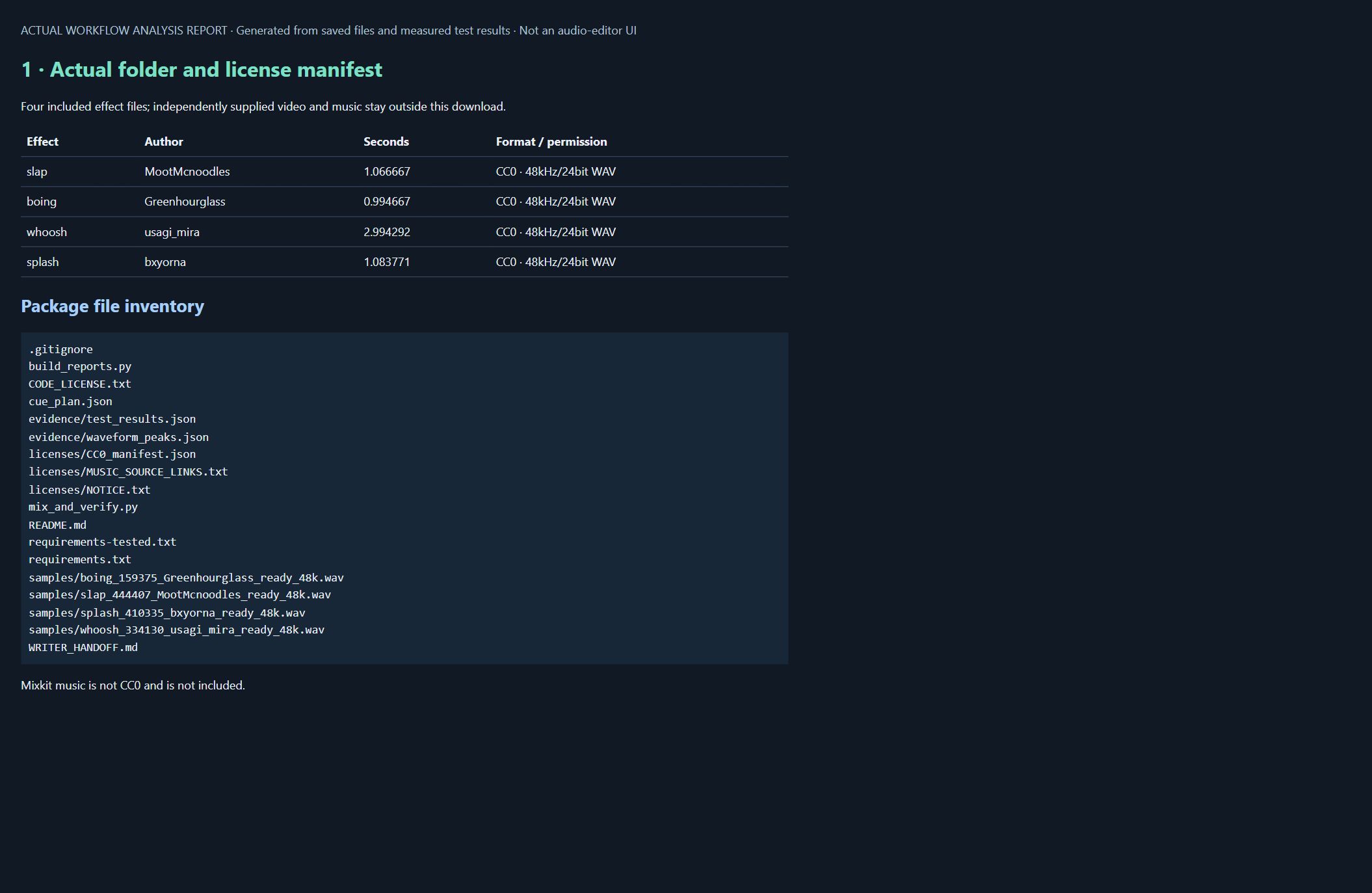
Keep source files intact in your library. Project-specific trimming, pitch/rate adjustment, pan and gain belong in the cue configuration. That separation lets you reuse the same documented source in another project without losing the connection between an edited excerpt and its original recording.
6. Choose and document a music source
The tested reconstruction uses “Sports Highlights” by Ahjay Stelino, Mixkit item 51. The observed source is Mixkit’s rock music collection. Obtain a permitted copy independently and place it at input/music.mp3. The package contains no downloader and no raw music file. It also does not include a music-only stem or a working mix containing the track.
Mixkit music is not CC0. Review its stock-music license and current terms for your intended use. Permission to integrate music into an online video is different from permission to redistribute the track as a reusable asset. This download keeps those boundaries separate: code and CC0 effects are supplied, while licensed music is obtained by the reader.
The cue plan depends on specific source offsets, including 79.51 and 80.76 seconds. Another track may be too short, have a different rhythm, or have an unsuitable passage at those locations. Replacing the file while keeping the same name is not a musical adaptation. Change every relevant offset and review the resulting arrangement.
The source record is in licenses/MUSIC_SOURCE_LINKS.txt. Keep it with your own project records. Optional credit can identify the title, artist, Mixkit, and applicable license. Do not claim ownership of the music or apply the pack’s code license to it. A documented source also does not guarantee that an automated platform will never issue a claim.
7. Prepare the project and run the tested scripts
Download the tutorial pack, extract it, and open the SFX_Music_Tutorial_Pack folder. The package contains 34 files: two Python scripts, an editable cue plan, four sample WAVs, licensing records, dependency lists, measured evidence, generated reports, four screenshots, and documentation. CHECKSUMS.json lists the hashes of the other 33 files. All listed hashes were checked during article preparation.
The completed test used Python 3.12.9, NumPy 2.4.4, SciPy 1.16.3, SoundFile 0.13.1, and FFmpeg 7.0.2. The full observed FFmpeg build string is in the evidence report. These are tested versions, not a claim that every newer combination or every operating system has been tested. No new dependency installation was performed for that completed run.
For a fresh environment, the documented setup is:
python -m venv .venv
python -m pip install -r requirements-tested.txt
ffmpeg -version
ffprobe -version
Activate the virtual environment using the normal command for your shell before the pip step. On Windows, py may be your Python launcher. FFmpeg and FFprobe are separate executables; the Python requirements file does not install them. Obtain FFmpeg through its official download guidance and an appropriate trusted distribution. Both tools must be on PATH, or specify their executable locations with the script’s --ffmpeg and --ffprobe options.
Create an input folder alongside the scripts. Put your permitted video at input/video.mp4 and your independently obtained track at input/music.mp3. This fixed cue plan requires a video at least 14.8 seconds long. Longer or substantially different clips need an edited plan; the script does not invent matching cues for them.
Run from the extracted pack folder:
python mix_and_verify.py --video input/video.mp4 --music input/music.mp3 --output new_private_output
python build_reports.py new_private_output
Choose a new output directory name for each run. The script refuses an existing directory instead of overwriting earlier results. It reads the input files and included samples, checks the sample hashes, creates a private working soundtrack and MP4, and writes the measured report. The report builder then copies evidence into the pack’s evidence folder and regenerates the HTML reports. Preserve the supplied evidence separately if you want to retain the original test alongside your own run.
The generated private_mix.wav and output.mp4 contain your supplied music. Keep them governed by its license and outside the public stock-asset package. The code makes no network requests, downloads no music, installs no software, and publishes nothing. --no-music is provided as an alternative to --music, but that effects-only branch was not separately executed for the supplied test.
8. Inspect the video before editing
Record the source video’s properties before touching the soundtrack. You want to know which video stream is intended, whether there is existing audio, the duration, the frame rate representation, and whether the source has unusual timestamps. The case-study value of 60 fps is not a reason to force every reader’s clip to 60 fps. A 30 fps or variable-frame-rate source needs to retain its own timing unless the picture edit explicitly calls for a conversion.
A probe report is also useful when a command fails. If the input contains multiple audio streams, blindly selecting “the audio” can produce the wrong language, a commentary track, or an unexpected silent stream. If there is no original audio, a graph that assumes it exists will fail. Make the treatment of original audio a visible configuration choice: discard it, preserve it at a chosen level, or prepare it separately.
An illustrative inspection command is below. It has not been run against the case-study file as a standalone command, the packaged script contains the executed inspection and verification logic.
ffprobe -v error -show_streams -show_format -of json input/video.mp4For a frame count, use an explicit counting check rather than relying solely on a metadata field that may be absent. FFprobe’s official documentation describes stream selection, JSON output, and frame-counting options. Save both the input report and final-output report. A comparison is more useful than a screenshot of an isolated number with no file identity.
9. Read the exact cue sheet
Open cue_plan.json. It separates music blocks, ducking windows, and effect placements. Music blocks define output start and end times, source offsets, gain, and optional build or highlight behavior. An ending value of null means the video duration, not an infinitely repeating track.
The five music blocks are:
- Output 0.00–5.90 seconds uses music from source 0.12 seconds, with 0 dB block gain.
- Output 6.88–9.55 uses source 6.84, with 0 dB block gain.
- Output 9.80–13.10 uses source 9.707, with 0 dB block gain.
- Output 13.10–14.35 uses source 79.51, with the anticipation treatment enabled.
- Output 14.65 through the end uses source 80.76, with a +2 dB block accent and highlight treatment.
The gaps are deliberate features of this arrangement. They are not missing files. The music is first attenuated by 6 dB before these block treatments, so a block marked 0 dB does not mean the original track plays at its untouched source level. Final global gain is a later operation applied to the combined mix.
There are thirteen effect placements, identified by the intended short-window energy peak time:
- Whoosh at 2.957 seconds, requested peak −18 dB, length 0.54 seconds, pan 0.25, rate 1.0.
- Whoosh at 3.760, peak −15 dB, length 0.62, pan 0.30, rate 1.1.
- Splash at 4.050, peak −16 dB, length 0.72, pan 0.30, rate 1.0.
- Splash at 5.056, peak −15 dB, length 0.70, pan 0.30, rate 1.05.
- Boing at 5.510, peak −16 dB, length 0.70, pan 0.25, rate 1.08.
- Boing at 6.360, peak −17 dB, length 0.66, pan 0.30, rate 0.9.
- Whoosh at 9.600, peak −14 dB, length 0.62, pan −0.15, rate 1.0.
- Splash at 9.650, peak −10 dB, length 0.90, pan −0.08, rate 0.85.
- Whoosh at 13.650, peak −13 dB, length 0.95, pan 0.30, rate 0.8.
- Splash at 13.650, peak −8 dB, length 1.20, pan 0.25, rate 0.67.
- Whoosh at 15.150, peak −18 dB, length 0.55, pan 0.35, rate 0.9.
- Slap at 15.140, peak −23 dB, length 0.30, pan 0.30, rate 0.8.
- Boing at 15.480, peak −16 dB, length 0.60, pan −0.20, rate 1.05.
These times refer to cue alignment, not the source-file beginning. The measured actual_start_seconds values in the result report are earlier where the selected transient has lead-in material. For example, the 13.65-second splash begins around 13.1543 seconds after trimming and rate adjustment. Understanding that distinction prevents a common mistake: shifting the whole file to the desired impact time and then wondering why the impact is late.
Use the values as a reproducible example for this footage, not a universal preset for unrelated scenes. When adapting them, review target times against your picture and keep pan values within the intended −1 to +1 range. The supplied script checks several input conditions but is not a comprehensive validator for arbitrary malformed configurations.
10. Build the final musical payoff
The final two or three seconds deserve deliberate attention because they contain the transition from anticipation to payoff. Begin with the picture event that matters most, then decide what the music should do around it. A build that begins too early can flatten the sequence by keeping everything at maximum intensity. A build that begins too late can feel disconnected from the action.
In the reconstruction timing plan, the build begins at 13.10 seconds and the main cue arrives at 14.65. That gives approximately 1.55 seconds between those anchors. The last 300 ms of that interval is reserved for the pause, so the audible build and the pause must be shaped as separate events. Do not confuse the total lead-in duration with the length of an uninterrupted crescendo.
You can create anticipation by changing level, choosing an excerpt with suitable musical movement, or reducing competing layers. Each method has different consequences. Turning up an arbitrary section of a song does not necessarily produce a convincing musical arrival. A source excerpt with an appropriate accent may work better, but it must be selected and listened to in context.
Keep the cue’s visual relationship precise. Decide whether the accent marks contact, the audience’s discovery, or the character’s reaction. Those can occur at different moments. If the visual surprise is visible before the sound, the cue may feel like commentary. If the sound arrives first, it may reveal the surprise prematurely. The right choice depends on the edit; the timestamp alone cannot answer it.
11. Understand the measured music-only pause
The tested music array is zero between 14.35 and 14.65 seconds. At 48 kHz that is exactly 14,400 samples per channel. The report confirms a peak of 0.0 in that interval. The effects array is separate and can contain tails during the same period, so the complete soundtrack is not claimed to be silent.
The anticipation block begins at 13.10. Its source passage is processed through a second-order 850 Hz low-pass filter and blended progressively toward the unfiltered signal. At the same time, its additional gain rises from −8 dB toward the block level. This is a concrete combination of spectral and level change, rather than an unexplained instruction to make the music dramatic.
The music blocks use short edge fades. Ordinary blocks request 864 samples, about 18 ms at 48 kHz, while the highlighted block requests 38 samples, approximately 0.79 ms. The fade helper also limits its length relative to the segment length. The ending cue at 14.65 seconds uses the music source at 80.76 seconds with +2 dB block gain. None of these settings establishes that the transition sounds ideal; that requires listening.
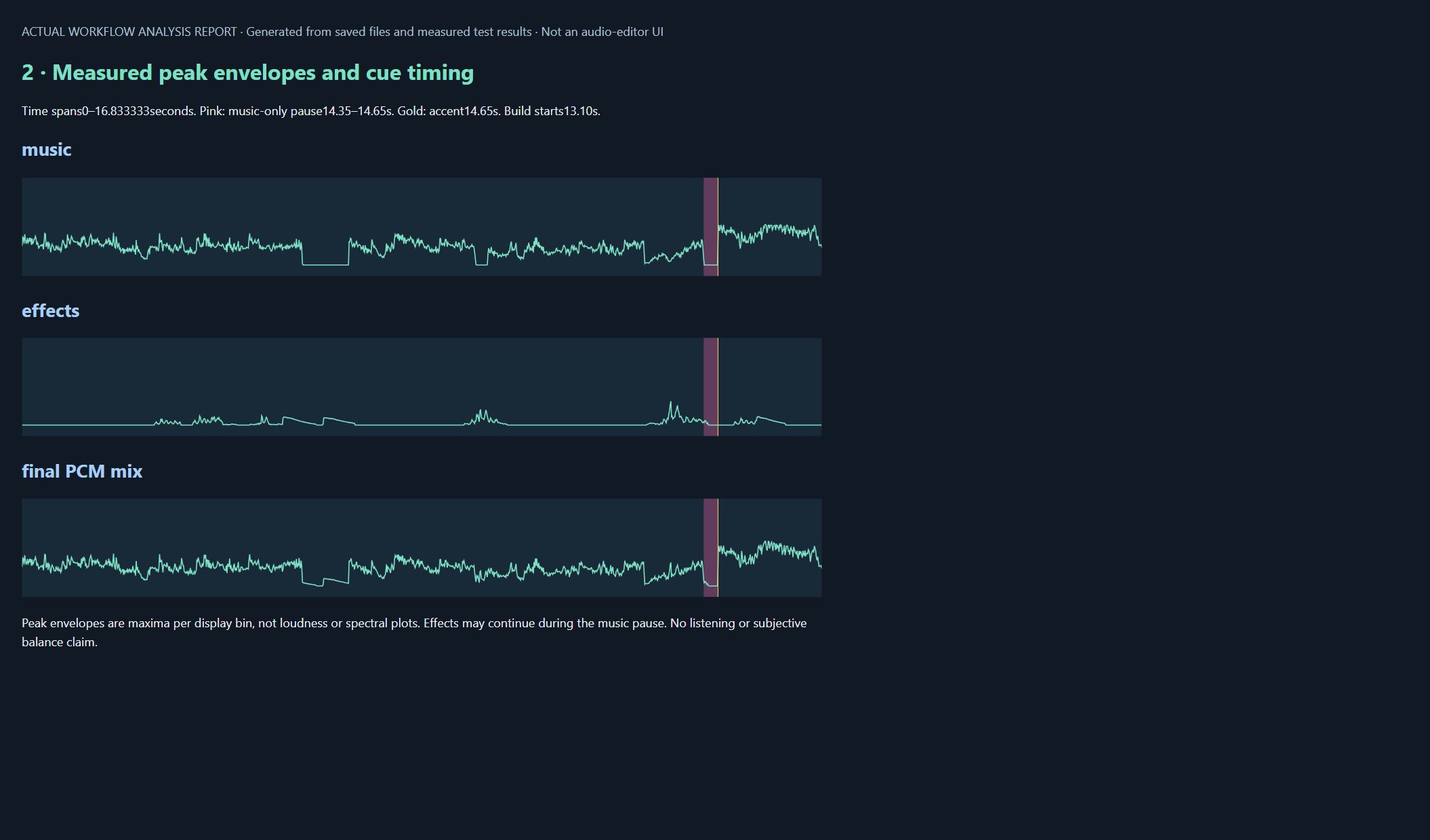
The screenshot displays maximum absolute amplitude within each display bin for music, effects, and the final PCM mix. It is not a spectrogram, RMS measurement, or loudness graph. Pink marks the music pause and the gold line marks the accent. Read the plotted data alongside the cue sheet and numerical pause check, especially because a display bin is much wider than a single audio sample.
12. Prepare and place individual effects
The supplied code loads each 48 kHz WAV through SoundFile. If a cue’s rate differs from one, SciPy resampling changes both duration and pitch. This is not pitch-preserving time stretching. The rational resampling factor is generated from the configured rate, so treat it as the script’s actual implementation rather than an exact promise for every arbitrary decimal rate.
The channels are averaged into mono. The script computes a moving energy estimate over 480 samples, approximately 10 ms, and chooses its maximum. It then selects a segment around that event, aiming to retain about 160 ms before the peak when the source length permits. The requested length is capped by available source material.
After trimming, the mono signal is scaled to the configured peak_db. Equal-power pan distributes it between left and right, and short fades soften the segment edges. The resulting pair is placed so its selected energy peak aligns with target_peak. Overlapping cues are added together; their final combined level is not equal to any one row’s requested peak.
This explains why peak_db is a pre-pan cue-control value rather than a final master reading. A centered mono cue is distributed across both channels, and several cues can overlap at the same point. The simultaneous whoosh and splash at 13.65 are an example. The later global gain affects both music and effects again.
The script’s short-window energy choice is a practical automatic anchor, not a perceptual detector that understands every effect. A long whoosh or multi-part splash may have a meaningful onset somewhere other than its loudest window. When adapting the library, listen and inspect the selected excerpt. If the wrong portion is chosen, change the source or editing logic deliberately rather than hiding the problem with an unexplained timing offset.
Keep attenuation separate from restoration. Lowering a distorted recording makes its distortion quieter; it does not repair it. The package does not claim denoising, source separation, or restoration of information absent from the preview files.
13. Build the audio separately
The code creates separate stereo music and effects arrays at 48 kHz, sized from the video duration. It arranges the music blocks, applies ducking windows, places the effects, and sums the buses. It checks for nonfinite values before continuing. The intermediate measurement file uses floating-point WAV so the analysis can inspect the raw sum without first forcing it into a fixed-point delivery range.
Seven ducking windows reduce music around selected events: 3.95–4.30 at −2 dB; 5.00–5.65 at −2.5 dB; 8.75–9.40 at −1.5 dB; 9.52–10.20 at −4 dB; 11.00–12.98 at −1.8 dB; 13.55–13.95 at −1 dB; and 15.10–15.28 at −1.5 dB. The implementation ramps into these windows over roughly 18 ms and releases over 160 ms. These envelopes are independent of the explicit music gaps.
Next, the script measures the raw mix and chooses the smaller gain allowed by a −16.5 LUFS target and a −2.5 dBTP ceiling. In the completed test that global adjustment was −1.08 dB. It applies this fixed gain to the array and writes private_mix.wav as 24-bit PCM. This is not a dynamic compressor and is not a claim that every input will achieve the same final loudness.
The loudness filter is used for analysis here. Its filtered output goes to the null sink rather than becoming the final soundtrack. This detail matters when reading the meter JSON: input fields describe the file under measurement, while output fields describe a hypothetical filtered result. The actual delivered encoded-audio readings are discussed below.
The music and effects arrays also produce low-resolution peak envelopes for the reports. Those envelopes let the reader inspect the arrangement without distributing the music-bearing WAV. The working WAV and final MP4 remain in the private output directory, outside the public download.
14. Use Python as a reproducible coordinator
Python can manage paths, validate the cue sheet, invoke FFmpeg, and save reports. Its role here is coordination. It does not need to reinvent audio decoding or silently interpret vague creative instructions. The useful script is one that makes the edit inspectable: inputs are declared, timing is visible, commands are recorded, and failures leave an explanation.
Pass command arguments as a list rather than building a shell command from untrusted filenames. Use a failure-checking subprocess call, capture the tool’s diagnostic output, and stop when a required stage fails. Python’s subprocess documentation explains these interfaces. The example below illustrates invocation style only; the actual workflow script is supplied in the download.
from pathlib import Path
import subprocess

source = Path("input/video.mp4")
if not source.is_file():
    raise FileNotFoundError("Add your source video at input/video.mp4")

result = subprocess.run(
    ["ffprobe", "-v", "error", "-show_streams", "-of", "json", str(source)],
    check=True,
    capture_output=True,
    text=True,
)
Path("probe-input.json").write_text(result.stdout, encoding="utf-8")
Validate numbers before generating a filtergraph. Reject negative cue times, reversed trim ranges, non-finite gains, and a pause that starts after its ending cue. Check that every referenced asset exists. A friendly error naming the offending cue is far better than a long FFmpeg error caused by malformed syntax several stages later.
Make output handling conservative. Write a new revision rather than overwriting the only approved render. If the script uses temporary files, keep them in a dedicated working folder. A cleanup routine should never guess which unrelated files are safe to remove. The supplied script was used for the recorded test; adaptations should be reviewed and tested again rather than inheriting its result automatically.
15. Attach the audio without re-encoding the picture
The tested script combines the original picture with the prepared soundtrack using explicit stream selection and video stream copy. The following is the readable equivalent of its mux step, with portable paths and the measured example duration substituted:
ffmpeg -v error -n -i input/video.mp4 -i new_private_output/private_mix.wav -map 0:v:0 -map 1:a:0 -c:v copy -c:a aac -b:a 224k -ar 48000 -ac 2 -t 16.833333 -movflags +faststart new_private_output/output.mp4The first video stream comes from the source, and the new audio stream comes from the working WAV. The original audio is replaced. Extra audio streams, subtitles, and attachments are not carried over by these maps. The video receives no resize, color filter, or frame-rate conversion. The soundtrack is encoded as stereo AAC at the configured 224 kb/s setting.
The duration is taken from the actual input rather than hard-coded to 16.833333 for every reader’s clip. The example assumes the selected video codec can be stored in MP4. If the source is incompatible, stop and choose an appropriate workflow instead of silently re-encoding while continuing to claim unchanged compressed video.
The -n option prevents an existing file from being overwritten, complementing the script’s new-output-directory requirement. +faststart changes MP4 organization for convenient playback; it is not a video-quality filter. The output is still a new container, and its whole-file checksum will differ because the audio and container data have changed.
The checks following the mux are part of the workflow. A successful exit code alone does not establish correct stream selection or intact pictures. Compare the actual output with the actual input, then keep the verification report beside that version.
16. Measure the actual delivered file
The encoded MP4 was analyzed after AAC encoding. Its encoded_audio_meter record reports input_i of −16.59 LUFS, input_tp of −4.24 dBTP, and input_lra of 6.10 LU. These describe this reconstruction, using the recorded tool versions. They are not universal platform requirements, and they are not original D2’s measurements.
The same JSON also contains output_i, output_tp, and other output fields from the analysis filter. Do not use those as the delivery-file readings. The filter was asked to analyze through a normalization configuration and send its processed signal to a null sink. Its hypothetical output was not written back over the MP4. The distinction is visible in meter() in the supplied source code.
The report’s PCM full-scale count is calculated from the final in-memory floating-point array before it is written as 24-bit PCM. It is zero, as is the nonfinite count. The exported AAC is separately decoded and checked; both its full-scale and nonfinite counts are also zero. These checks are valuable but do not detect every possible source distortion or judge subjective harshness.
Integrated loudness describes the measured program interval; true peak addresses reconstructed peaks. A short isolated impact can still feel excessive in a technically safe mix. Conversely, turning everything down can preserve headroom while making an important story cue hard to hear. Keep technical measurements and artistic judgments distinct.
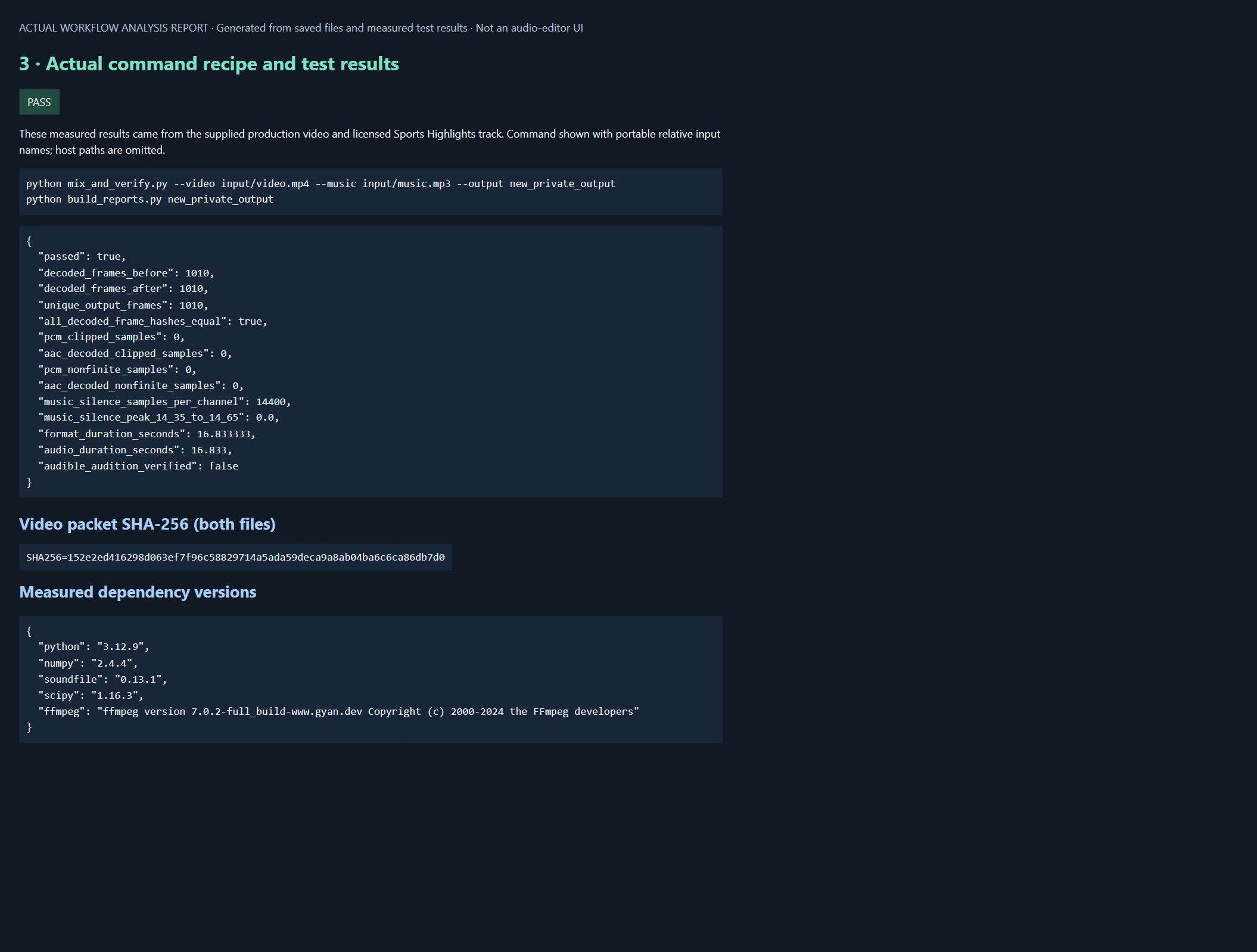
The screenshot is a real browser capture of the generated test report. It shows frame checks, sample checks, the music pause, durations, and dependency versions. It is not a terminal screenshot. Full encoded loudness readings are in the downloadable JSON, which is the appropriate source for values not visible in this particular screenshot.
17. Verify that the picture stayed unchanged
The completed test compared compressed video packet hashes before and after muxing. Both were 152e2ed416298d063ef7f96c58829714a5ada59deca9a8ab04ba6c6ca86db7d0. It also compared the ordered list of decoded frame-content hashes. Both lists contained 1,010 entries, every corresponding hash matched, and the output contained 1,010 unique frame hashes.
Those results establish unchanged compressed video content and matching decoded pictures in the tested workflow. The script extracts the frame-hash field from FFmpeg’s frame-MD5 output; it does not separately compare every per-frame timestamp field. It records video stream rate and duration, but it should not be described as a complete arbitrary-timestamp equivalence validator. That boundary matters especially when adapting the code to unusual or variable-frame-rate sources.
The output retained 1080 × 1920 dimensions, a 60/1 frame-rate value, and the reported video duration of 16.833333 seconds. Its encoded audio duration was 16.833 seconds. The checks support preservation of the actual existing 60 fps sequence; they do not create new motion or turn a lower-frame-rate input into 60 fps.
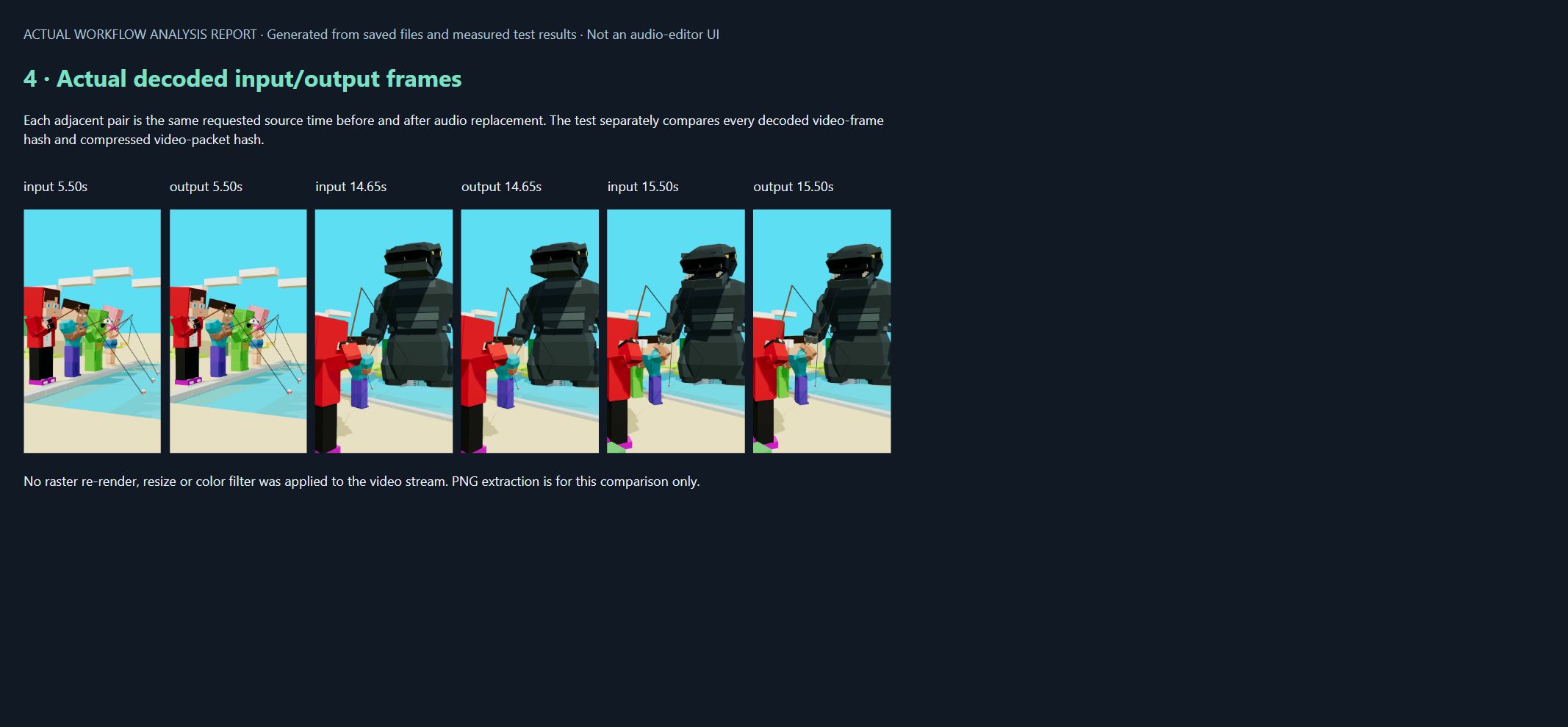
The screenshot shows extracted input/output frame pairs at 5.50, 14.65, and 15.50 seconds. These illustrations supplement the all-frame comparison rather than replace it. Three matching pictures alone would not prove that the entire sequence matched. The individual extracted PNG pairs also have matching file hashes in the package manifest.
A whole-MP4 checksum cannot answer this specific preservation question because the soundtrack and container have changed. Keep artifact hashes for version identification and use stream/content comparisons for the corresponding preservation claim. Re-run the checks after changing the command or the source file.
18. Review the sound by listening
No audible audition was performed for this reconstruction, and subjective balance was not verified. The evidence report states both limitations explicitly. The measured pass demonstrates the technical operation and its recorded checks, not an approved final soundtrack or a match to any reference audio.
For your own version, play the entire Short at normal speed with the picture. Then replay the ending without scrubbing so the buildup, pause, and payoff are experienced as one sequence. An isolated cue can sound impressive while feeling wrong in the complete edit. Check whether the musical passage contains unwanted vocals or other material that changes the intended tone; this workflow does not automatically certify their absence.
Listen at a comfortable, consistent level. If available, compare headphones with a small speaker or phone. The purpose is to catch obvious problems such as a bass-heavy accent losing its meaning, a sharp effect becoming unpleasant, or a quiet reaction disappearing beneath the bed. This is a review procedure, not a claim that those playback tests have already been completed.
Pay particular attention to transitions: the opening, the short music gaps, the 14.35–14.65 interval, the highlighted block’s very short edge fade, and the ending. Effects can remain audible through the music pause, which may be desirable or distracting depending on the scene. Compare timing alternatives one at a time and retain the version that supports the picture.
Record which output you reviewed and what you changed. If a gain or timing revision follows the listening pass, create a new output and repeat the relevant technical checks. An earlier clean report should not be attached to a later unmeasured version.
19. Read the real screenshots and reports
The four figures in this article are browser screenshots of local HTML analysis reports generated by build_reports.py. Their headers explicitly identify them as generated workflow analysis, not audio-editor interfaces. The underlying machine-readable data and HTML are included so you can inspect the evidence without access to the original computer.
The first report lists the four distributed effect files and package inventory. The second displays measured maximum-amplitude envelopes for the music, effects, and final PCM mix. The third summarizes the actual bounded test and portable equivalent commands. The fourth places decoded input/output pictures beside each other. Each report has a different evidentiary purpose.
The commands in the report use neutral relative input names; private host paths were omitted. The captions describe that sanitization rather than pretending the screenshot is a raw terminal capture. The images contain no account details, credentials, desktop documents, or personal filesystem paths. The depicted character footage illustrates this production workflow; it is not offered as a reusable stock-character license.
Open reports/index.html after extraction to browse the supplied evidence. A browser or web server is not required for mixing the audio. If you generate reports from your own run, preserve any evidence you need before overwriting the local report folder. Do not expose a private media directory through a network server simply to view a report.
When creating screenshots for another tutorial, follow the same rule: show the actual application or actual measured report, label it accurately, and keep the original evidence available. A diagram can explain a concept, but it should not impersonate proof that a process ran.
20. Understand what the download does and does not contain
The ZIP contains the exact inspected scripts and cue plan, four CC0 derivative WAVs, dependency records, licensing manifests, HTML reports, measured JSON evidence, frame samples, screenshots, and documentation. Its size is 4,404,625 bytes. The ZIP’s SHA-256 is b21bcf4c7b4807e9f644d4e9cb7c05ab34112df677f2ea2cedf7896738a39d45.
The archive was extracted and its 33 listed member checksums were verified during preparation of this article. The completed media run was performed with the recorded environment and source video/music described in the evidence. This inspection did not repeat the media run on another operating system. Distinguish a checked archive and documented real run from an unsupported claim of universal portability.
Raw Mixkit music, isolated music stems, the production input video, the resulting MP4, and music-bearing working WAVs are excluded. The four included effects have their own CC0 provenance. The code license is MIT; it does not apply to music, screenshots, character designs, or other media merely because those items appear near the scripts.
The package is a runnable workflow with external input requirements, not a self-contained movie-generation demo. A reader supplies an appropriately licensed video and music file, then adapts the cue plan. The script does not fetch missing assets or substitute another song. If the music is too short for a source offset, it stops with an error rather than silently inventing a new arrangement.
Keep your outputs separate from the public bundle. A working directory can accumulate large media files that were never intended for redistribution. Before sharing your own adaptation, inspect its file list and permissions again. A successful technical test does not automatically clear every included asset for public download.
21. Troubleshooting
The effect arrives late even though the timestamp looks correct
Inspect the source excerpt. Its first audible transient may occur after leading silence or a soft onset. Confirm whether the cue time means “begin the file” or “align the impact.” If you change the trim, keep the manifest and cue sheet consistent. Do not compensate by randomly shifting several other effects; that makes the timeline harder to reason about.
The pause does not sound quiet
Identify which buses remain active. The music may be muted while a splash decay, laugh, original soundtrack, or ambience continues. Check the sum, not just the music waveform. If the intended result is a music-only pause, describe it that way. If the goal is a full pause, review every contributing layer and its fade boundaries.
The final hit is loud but still feels weak
Look at contrast and timing before adding gain. A continuously dense buildup can leave no room for the hit to feel different. The cue may also arrive after the visual event has already resolved. Compare a cleaner lead-in and a nearby timing alternative, keeping playback level controlled. An effect with a different character may work better than a louder copy of the same one.
The mix clips after adding one more effect
Several safe-looking layers can exceed the available headroom when combined. Reduce levels or revise the mix rather than assuming that each individually unclipped source guarantees an unclipped sum. Re-measure the final encoded file after changes. If you introduce limiting or normalization, document it and listen for unwanted changes in the cue’s shape.
The export is shorter than the original
Check the soundtrack duration and any command option that ends output when a stream finishes. Inspect the source timestamps and the selected streams. A rounded player duration is not a sufficient diagnosis. Compare stream-level reports and frame counts before deciding whether actual pictures were lost or the display is merely rounding differently.
The script cannot find FFmpeg or FFprobe
Check the documented executable location and environment. Confirm that the tools run from the same terminal or process environment as the script. Record versions once the tools are found. Do not solve a missing executable by downloading an arbitrary binary from an unrelated mirror. Use a trusted distribution route and keep setup instructions appropriate to the reader’s operating system.
A preview sounds worse after conversion to WAV
Conversion cannot restore information absent from a lossy preview. Confirm whether the downloaded file is a preview or the original. Keep the source-quality label accurate, and avoid unnecessary lossy intermediate encodes. If the original is available through the source’s supported download flow, use that route and update the manifest and checksums.
A copyright claim appears despite a documented source
Keep the source page, license record, download date, and project information. A license record does not guarantee that an automated platform will never issue a claim. Follow the platform’s process and the source provider’s support guidance, and make only statements you can support. Do not discard the evidence or assume that renaming the file resolves the underlying issue.
22. Frequently asked questions
Can I add new sound without reducing video quality?
Video stream copy avoids a new video encode when the source stream is compatible with the chosen output container and no picture processing is requested. The audio is handled separately. Verify the output because mapping errors, duration handling, or later processing can still produce a file that does not match the intended picture.
Does video stream copy mean the entire MP4 stays byte-identical?
No. You are creating a new container with different audio and potentially different metadata or packet organization. The full-file checksum should change. The relevant preservation question concerns the selected video content and timing, supported by stream, frame-count, and decoded-content checks.
Should every Short use a 300 ms pause?
No. That interval belongs to this case’s ending plan. A different scene, cue, or pace can need a different amount of space. Start from the visual event and the intended emotional beat, then listen. A timing value is useful because it is reproducible, not because it is universally correct.
Should I target exactly −16.59 LUFS?
No. That is the measured reconstruction result. It is not a platform specification or a setting to copy into every project. Choose an appropriate delivery approach for the actual destination, retain headroom, measure the final encode, and judge the relative balance of the content itself.
Can I include the Mixkit track in my tutorial ZIP?
This package is designed not to do that. The reader obtains music from its source under the applicable terms and supplies it locally. The public download excludes the raw track and music-only derivative files. An audiovisual use and redistribution of a reusable music asset are different situations.
Are all Freesound effects suitable for commercial work?
No. Check the individual item license and provenance. This source list uses items displaying CC0, but other Freesound items use attribution or noncommercial terms. Do not treat a site-wide search result as a license for the files it returns.
Is a public MP3 preview the same as the uploaded WAV?
No. It may be a separately encoded preview. Name it honestly in the manifest and preserve its source details. Converting it to WAV can simplify editing, but it does not make it an original lossless recording.
Can I keep the original video’s audio too?
Yes, if that is part of the intended mix and you have the necessary rights. Treat it as another explicitly controlled input. Check whether it duplicates effects already being added or prevents the planned pause from becoming quiet. Do not include it accidentally through automatic stream selection.
Do I need Python?
No. The processing can be performed directly with FFmpeg or another suitable editor. Python becomes useful when you want a repeatable cue configuration, input validation, consistent reports, and predictable packaging. A script should make the workflow clearer rather than conceal the decisions.
Does a clean measurement prove the soundtrack is good?
No. Technical measurements cannot judge whether the joke lands, whether a vocal reaction fits, or whether the music distracts from the picture. They support a listening review. Both should refer to the exact final version rather than an earlier working file.
23. Reproduction checklist and next steps
Start with an untouched picture source and a documented cue sheet. Obtain the exact permitted music input or adapt the source offsets for your own track. Keep the four effect files and their manifest together so the script can verify them. Use a new output folder, run the mixer and checks, then open the generated reports.
For this example, the demonstrated outcome is bounded and concrete: 1,010 matching decoded frames, matching compressed video hashes, a measured 300 ms music-only pause, and a newly encoded soundtrack measured at −16.59 LUFS and −4.24 dBTP. It is a D2-style reconstruction with stated differences from the production mix. Listening and subjective balance remain unverified.
Before publishing your own video, check the following:
- The source video and music are the files you intended to use.
- Every music source offset is valid and every cue matches your picture.
- The report belongs to the exact output you are about to review.
- Frame-content and compressed-stream comparisons pass for your run.
- Audio sample and loudness checks are acceptable for your delivery needs.
- You have listened through the complete output, including the pause and ending.
- Your public download, if any, excludes music or footage you cannot redistribute.
- Screenshots and logs reveal no credentials or private paths.
Download the tested scripts, cue sheet, four CC0 samples and evidence. For a separate narration-generation workflow, see the Voicebox tutorial. For the upstream task of producing local AI video, see the local AI video models guide. This article begins after the picture exists: its job is to make the soundtrack edit repeatable while preserving that picture.
The useful result is a visible chain from source assets to cue decisions, processed audio, delivery file, and measured checks. Change one cue, build a new revision, and keep the approved visual sequence intact while you evaluate the sound.