The Claude API has a built-in web search tool. You add one entry to tools, and Claude searches the live web, reads the results and answers with cited sources. No search API key, no scraper and no extra loop on your side.
This guide shows you how to switch it on, control it, read the citations and keep the bill predictable. Every example is plain Python with the official anthropic SDK.
I checked the parameter names against the official docs and the Python SDK version 2.14.0 (released 24 Nov 2026) on 28 Nov 2026.
- Enable: add
{"type": "web_search_20260318", "name": "web_search"}totools. It is on for every org unless an admin turned it off in the Console. - Control:
max_usescaps searches per turn,allowed_domainsorblocked_domainsfilter sites,user_locationlocalizes results. - Citations: always on. Text blocks carry
web_search_result_locationcitations with URL, title and up to 150 characters of cited text. - Price: $10 per 1,000 searches ($0.01 each) plus normal token costs. Failed searches are not billed.
- Web fetch: a sister tool that reads a full page or PDF from a known URL. It has no extra fee, only tokens.
- Errors: search errors come back as HTTP 200 with an
error_codeinside the result block, not as exceptions.
What the Claude Web Search Tool Does
Web search is a server tool. Anthropic runs the search on its side, so you never execute anything or send back a tool_result. You only declare the tool, and the results arrive inside the same response.
Here is the flow for one request:
- Claude decides whether the prompt needs fresh information.
- The API runs the search and gives Claude the results. This can repeat several times in one request.
- Claude answers at the end of its turn, with citations pointing to the pages it used.
You can nudge this behaviour in the system prompt. For a hard cap, use max_uses, covered below.
Prerequisites
- Python 3.10+ and the official SDK:
pip install -U anthropic. - An API key saved in the
ANTHROPIC_API_KEYenvironment variable. See how to get a Claude API key. - Credits on your Console account, because each search costs $0.01.
- Basic SDK knowledge. If you are new, start with the Claude API Python tutorial.
How to Enable Web Search (Console + Code)
There is no beta header. Web search is enabled for every organization by default. An admin can turn it off or restrict domains on the Console’s Capabilities settings page.
- Check the org setting. Sign in at platform.claude.com and open Settings > Capabilities (platform.claude.com/settings/capabilities). Make sure web search is allowed. Web fetch has its own switch on the same page.
- Review org domain lists. On the same page, an admin can set allowed or blocked domains. Any list you send in a request must fit inside these rules.
- Install the SDK. Run
pip install -U anthropicin a fresh virtual environment. - Set your key. On macOS or Linux run
export ANTHROPIC_API_KEY="your-key". On Windows PowerShell use$env:ANTHROPIC_API_KEY="your-key". - Add the tool. Put
{"type": "web_search_20260318", "name": "web_search"}in thetoolslist ofclient.messages.create(). - Run and check usage. Read
response.usage.server_tool_use.web_search_requeststo see how many searches you paid for.
Note: if an admin has disabled web search, the request fails with a 400 invalid_request_error saying web search is not enabled. That is different from the in-result error codes covered later.
Which Tool Version to Use
The type string picks the tool version. Three versions are current, and newer ones add features on top:
| Tool type | What it adds | Use it when |
|---|---|---|
web_search_20250305 |
Basic search. Every result goes into context. | Older models, ZDR setups, Vertex AI (Google managed) or Foundry hosted on Azure |
web_search_20260209 |
Dynamic filtering: Claude writes code to filter results before they reach context | Claude 4.6 and later models, search-heavy prompts |
web_search_20260318 |
Dynamic filtering plus response_inclusion to drop consumed result blocks from the response |
New projects on current models (the version the docs now use) |
Dynamic filtering runs inside code execution, which the API sets up for you. You do not need to add the code execution tool, and there is no extra code execution charge beyond tokens.
Warning: dynamic filtering is not eligible for Zero Data Retention. If you need ZDR, set "allowed_callers": ["direct"] on the tool, or use web_search_20250305.
Example 1: Your First Search
This script asks a time-sensitive question, prints the answer and shows how many searches ran. It uses Claude Opus 5.5, the current default model.
import anthropic

client = anthropic.Anthropic()  # reads ANTHROPIC_API_KEY

response = client.messages.create(
    model="claude-opus-5-5",
    max_tokens=4096,
    messages=[{
        "role": "user",
        "content": "What is the latest stable Python release and what are its headline features?",
    }],
    tools=[{
        "type": "web_search_20260318",
        "name": "web_search",
        "max_uses": 3,
    }],
)

print("Stop reason:", response.stop_reason)

for block in response.content:
    if block.type == "text":
        print(block.text, end="")
print()

tool_usage = response.usage.server_tool_use
searches = tool_usage.web_search_requests if tool_usage else 0
print("Searches billed:", searches)
print("Input tokens:", response.usage.input_tokens)
print("Output tokens:", response.usage.output_tokens)
The response content mixes several block types. You will see text, then a server_tool_use block with the query, then a web_search_tool_result block with the hits, then more text with citations.
Limit Searches With max_uses
max_uses caps the number of searches in one turn. The docs say single-fact queries usually need 1 to 3 searches, while comparisons across many entities can use 10 or more.
- Failed searches count against the limit.
- Going over returns a result block with the
max_uses_exceedederror code (for direct calls). - A turn can span requests. Searches from earlier requests in the same turn (for example after
pause_turn) count too, unless they ran through dynamic filtering.
Tip: set max_uses on every production request. It is the simplest way to put a ceiling on the $0.01 per search fee.
Example 2: Allowed and Blocked Domains
Use allowed_domains to search only trusted sites, or blocked_domains to exclude some. You can send one list or the other, never both, or the API returns a 400.
import anthropic

client = anthropic.Anthropic()

response = client.messages.create(
    model="claude-opus-5-5",
    max_tokens=4096,
    messages=[{
        "role": "user",
        "content": "Summarize what is new in the most recent Python version.",
    }],
    tools=[{
        "type": "web_search_20260318",
        "name": "web_search",
        "max_uses": 4,
        "allowed_domains": ["docs.python.org", "peps.python.org"],
    }],
)

for block in response.content:
    if block.type == "text":
        print(block.text, end="")
print()
The domain rules from the official server tools guide:
- No scheme: write
example.com, nothttps://example.com. - Subdomains included:
example.comalso coversdocs.example.com. - Specific subdomain:
docs.example.comreturns only that subdomain. - Paths work for search:
example.com/blogmatchesexample.com/blog/post-1. - Wildcards only in the path:
example.com/*is valid,*.example.comis not. - Org rules win: a request-level allowed list must be a subset of the org allowed list in the Console.
Use plain ASCII domain names. The docs warn that look-alike Unicode letters can slip past filters.
Example 3: Localize Results With user_location
Questions like “best weekend events” or “petrol price today” depend on where the user is. Pass an approximate location and the search is localized.
import anthropic

client = anthropic.Anthropic()

response = client.messages.create(
    model="claude-opus-5-5",
    max_tokens=2048,
    messages=[{
        "role": "user",
        "content": "What tech meetups are happening this week near me?",
    }],
    tools=[{
        "type": "web_search_20260318",
        "name": "web_search",
        "max_uses": 3,
        "user_location": {
            "type": "approximate",
            "city": "Mumbai",
            "region": "Maharashtra",
            "country": "IN",
            "timezone": "Asia/Kolkata",
        },
    }],
)

for block in response.content:
    if block.type == "text":
        print(block.text, end="")
print()- type: must be
approximate. - At least one field:
city,region,countryortimezone. - country: a two-letter ISO 3166-1 alpha-2 code. Unsupported codes return a 400.
- timezone: an IANA ID such as
Asia/Kolkata.
Example 4: Read Citations and Continue the Chat
Citations are always on for web search. Each cited text block has a citations list of web_search_result_location objects with url, title, cited_text (up to 150 characters) and an encrypted_index.
This script collects sources, handles search errors and pause_turn, then asks a follow-up question in the same conversation.
import anthropic

client = anthropic.Anthropic()
MODEL = "claude-opus-5-5"
TOOLS = [{"type": "web_search_20260318", "name": "web_search", "max_uses": 5}]


def run_turn(messages):
    """Call the API, resuming if the server pauses a long search turn."""
    for _ in range(5):
        response = client.messages.create(
            model=MODEL, max_tokens=4096, messages=messages, tools=TOOLS
        )
        # Keep the assistant blocks exactly as received
        messages.append({"role": "assistant", "content": response.content})
        if response.stop_reason != "pause_turn":
            return response
    return response


def show(response):
    sources = {}
    for block in response.content:
        if block.type == "text":
            print(block.text, end="")
            for c in block.citations or []:
                if c.type == "web_search_result_location":
                    sources[c.url] = c.title
        elif block.type == "web_search_tool_result":
            if not isinstance(block.content, list):
                print("[search error:", block.content.error_code, "]")
    print()
    for i, (url, title) in enumerate(sources.items(), start=1):
        print(f"[{i}] {title} - {url}")


messages = [{"role": "user", "content": "Who won the most recent Formula 1 race?"}]
show(run_turn(messages))

messages.append({"role": "user", "content": "And who finished second?"})
show(run_turn(messages))
Two details matter here:
- Send blocks back unchanged. Each search result has
encrypted_content. If it is missing or edited in a later request, the API returns a 400 validation error. - Handle pause_turn. On a long search turn the API can stop with
pause_turn. Send the paused assistant message back as is, with no extra “continue” message, and it resumes.
Note: Anthropic’s docs say that when you show API output to end users, you must include citations to the original sources. Keep the source list in your UI.
The citation fields cited_text, title and url do not count toward your input or output tokens.
curl Example
The same call over raw HTTP. The docs use API version header 2026-10-21.
curl https://api.anthropic.com/v1/messages \
  -H "x-api-key: $ANTHROPIC_API_KEY" \
  -H "anthropic-version: 2026-10-21" \
  -H "content-type: application/json" \
  -d '{
    "model": "claude-opus-5-5",
    "max_tokens": 2048,
    "messages": [
      {"role": "user", "content": "What is the weather in London today?"}
    ],
    "tools": [{
      "type": "web_search_20260318",
      "name": "web_search",
      "max_uses": 3
    }]
  }'
Web Fetch Tool: How It Differs
Web search finds pages. Web fetch reads one page in full. It pulls the complete text of a URL or PDF into the conversation, so Claude can summarize or quote it.
| Feature | Web search | Web fetch |
|---|---|---|
| Job | Find relevant pages for a query | Read the full content of a known URL |
| Latest type | web_search_20260318 |
web_fetch_20260318 |
| Extra fee | $10 per 1,000 searches | None, tokens only |
| Citations | Always on | Off by default; set "citations": {"enabled": true} |
| Which URLs | Any, subject to domain filters | Only URLs already in the conversation (user messages, client tool results, earlier search or fetch results) |
| Extra params | user_location |
max_content_tokens, url_sources, use_cache |
| Content types | Search results | Text, HTML and PDF (no JavaScript-rendered sites) |
| Usage counter | web_search_requests |
web_fetch_requests |
Used together, Claude searches first, then fetches the best result to read it fully. Cap the size with max_content_tokens, because a full page can be large.
import anthropic

client = anthropic.Anthropic()

response = client.messages.create(
    model="claude-opus-5-5",
    max_tokens=4096,
    messages=[{
        "role": "user",
        "content": "Find the official release notes for the newest Django version and list the key changes.",
    }],
    tools=[
        {"type": "web_search_20260318", "name": "web_search", "max_uses": 3},
        {
            "type": "web_fetch_20260318",
            "name": "web_fetch",
            "max_uses": 3,
            "max_content_tokens": 20000,
            "citations": {"enabled": True},
        },
    ],
)

for block in response.content:
    if block.type == "text":
        print(block.text, end="")
print()
print(response.usage.server_tool_use)
The docs give rough sizes for fetched content: an average 10 kB page is about 2,500 tokens, a 100 kB docs page about 25,000 tokens and a 500 kB research PDF about 125,000 tokens.
Warning: Anthropic warns that web fetch can leak data if Claude processes untrusted input next to sensitive data. Use allowed_domains, max_uses and url_sources to lock it down, or leave it off.
Pricing With a Worked Example
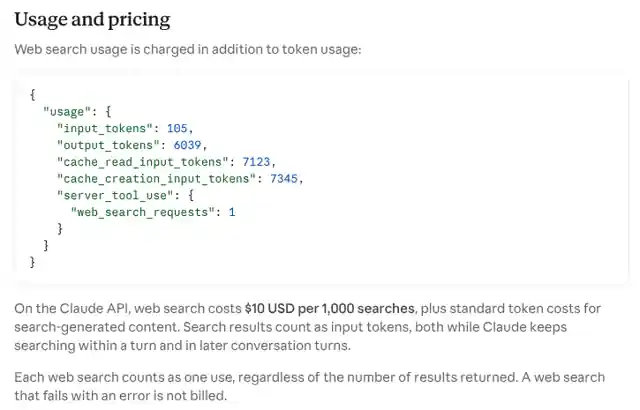
On the Claude API, web search costs $10 per 1,000 searches, on top of normal token costs. Search results count as input tokens, both during the turn and in later turns when you resend history. Full model rates are in our Claude API pricing guide.
| Item | Price |
|---|---|
| Web search | $10 per 1,000 searches ($0.01 each), failed searches free |
| Web fetch | No extra fee, only tokens for fetched content |
| Code execution used by dynamic filtering | No extra fee, only tokens |
| Claude Opus 5.5 tokens | $4 input / $20 output per million |
| Claude Sonnet 5.5 tokens | $2 input / $10 output per million |
| Claude Haiku 5.5 tokens (prompts up to 100K) | $0.10 input / $0.50 output per million |
| Batch API web searches | Same per-search price as normal requests |
Worked example: one research question
Say one request runs 3 searches, ends with 30,000 input tokens (prompt plus search results) and writes 1,500 output tokens.
| Model | Searches | Input | Output | Total per request | Per 1,000 requests |
|---|---|---|---|---|---|
| Opus 5.5 | $0.03 | $0.12 | $0.03 | $0.18 | $180 |
| Sonnet 5.5 | $0.03 | $0.06 | $0.015 | $0.105 | $105 |
| Haiku 5.5 | $0.03 | $0.003 | $0.00075 | about $0.034 | about $34 |
On Haiku 5.5 the search fee is almost 90% of the cost. On Opus 5.5 the tokens dominate. So max_uses saves most on cheap models, while dynamic filtering and prompt caching save most on big ones.
Supported Models and Platforms
The official tool page lists web search support on these models:
| Model family | Model IDs | Dynamic filtering |
|---|---|---|
| Fable / Mythos | claude-fable-5-2, claude-fable-5-1, claude-fable-5, Mythos 5.2 / 5.1 / 5 / Preview |
Yes |
| Opus | claude-opus-5-5, claude-opus-5, claude-opus-4-8, claude-opus-4-7, claude-opus-4-6, Opus 4.5 |
Yes on 4.6 and later |
| Sonnet | claude-sonnet-5-5, claude-sonnet-5, claude-sonnet-4-6, Sonnet 4.5 |
Yes on 4.6 and later |
| Haiku | claude-haiku-5-5, Haiku 4.5 |
Haiku 5.5 yes; Haiku 4.5 needs allowed_callers: ["direct"] or the basic version |
Platforms: the Claude API, Claude Platform on AWS, Claude Models on Google Cloud (Anthropic managed) and Microsoft Foundry hosted on Anthropic support every version. Vertex AI (Google managed) and Foundry hosted on Azure get only the basic web_search_20250305. Amazon Bedrock is not listed.
To check a model in code, read capabilities.server_tools.web_search.supported from the Models API.
Limits at a Glance
| Limit | Value |
|---|---|
| Searches per turn | Whatever you set in max_uses (failed searches count) |
| Domain lists | allowed_domains or blocked_domains, not both |
| Cited text length | Up to 150 characters per citation |
| Web fetch URL length | 250 characters max |
| Web fetch content types | Text, HTML, PDF; no JavaScript-rendered pages |
| Server-side loop | Long turns can stop with pause_turn; resend to continue |
| Batch API | Web search allowed, but throttled per org; see the Console Rate limits page |
If you mix web search with your own client tools, read our Claude tool use tutorial. When Claude calls a client tool and a search in the same group, the API stops with tool_use first and runs the search after you return your tool results.
Troubleshooting: Common Errors and Fixes
Search errors do not raise exceptions. The API returns HTTP 200, and the web_search_tool_result block’s content becomes a single error object instead of a list. Request-level problems still raise normal SDK errors.
| Error you see | What it means | Fix |
|---|---|---|
max_uses_exceeded (in result) |
Claude hit your search cap | Raise max_uses or make the prompt narrower |
too_many_requests (in result) |
Search rate limit hit | Back off and retry; check the Console Rate limits page |
query_too_long (in result) |
The query Claude built is too long | Ask a shorter, more focused question |
request_too_large (in result) |
Usually a very long domain list | Trim allowed_domains / blocked_domains |
invalid_tool_input (in result) |
Bad search query parameter | Retry; simplify the prompt |
unavailable (in result) |
Internal error on Anthropic’s side | Retry later; failed searches are not billed |
400 invalid_request_error: web search not enabled |
An admin turned it off in the Console | Re-enable it on Settings > Capabilities |
| 400 when sending both domain lists | allowed_domains and blocked_domains together |
Keep only one list |
| 400 validation error on a follow-up turn | encrypted_content missing or changed |
Append response.content exactly as received |
400 asking you to set allowed_callers |
Model lacks programmatic tool calling (for example Haiku 4.5) | Add "allowed_callers": ["direct"] or use web_search_20250305 |
Empty content list |
Search worked but found nothing | Not an error; broaden the query or the domain list |
| 429 or 529 HTTP errors | API rate limit or overload | See fixing Claude API 429 and 529 errors |
For web fetch, watch for url_not_in_prior_context (the URL was never in the chat), url_not_allowed (blocked by domain rules or robots.txt) and url_not_accessible (the site returned an HTTP error).
Frequently Asked Questions
Do I need a separate search API key for Claude web search?
No. Web search runs on Anthropic’s servers and is billed to your normal Claude API account. You only need your Anthropic API key.
How much does one Claude web search cost?
Each search costs $0.01 ($10 per 1,000), plus the input tokens the results add. A search that fails with an error is not billed.
Is web fetch free?
Web fetch has no per-call fee. You pay only standard token costs for the fetched content that enters the conversation.
Can I turn off citations?
No. Citations are always enabled for web search. They are optional only for web fetch, where they are off by default.
Why did Claude answer without searching?
Claude skips searching for stable facts, maths, coding concepts or text already in the chat. Ask it to look something up, or say in the system prompt that it should search for current facts.
Does web search work on Amazon Bedrock?
Bedrock is not in the official platform list for the web search tool. Use the Claude API, Claude Platform on AWS, Google Cloud or Microsoft Foundry instead.
Can I use web search in the Message Batches API?
Yes, at the same price per search. Batch searches are throttled per organization, so big batches with many searches can take longer.