The Claude Files API lets you upload a PDF, image or dataset once and reuse it by its file_id in as many requests as you like. It left beta in August 2026, so you no longer need a beta header.
This guide walks through every part of it with runnable Python code: uploads, content blocks, code execution, list/get/delete, limits, pricing and the errors you will actually hit.
- What it does: upload a file to
POST /v1/files, get afile_id, then point to it from any Messages request. - Status: generally available. No
files-api-2025-04-14header needed; useclient.filesin the Python SDK. - Blocks: PDFs and plain text use
document, images useimage, CSV/Excel/JSON for code execution usecontainer_upload. - Limits: 500 MB per file, 1 TB per organization, about 500 file requests per minute.
- Cost: upload, list, get, download and delete are free. You pay normal input tokens when a file is used in a message.
What the Claude Files API Is and When to Use It
Normally you send a PDF or image to Claude as base64 inside every request. That works, but a 30 MB PDF travels over the wire each time you ask a new question.
The Files API flips this around. You upload the file to Anthropic’s storage once, get back an ID like file_011CNha8iCJcU1wXNR6q4V8w, and send only that short ID in later requests.
It is a good fit when you:
- Ask many questions about one document: contracts, reports, manuals or research papers.
- Feed data to code execution: CSV, Excel and JSON files that Claude analyzes with Python in a sandbox.
- Download files Claude creates: charts, reports and spreadsheets made by code execution or Skills.
- Keep requests small: many large images or PDFs can push a base64 request past the 128 MB Messages limit.
For a single quick question about a small image, plain base64 is still fine. If you are new to the SDK, start with our Claude API Python tutorial first.
Is the Files API Still in Beta?
anthropic-beta: files-api-2025-04-14 header.Old code that still sends the header keeps working and gets the old response shapes. If you remove it, you get the new shapes. The key differences are below.
| Item | With the old beta header | Without the header (current) |
|---|---|---|
| Python namespace | client.beta.files |
client.files |
| List response | data, has_more, first_id, last_id |
data, next_page |
| List cursors | before_id, after_id |
page, or up to 100 ids[] |
expires_at field |
Not returned | Always present, null if no expiry |
| Content-Type on upload | Required | Optional, detected automatically |
Note: From Python SDK 1.2.0, even client.beta.files stops sending the beta header. Use client.files in new code. This guide was checked against the anthropic Python SDK 2.14.0 (released 24 November 2026), which sends API version 2026-10-21.
Prerequisites and Setup
You need three things before running the examples:
- An API key: follow our guide on how to get a Claude API key.
- Python 3.10 or newer: the 2.x SDK needs it.
- Some credit: file storage is free, but each message that reads a file uses input tokens.
- Create a project folder and virtual environment. Run
python -m venv .venv, then activate it. - Install the SDK. Run
pip install -U anthropic. Check withpip show anthropicthat you have version 2.x. - Set your key as an environment variable. On macOS or Linux run
export ANTHROPIC_API_KEY="sk-ant-...". On Windows PowerShell use$env:ANTHROPIC_API_KEY="sk-ant-...". Never paste the key into your code. - Put a test file next to your script. For example
report.pdf,chart.pngorsales.csv. - Run a quick check. Save the first example below as
files_demo.pyand runpython files_demo.py.
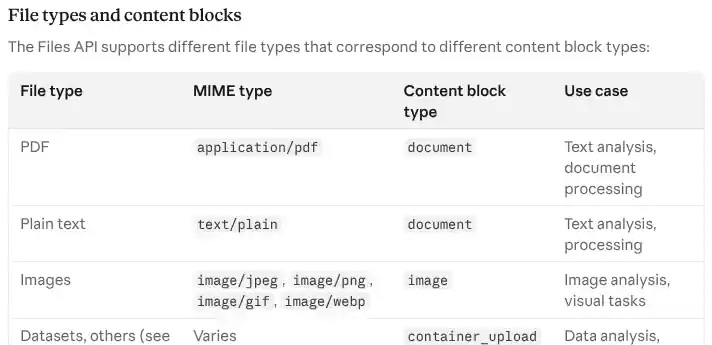
Which File Types Work With Which Content Blocks
This is the part that trips most people up. The content block you use must match the file’s MIME type, or you get a 400 error.
| File type | MIME type | Content block | Typical use |
|---|---|---|---|
application/pdf |
document |
Reports, contracts, papers (text and page images) | |
| Plain text | text/plain |
document |
Notes, logs, .md or .csv read as text |
| Images | image/jpeg, image/png, image/gif, image/webp |
image |
Screenshots, photos, charts |
| Datasets and others | Varies (CSV, .xlsx, .xls, JSON, XML, images, text) | container_upload |
Analysis with the code execution tool |
What about Word and Excel files in a normal chat request? The document block does not accept .docx or .xlsx. You have three options:
- Convert to text: extract the text and send it in a text block, or upload it with an explicit
text/plaintype. - Convert to PDF: best for .docx files with images, because PDF support reads page images and supports citations.
- Use code execution: upload the .xlsx and send it as a
container_uploadso Claude reads it with pandas or openpyxl.
Optional fields on a document block are title, context and citations (set {"enabled": true} to get page-level citations back).
Example 1: Upload a PDF and Ask Several Questions
This script uploads a PDF once, sets it to expire after a day, and asks three questions using the same file_id. It then deletes the file.
import anthropic
from pathlib import Path

client = anthropic.Anthropic()  # reads ANTHROPIC_API_KEY

# 1. Upload once. expires_in_seconds is optional (3600 to 7776000).
uploaded = client.files.upload(
    file=Path("report.pdf"),
    expires_in_seconds=86400,  # auto-expire after 24 hours
)
print("Uploaded:", uploaded.id, uploaded.size_bytes, "bytes")

questions = [
    "Summarize this report in 5 bullet points.",
    "List every number or date that looks like a deadline.",
    "What risks does the report mention?",
]

# 2. Reuse the same file_id for every question
for q in questions:
    response = client.messages.create(
        model="claude-opus-5-5",
        max_tokens=4000,
        messages=[{
            "role": "user",
            "content": [
                {
                    "type": "document",
                    "source": {"type": "file", "file_id": uploaded.id},
                    "title": "Quarterly report",
                },
                {"type": "text", "text": q},
            ],
        }],
    )
    text = "".join(b.text for b in response.content if b.type == "text")
    print("\nQ:", q, "\nA:", text)
    print("Input tokens:", response.usage.input_tokens)

# 3. Clean up
client.files.delete(uploaded.id)
The upload response includes id, filename, mime_type, size_bytes, created_at, downloadable and expires_at. Files you upload always show "downloadable": false.
Tip: Asking many questions about the same big PDF? Add prompt caching to the document block. Repeat reads then cost a small fraction of the normal input price. See our prompt caching guide.
Example 2: Upload an Image and Use It in a Message
Images work the same way, but with an image block. Here we pass the filename, file object and MIME type as a tuple, which is handy when the extension is unusual.
import anthropic

client = anthropic.Anthropic()

with open("chart.png", "rb") as f:
    image_file = client.files.upload(file=("chart.png", f, "image/png"))

response = client.messages.create(
    model="claude-opus-5-5",
    max_tokens=2000,
    messages=[{
        "role": "user",
        "content": [
            {"type": "image", "source": {"type": "file", "file_id": image_file.id}},
            {"type": "text", "text": "Describe this chart and list the top 3 values."},
        ],
    }],
)

for block in response.content:
    if block.type == "text":
        print(block.text)
Image limits still apply after upload. Each image can be up to 8000×8000 px, and a request can hold up to 600 images on 1M-context models. Above 20 images in one request, a stricter size rule applies, so keep each side under 3,000 px.
Example 3: Analyze a CSV With Code Execution and Download the Result
This is where the Files API really shines. You upload a dataset, hand it to the code execution sandbox with a container_upload block, and download any files Claude creates.
import anthropic
from pathlib import Path

client = anthropic.Anthropic()

data = client.files.upload(file=Path("sales.csv"))

response = client.messages.create(
    model="claude-opus-5-5",
    max_tokens=8000,
    tools=[{"type": "code_execution_20260521", "name": "code_execution"}],
    messages=[{
        "role": "user",
        "content": [
            {"type": "text", "text": "Find monthly revenue totals and save a bar chart as revenue.png."},
            {"type": "container_upload", "file_id": data.id},
        ],
    }],
)

# Print Claude's text answer
for block in response.content:
    if block.type == "text":
        print(block.text)

# Collect file_ids of generated files
generated = []
for block in response.content:
    if block.type == "bash_code_execution_tool_result":
        result = block.content
        if result.type == "bash_code_execution_result":
            for out in result.content:
                generated.append(out.file_id)

# Download them (only generated files are downloadable)
for fid in generated:
    meta = client.files.retrieve_metadata(fid)
    client.files.download(fid).write_to_file(meta.filename)
    print("Saved", meta.filename)
A few facts about the sandbox, from the code execution docs:
- Runtime: Python 3.11 on Linux, 1 CPU, 5 GiB RAM and 5 GiB disk.
- No internet: outbound network calls are blocked, so the data must come in via the Files API.
- Libraries: pandas and numpy plus openpyxl, xlrd, pypdf, pdfplumber, python-docx, python-pptx, pillow and more.
- Captured outputs: files saved at the top level of
$OUTPUT_DIRcome back asfile_identries. - Containers: expire 30 days after creation, and you can reuse one across requests.
Warning: When a request includes files for code execution, execution time is billed even if Claude never calls the tool, because the files are preloaded into the container.
Example 4: List, Get Metadata and Delete Files
Here is a small housekeeping script. It lists every file (the SDK auto-paginates), shows which ones have expired, and deletes old test files with proper error handling.
import anthropic
from datetime import datetime, timezone

client = anthropic.Anthropic()
now = datetime.now(timezone.utc)

# List: newest first, 20 per page by default, SDK pages for you
for f in client.files.list():
    expired = f.expires_at is not None and f.expires_at < now
    print(f.id, f.filename, f.mime_type, f.size_bytes, "EXPIRED" if expired else "")

# Get metadata for one file
file_id = "file_011CNha8iCJcU1wXNR6q4V8w"
try:
    info = client.files.retrieve_metadata(file_id)
    print(info.filename, info.created_at, info.downloadable)
    client.files.delete(file_id)
    print("Deleted", file_id)
except anthropic.NotFoundError:
    print("No such file in this workspace:", file_id)
except anthropic.RateLimitError:
    print("Too many file requests. Wait and retry.")
except anthropic.APIStatusError as e:
    print("API error", e.status_code, e.message)
To check a known set of files in one call, pass up to 100 IDs as ids[]. IDs that do not exist are silently left out of the result, so compare the lists yourself.
The Same Flow With curl
If you prefer raw HTTP, these are the four calls you need. Note that the upload is a multipart form, not JSON.
# Upload (optional expiry in seconds)
curl -X POST https://api.anthropic.com/v1/files \
  -H "x-api-key: $ANTHROPIC_API_KEY" \
  -H "anthropic-version: 2026-10-21" \
  -F "file=@report.pdf" \
  -F "expires_in_seconds=86400"

# Use it in a message
curl https://api.anthropic.com/v1/messages \
  -H "x-api-key: $ANTHROPIC_API_KEY" \
  -H "anthropic-version: 2026-10-21" \
  -H "content-type: application/json" \
  -d '{
    "model": "claude-opus-5-5",
    "max_tokens": 1024,
    "messages": [{"role": "user", "content": [
      {"type": "document", "source": {"type": "file", "file_id": "'"$FILE_ID"'"}},
      {"type": "text", "text": "Summarize this document."}
    ]}]
  }'

# List, then delete
curl https://api.anthropic.com/v1/files \
  -H "x-api-key: $ANTHROPIC_API_KEY" -H "anthropic-version: 2026-10-21"
curl -X DELETE "https://api.anthropic.com/v1/files/$FILE_ID" \
  -H "x-api-key: $ANTHROPIC_API_KEY" -H "anthropic-version: 2026-10-21"
Generated files download from GET /v1/files/{file_id}/content. Metadata lives at GET /v1/files/{file_id}.
Storage Limits, Expiry and Platform Support
| Limit | Value |
|---|---|
| Max size per file | 500 MB |
| Total storage | 1 TB per organization |
| Rate limit on file calls | About 500 requests per minute |
| File name | 1 to 255 characters, no < > : " | ? * / \ |
| Optional expiry | 3,600 seconds (1 hour) to 7,776,000 seconds (90 days), set once at upload |
| PDFs per request | Up to 600 pages (100 when the context window is under 1M tokens) |
| Messages request size | 128 MB on the first-party API |
| List page size | 20 by default, up to 1,000 |
How the file lifecycle works
- Workspace scope: any API key in the same workspace can use any file in it. Files are not tied to one user or chat.
- No edits: you cannot rename or change a file. Upload a new one and delete the old one.
- Persistence: files stay until you delete them or they reach
expires_at. Deleted files cannot be recovered. - After expiry: downloads return 404 and Messages requests that use the file fail. Metadata stays visible for up to 30 days.
Warning: Never accept a file_id from your end users. Anyone with a valid ID in your workspace could read another user’s file. Keep the user-to-file mapping on your server, and use one workspace per tenant for hard isolation.
Where it works
The Files API is available on the Claude API, Claude Platform on AWS, Claude Models on Google Cloud (Anthropic managed) and Microsoft Foundry deployments hosted on Anthropic. It is not available on Amazon Bedrock or Google’s Vertex AI. It is also not eligible for zero data retention, since files are stored until deleted.
Files API Pricing With a Worked Example
Every file operation is free: upload, download, list, get metadata and delete. You only pay when file content goes into a Messages request, at the model’s normal input price. Full rates are on our Claude API pricing page.
| Model | Input / 1M tokens | Cache read / 1M | Output / 1M tokens |
|---|---|---|---|
| Claude Opus 5.5 | $4 | $0.20 | $20 |
| Claude Sonnet 5.5 | $2 | $0.10 | $10 |
| Claude Haiku 5.5 (prompts up to 100K) | $0.10 | $0.01 | $0.50 |
| Code execution | 1,550 free hours per org per month, then $0.05 per container hour (5 minute minimum). Free when web search or web fetch is in the request. | ||
Worked example: 20-page PDF, 5 questions on Sonnet 5.5
Anthropic says each PDF page typically uses 1,500 to 3,000 text tokens, plus up to 1,568 tokens for the page image. Let’s assume about 3,000 tokens per page to be safe.
- Document size: 20 pages x 3,000 = about 60,000 input tokens per request.
- Input cost per question: 60,000 x $2 / 1,000,000 = $0.12.
- Output per answer: 1,000 tokens x $10 / 1,000,000 = $0.01.
- Five questions, no caching: 5 x $0.13 = about $0.65.
With prompt caching, the first request pays a 1.25x write ($0.15 for the document). The next four read it at $0.10 per million, about $0.006 each. That brings the total, including output, to about $0.22. Uploading through the Files API does not change token counts; it just saves bandwidth.
Tip: Use client.messages.count_tokens with the same document block to see the exact token count before you run a big job.
Troubleshooting: Common Problems and Fixes
These are the error types and messages documented by Anthropic for the Files API and Messages API.
| Error | What it means | Fix |
|---|---|---|
404 not_found_error: “File `file_…` not found.” |
Wrong ID, deleted file, or a key from another workspace | Check the ID and use a key from the workspace where you uploaded it |
400 invalid_request_error (file type mismatch) |
An image used in a document block, or a PDF in an image block |
Match the block to the MIME type using the table above |
| 400 when downloading | You tried to download a file you uploaded | Only files with "downloadable": true (from code execution or Skills) can be downloaded |
| 400 exceeds context window | The file is bigger than the model’s context, e.g. a huge text file | Split the file, or use code execution to process it |
| 400 invalid file name | Name is empty, over 255 characters, or has forbidden characters | Rename the file before upload |
| 400 storage limit exceeded | Your organization hit 1 TB | Delete old files or set expires_in_seconds on uploads |
413 request_too_large |
File over 500 MB, or a Messages request over 128 MB | Compress, split, or downsample images |
429 rate_limit_error |
Over about 500 file calls per minute, or your tier limit | Back off and retry; see our 429 and 529 fix guide |
400 on list with before_id |
Old beta pagination used without the beta header | Switch to page / next_page or the SDK auto-pager |
AttributeError on client.files |
Very old SDK version | Run pip install -U anthropic |
Two more gotchas. A PDF with a password or encryption will not work, so remove protection first. And code execution tool errors such as execution_time_exceeded or output_file_too_large come back inside the tool result block, not as an HTTP error.
Frequently Asked Questions
Do I still need the files-api-2025-04-14 beta header?
No. The Files API is generally available, so you can drop the header and use client.files. Old code with the header keeps working but returns the older response shapes.
Can I download a file I uploaded?
No. Uploaded files have "downloadable": false and return a 400 on download. Only files created by the code execution tool or Skills can be downloaded.
How long are files kept?
Until you delete them, unless you set expires_in_seconds at upload time. Expiry can be between 1 hour and 90 days and cannot be changed later.
Is storing files on the Files API free?
Yes. Upload, list, metadata, download and delete calls cost nothing. You pay normal input token prices only when a file is used in a message.
Can I send Word or Excel files to Claude?
Not in a document block. Convert Word to PDF or text, or upload Excel files and pass them to the code execution tool with a container_upload block.
Does the Files API work on Amazon Bedrock or Vertex AI?
No. It works on the Claude API, Claude Platform on AWS, Claude Models on Google Cloud (Anthropic managed) and Microsoft Foundry deployments hosted on Anthropic.
Can my app’s users share a file_id?
They should not. Files are visible to every key in the workspace, so keep file IDs on your server and use separate workspaces per tenant.