Should you pay $20 a month for Claude Pro, or pay only for what you use with the Claude API? Both give you the same Claude models, but the bill works in a very different way.
In this guide I run the token math with the current official prices, so you can see which one is cheaper at light, medium and heavy use. Then we cover limits, Claude Code, features, privacy and a safe API setup with spend limits.
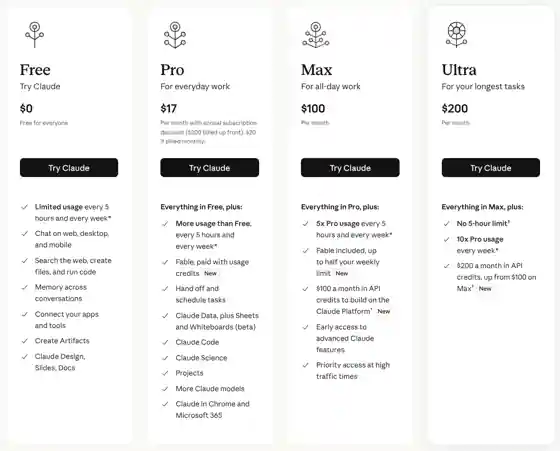
- Claude Pro: $20/month (or $17/month billed yearly at $200). Flat price, chat apps, Projects, memory, Artifacts and Claude Code, with 5-hour and weekly usage limits.
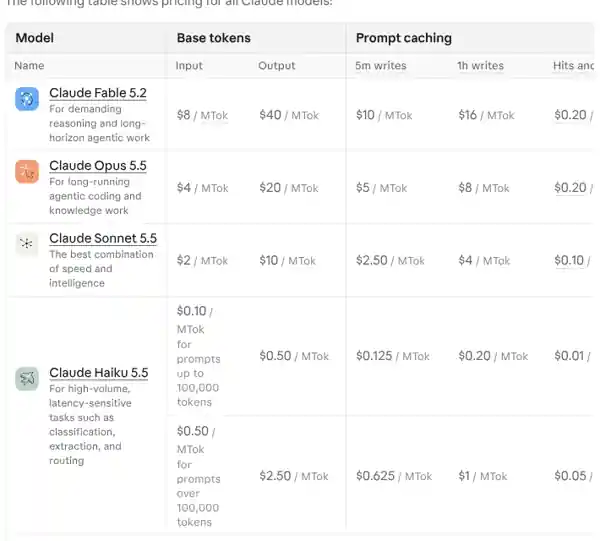
- Claude API: pay per token. Sonnet 5.5 costs $2 input / $10 output per million tokens, Opus 5.5 costs $4 / $20, Haiku 5.5 costs $0.10 / $0.50.
- Light chat users (about 10 messages a day) spend roughly $4-8 a month on the API, so the API is cheaper if you are happy to build or use your own interface.
- Daily chat and coding users get far more value from Pro. One heavy Claude Code month on the API can pass $150.
- Privacy: the API runs under commercial terms and is not used for training by default. Pro has a training setting you control.
Quick Answer: Pro or API?
The key point is simple. Pro is a flat fee with limits. The API has no fixed fee, but every token costs money.
The models are the same on both sides, so benchmark scores do not decide this choice. What decides it is how much you use Claude and how you want to use it.
Current Prices Side by Side
These prices come from the official Claude pricing page and the Claude Platform pricing docs, checked on 26 November 2026. All prices are in USD and exclude tax.
| Item | Claude Pro | Claude API |
|---|---|---|
| Price | $20/month, or $17/month billed yearly ($200 up front) | Pay per token, prepaid credits |
| Models | Sonnet, Opus, Haiku; Fable only via paid usage credits | All current models, incl. Fable 5.2 at $8 / $40 |
| Limits | 5-hour and weekly usage limits | Rate limits plus a monthly spend cap by tier |
| Interface | Web, desktop, mobile apps | Your own code, or the Console playground |
| Claude Code | Included, shares your plan limits | Works, billed per token |
| Projects, memory, Artifacts | Yes | No (you build your own) |
| Voice mode | Yes, in the apps | No built-in voice |
| Discounts | Yearly billing | Batch API 50% off, prompt caching |
| Data training | Your choice in privacy settings | Not trained on by default (commercial terms) |
Here are the API prices for the four main current models, per million tokens (MTok):
| Model | Input | Output | Cache hit | Batch (in / out) |
|---|---|---|---|---|
| Fable 5.2 | $8 | $40 | $0.20 | $4 / $20 |
| Opus 5.5 | $4 | $20 | $0.20 | $2 / $10 |
| Sonnet 5.5 | $2 | $10 | $0.10 | $1 / $5 |
| Haiku 5.5 (prompts up to 100K) | $0.10 | $0.50 | $0.01 | $0.05 / $0.25 |
| Haiku 5.5 (prompts over 100K) | $0.50 | $2.50 | $0.05 | $0.25 / $1.25 |
For every other model and add-on, see my full Claude API pricing guide. To compare all consumer plans, read Claude Free vs Pro vs Max vs Ultra.
Worked Token Cost Math
A token is a small piece of a word. As a rough rule, 1,000 tokens is about 750 English words. Each API call bills the input you send plus the output Claude writes.
The sample message
Let’s take a typical chat turn: 3,000 input tokens (your question plus some earlier chat) and 800 output tokens (a medium answer). Here is the cost of one such message:
- Sonnet 5.5: 3,000 x $2/1M = $0.006, plus 800 x $10/1M = $0.008. Total $0.014.
- Opus 5.5: 3,000 x $4/1M = $0.012, plus 800 x $20/1M = $0.016. Total $0.028.
- Haiku 5.5: 3,000 x $0.10/1M = $0.0003, plus 800 x $0.50/1M = $0.0004. Total $0.0007.
Monthly cost at three usage levels
Now multiply by 30 days. This is the plain, uncached cost of the sample message.
| Usage level | Messages / month | Haiku 5.5 | Sonnet 5.5 | Opus 5.5 | Pro |
|---|---|---|---|---|---|
| Light (10/day) | 300 | $0.21 | $4.20 | $8.40 | $20 |
| Medium (40/day) | 1,200 | $0.84 | $16.80 | $33.60 | $20 |
| Heavy (100/day) | 3,000 | $2.10 | $42.00 | $84.00 | $20* |
*At 100 long messages a day, you may hit Pro’s 5-hour or weekly limits. Then you would wait, buy usage credits or move to Max.
The break-even point
- Sonnet 5.5: $20 / $0.014 = about 1,430 messages a month, or 48 a day.
- Opus 5.5: $20 / $0.028 = about 715 messages a month, or 24 a day.
- Yearly Pro ($17/month): about 1,215 Sonnet or 607 Opus messages a month.
Below those numbers, the API is cheaper. Above them, Pro wins, as long as you stay inside its limits.
Why long chats cost more than you think
The API is stateless. Each new message re-sends the whole chat history as input. A 30-turn chat can easily reach 20,000 input tokens per message.
At 20,000 input plus 800 output, one Sonnet 5.5 message costs $0.04 + $0.008 = $0.048. That is more than three times the sample message.
Tip: prompt caching fixes much of this. A Sonnet 5.5 cache hit costs $0.10 per million tokens instead of $2, so those 20,000 cached tokens cost $0.002 instead of $0.04.
Example: asking 10 questions about one document
Say you load a 60,000-token report and ask 10 questions with Sonnet 5.5 (ignoring output):
- Without caching: 10 x 60,000 x $2/1M = $1.20.
- With 5-minute caching: one cache write at $2.50/1M = $0.15, then 9 hits at $0.10/1M = $0.054. Total about $0.20.
On Pro, the same job costs nothing extra, but big files use up your limits faster. The pricing page says limits depend on the model, chat length and file size.
Usage Limits vs Pay-As-You-Go
How Pro limits work
- Two windows: a 5-hour session limit and a weekly limit.
- Shared pool: chats in the apps and Claude Code draw from the same allowance.
- No fixed message count: Anthropic does not publish an exact number. Longer chats, bigger files and stronger models use more.
- Over the limit: you can wait for the reset, turn on usage credits, or upgrade to Max ($100, 5x Pro usage).
Usage credits are billed at standard API rates, says the usage credits help article. You set them up in Settings, then Usage, and you can set a monthly spend limit.
How API billing works
- Prepaid credits: you buy credits on the Console Billing page. They expire one year after purchase and are non-refundable.
- No time windows: you can send as much as your rate limits allow, at any hour.
- Tier caps: each usage tier has a monthly spend cap. Start is $500, Build is $1,000 and Scale is $200,000.
- Your own cap: you can set a lower monthly spend limit in the Console.
Note: Max and Ultra plans include $100 and $200 a month in API credits. These credits cannot be used in Claude Code or the Claude apps, and they expire at the end of each billing cycle.
Claude Code: Subscription vs API Billing
This is where the gap is biggest. Coding agents read many files and run many tool calls, so they burn tokens fast.
The official Claude Code costs page says enterprise deployments average about $13 per developer per active day and $150-250 per developer per month on token billing. For 90% of users it stays below $30 per active day.
| Point | On Pro subscription | On API billing |
|---|---|---|
| Cost | Included in $20 | Every token billed; about $13 per active day on average |
| Limits | Shares 5-hour and weekly limits with chat | Only rate limits and your spend cap |
| Sign-in | /login with your claude.ai account |
Console account or ANTHROPIC_API_KEY |
| Spend control | Usage credits spend limit | Workspace spend limits in the Console |
| Check usage | /usage shows plan bars |
/usage shows session cost; the Console has the real bill |
Warning: if ANTHROPIC_API_KEY is set in your shell, Claude Code uses that key instead of your subscription, and you pay API rates. Unset it if you meant to use Pro.
For a deeper look, read my Claude Code pricing guide.
Features: Projects, Memory, Artifacts vs Raw API
What Pro gives you out of the box
- Projects: folders with your files and custom instructions (Free allows up to 5).
- Memory: Claude can remember context across conversations.
- Artifacts: live documents, code and small apps next to the chat.
- Apps and extras: web, desktop and mobile apps, voice mode, web search, Claude in Chrome and Microsoft 365, plus Claude Code.
What the API gives you
- Raw model access: you send messages and get text back. No chat history is stored for you.
- Building blocks: tool use, a memory tool, a Files API, code execution and web search ($10 per 1,000 searches).
- Cost tools: the Batch API at 50% off and prompt caching.
- Every model: including Fable 5.2 at standard token prices.
In short, Pro is a finished product. The API is a set of parts for building your own tool, bot or workflow.
Privacy and Data Retention
The official data usage page splits users into two groups:
- Consumer (Free, Pro, Max): you choose whether your chats help train future models. With the setting on, data is kept for 5 years. With it off, data is kept for 30 days.
- Commercial (API, Team, Enterprise): Anthropic does not train on your prompts by default. Standard retention is 30 days, and qualified accounts can get zero data retention.
You can change the consumer setting at any time in claude.ai under Settings, then Privacy. If you handle client data at work, the API’s commercial terms are usually the safer choice.
Which to Pick for Each Job
| Job | Better pick | Why |
|---|---|---|
| Coding | Pro (or Max) | Claude Code is included; API coding often costs $150+ a month |
| Writing | Pro for daily use, API for rare use | Projects and memory keep your style; light use is cheap on the API |
| Research | Pro | Web search, file uploads and Projects in one place |
| Images | Either | Both read images and screenshots you upload |
| Voice | Pro | Voice mode lives in the apps; the API has no built-in voice |
| Budget | API with Haiku or Sonnet | Light users pay a few dollars a month |
| Building apps | API | Only the API lets your code call Claude |
Comparing Claude with other chatbots too? See ChatGPT vs Claude vs Gemini vs Grok.
How to Set Up the API With Spend Limits
Here is a safe setup that keeps surprise bills away. The full key walkthrough is in how to get a Claude API key.
- Create a Console account. Go to platform.claude.com and sign up.
- Buy a small amount of credit. Open Settings, then Billing, click Buy credits and enter an amount. Start small while you learn.
- Leave auto-reload off. With it off, the API simply stops when credits run out. That is a hard safety net.
- Set a monthly spend limit. Open Spend limits, click Set limit next to Monthly spend limit, and enter your cap. It cannot be higher than your tier’s cap.
- Use a workspace for each project. Workspaces let you split keys and set separate limits, so one runaway script cannot drain everything.
- Create an API key. Open API keys, create one, and copy it once. Never paste it into public code.
- Save the key as an environment variable. On Mac or Linux run
export ANTHROPIC_API_KEY="your-key". - Send a test call and check the token count. Use the Python code below, then watch the Console Usage page.
pip install anthropic

import anthropic

client = anthropic.Anthropic()  # reads ANTHROPIC_API_KEY
msg = client.messages.create(
    model="claude-sonnet-5-5",
    max_tokens=1024,
    messages=[{"role": "user", "content": "Explain tokens in two lines."}],
)
print(msg.content[0].text)
print(msg.usage.input_tokens, msg.usage.output_tokens)
Multiply the printed token counts by the prices above, and you have the exact cost of that call.
How to Try Both for Free or Cheap
- Start on Claude Free. Sign up at claude.ai. Free includes chat, memory, Artifacts and up to 5 Projects, with tighter limits.
- Track a normal week. Count how many messages you send per day, and note any long chats or big files.
- Test the API with a few dollars. Buy a small credit amount, set a low spend limit, and try the Console playground or the code above.
- Compare with the math. If your daily count is well under 48 Sonnet messages, the API may be cheaper. If you code or chat all day, go Pro.
Troubleshooting: Common Problems and Fixes
- Claude Code bills my API credits, not Pro: unset
ANTHROPIC_API_KEY, run/logout, then/loginwith your claude.ai account. Check with/status. - “You have reached your specified API usage limits”: you hit the spend limit you set. This comes back as a 400 error. Raise or remove the limit in the Console.
- 429 with “enforced_spend_limit_reached”: you hit your tier’s monthly cap. Access returns on the 1st of next month at 00:00 UTC, or when you move up a tier.
- API stops working suddenly: your prepaid credits ran out. Buy more on the Billing page.
- “You’ve hit your session limit” on Pro: wait for the 5-hour reset shown in the message, turn on usage credits, or start shorter chats.
- API bill higher than expected: long chats re-send history each time. Turn on prompt caching, trim old messages, or use Sonnet or Haiku instead of Opus.
Frequently Asked Questions
Is the Claude API cheaper than Claude Pro?
For light use, yes. Ten Sonnet 5.5 messages a day cost about $4.20 a month on the API versus $20 for Pro. Past roughly 48 Sonnet messages a day, Pro becomes the better deal.
Does Claude Pro include API access?
No. Pro covers the Claude apps and Claude Code, but not API credits. Max and Ultra include $100 and $200 a month in API credits.
Can I use my Pro plan with Claude Code?
Yes. Sign in with /login using your claude.ai account. Claude Code then shares your Pro 5-hour and weekly limits.
Are Pro and the API the same models?
Yes, both run Anthropic’s current models. The difference is price and features, not the model quality.
Does Anthropic train on my API data?
Not by default. The API runs under commercial terms, and standard retention is 30 days.
How do I stop a surprise API bill?
Leave auto-reload off and set a monthly spend limit in the Console. When either limit is reached, requests stop instead of billing more.
Do API credits expire?
Yes. Prepaid API credits expire one year from the purchase date and are non-refundable.
Sources
- Claude plans and pricing
- Claude Platform docs: Pricing
- Claude Platform docs: Rate limits and spend limits
- Claude Help Center: Using Claude Code with your Pro or Max plan
- Claude Help Center: Usage credits for paid Claude plans
- Claude Help Center: How do I pay for my API usage
- Claude Code docs: Manage costs
- Claude Code docs: Data usage