Google gives you two doors to the same Gemini models. One is Google AI Studio with the Gemini Developer API. The other is Vertex AI, which Google now runs as the Gemini Enterprise Agent Platform.
Picking the wrong one can cost you money, privacy or weeks of rework. This guide compares both side by side, using Google’s own docs, so you can choose once and move on.
- Most people: start with Google AI Studio and the Gemini Developer API. Google’s own docs say most developers should use it unless they need enterprise controls.
- Free tier: AI Studio has a real free tier, but free prompts can be used to improve Google products. Vertex AI gives new Cloud users $300 in credits, or a 90-day free express mode.
- Privacy: paid Gemini API and all Vertex AI traffic are not used to improve Google products.
- Auth: AI Studio uses API keys. Vertex AI uses Google Cloud service accounts and IAM.
- Enterprise: only Vertex AI has SLAs, HIPAA and SOC 2 support, data residency, CMEK, VPC and Provisioned Throughput.
- Code: the same Google Gen AI SDK works with both. Switching is mostly one line of client setup.
Quick Answer: Which One Should You Use?
Google says this plainly on its migration page: “Most developers should use the Gemini Developer API unless there is a need for specific enterprise controls.” You can always move later, because the same SDK talks to both.
- Pick AI Studio if: you want a key in two minutes, a free tier to learn on, and simple billing.
- Pick Vertex AI if: your company already runs on Google Cloud, handles health or finance data, or needs a signed enterprise agreement.
- Pick both if: you prototype in AI Studio and ship the production version on Vertex AI.
New to AI Studio itself? My Google AI Studio guide walks through the interface, prompts and key creation.
Wait, What Happened to the Vertex AI Name?
On 22 April 2026, Google Cloud introduced the Gemini Enterprise Agent Platform and called it “the evolution of Vertex AI.” Google said all Vertex AI services and roadmap updates will now ship through Agent Platform instead of a standalone service.
In practice, most people still search for “Vertex AI,” and many URLs, SDK flags and endpoints still use the old name. The API endpoint is still aiplatform.googleapis.com.
Note: In this article, “Vertex AI” and “Agent Platform” mean the same Google Cloud product. The playground that used to be Vertex AI Studio is now called Agent Studio.
Google AI Studio vs Vertex AI Side by Side
This table follows Google Cloud’s own comparison on its “Migrate from Google AI Studio” page, checked on 26 November 2026.
| Feature | Google AI Studio (Gemini Developer API) | Vertex AI (Agent Platform) |
|---|---|---|
| Endpoint | generativelanguage.googleapis.com |
aiplatform.googleapis.com |
| Sign-up | Google Account | Google Cloud account with billing |
| Authentication | API key (OAuth possible) | Service accounts and IAM (API keys in express mode) |
| Playground | Google AI Studio | Agent Studio |
| Free usage | Free tier on many models | $300 credit for new Cloud users, or 90-day express mode |
| Rate limits | By model and usage tier | By model and region |
| Data used to improve Google products | Free tier: yes. Paid tier: no | Never |
| Support and SLA | No enterprise support or SLA | 24/7 enterprise support, availability SLAs |
| Compliance | No HIPAA or SOC 2 certifications | HIPAA, SOC 2, data residency, CMEK, Access Transparency |
| Network security | API key only | IAM plus VPC support |
| Endpoints | Global | Global and regional |
| Dedicated capacity | Not available | Provisioned Throughput |
| Models | Google models | Google plus third-party models in Model Garden |
| Tuning and MLOps | Standard features | Full tuning, evaluation, monitoring, Model Registry |
| Commercial terms | Standard terms, same price for everyone | Enterprise terms, counts toward Cloud commitments, custom discounts |
Free Tier: What You Really Get on Each
Google AI Studio free tier
The Gemini API pricing page lists a Free plan with free input and output tokens, AI Studio access and “limited access to certain models.” You do not need a card. Top Pro-class models are often paid only.
- Cost: $0 for tokens on free-tier models.
- Catch: free-tier content is used to improve Google products.
- Limits: per-project RPM, TPM and RPD caps. Your live limits are on the AI Studio rate limit page.
- Grounding: a smaller free allowance of Google Search grounding.
For model-by-model free limits and paid prices, see my Gemini API pricing and free tier guide.
Vertex AI free options
Vertex AI has no permanent free token tier. Instead, Google Cloud offers two ways to start without paying:
- $300 credit: new Google Cloud customers get $300 in free credits, which work on Gemini models.
- Express mode: people with a @gmail.com account can try Agent Platform free for up to 90 days with an API key and no billing account.
- Express mode limits: Gemini 2.5 models get 10 requests per minute. Gemini 3 models use dynamic limits. Live API models are not supported.
Tip: Express mode is the cheapest way to test the Vertex AI code path before you commit. Google Workspace accounts cannot use it, so use a personal Gmail account or the standard setup.
Pricing Differences
For the same model, the list price per token is usually the same on both. I compared the Gemini API pricing page with the Agent Platform pricing page on 26 November 2026.
| Model (per 1M tokens, prompts up to 200K) | Gemini Developer API (paid) | Vertex AI (global endpoint) |
|---|---|---|
| Gemini 3.1 Pro Preview | $2.00 in / $12.00 out | $2.00 in / $12.00 out |
| Gemini 3.1 Flash-Lite | $0.25 in / $1.50 out | $0.25 in / $1.50 out |
| Gemini 2.5 Pro | $1.25 in / $10.00 out | $1.25 in / $10.00 out |
| Gemini 2.5 Flash | $0.30 in / $2.50 out | $0.30 in / $2.50 out |
| Gemini 2.5 Flash-Lite | $0.10 in / $0.40 out | $0.10 in / $0.40 out |
The real differences are in how you pay and what extras cost:
- Regional endpoints: on Vertex AI, non-global endpoints cost about 10% more. Gemini 3.5 Flash is $1.50 / $9.00 on global and $1.65 / $9.90 on non-global.
- Free tier: only the Developer API has $0 tokens. Vertex AI uses credits instead.
- Billing style: AI Studio uses prepaid credits ($5 minimum, $5,000 maximum) or postpay. Vertex AI bills through your normal Google Cloud billing account.
- Discounts: both have Batch at about 50% off, plus Flex and Priority options. Only Vertex AI offers Provisioned Throughput, volume discounts and spend that counts toward Cloud commitments.
- Promotions: Agent Platform lists some model promotions, such as 50% credits back on select new models for a limited time.
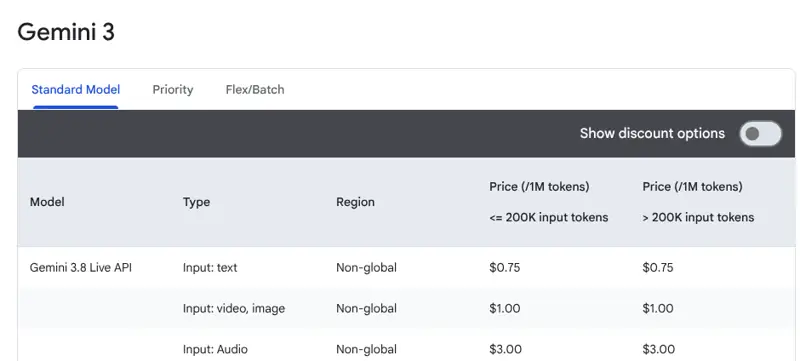
Warning: Google has been changing Gemini prices often, including time-limited intro rates. Check both official pricing pages on the day you budget.
API Keys vs Service Accounts
This is the biggest day-to-day difference. It changes how you deploy, rotate secrets and audit who called the model.
Gemini Developer API: API keys
- Where: create a key at aistudio.google.com/api-keys with “Create API key.”
- How: set it as the
GEMINI_API_KEYenvironment variable and the SDK picks it up. - Risk: anyone with the key can spend your quota. Never ship it in a mobile or browser app.
Vertex AI: service accounts and IAM
- Where: roles are set in Google Cloud IAM, and code uses Application Default Credentials (ADC).
- Local setup: run
gcloud auth application-default loginonce. - In production: attach a service account to Cloud Run, GKE or Compute Engine. There is no secret string to leak.
- Audit: ADC gives per-caller attribution in Data Access audit logs.
Vertex AI also accepts API keys now, but Google’s docs say to “use an API key for testing and Application Default Credentials for production.” Express mode keys do not create customer-accessible Data Access audit logs.
Data Use and Privacy
If you send customer data, read this section twice. The rules differ a lot between the free tier and everything else.
Google AI Studio and the Gemini Developer API
- Free (unpaid) use: Google can use prompts and responses to improve its products. Human reviewers may read them after they are disconnected from your account. Google’s terms say not to submit sensitive, confidential or personal information.
- Paid use: prompts and responses are not used to improve Google products. They are logged for a limited time to detect policy abuse.
- AI Studio prompts: once at least one API project has billing on, Google says AI Studio use falls under the paid-services terms too.
- EEA, UK and Switzerland: the paid data terms apply to everyone there, and apps offered to users there must use paid services.
- Stored requests: since 26 October 2026, new paid projects store GenerateContent requests by default (
store=true). You can opt out per request or in Logs and Datasets settings.
Vertex AI (Agent Platform)
- Training: Google will not use your data to train or fine-tune models without your permission.
- Caching: implicit caching is on by default and cached data is deleted within 24 hours. An admin can turn it off.
- Abuse logging: Google may log prompts for abuse detection. Exceptions go through your account team.
- Zero data retention: possible if you disable caching, avoid Google Search grounding (use Web Grounding for Enterprise), and set
store = falseon Interactions API calls.
Note: Some features keep data no matter what. Google says Grounding with Google Maps stores data for 30 days and Deep Research keeps data for seven days on Agent Platform.
Quotas and Rate Limits
Gemini Developer API usage tiers
Limits are set per project, not per key. They are measured as requests per minute (RPM), input tokens per minute (TPM) and requests per day (RPD). Daily limits reset at midnight Pacific time.
| Tier | How to qualify | Billing cap |
|---|---|---|
| Free | Active project or free trial | N/A |
| Tier 1 | Link an active billing account | $250 |
| Tier 2 | $100 total paid spend, plus 3 days since first payment | $2,000 |
| Tier 3 | $1,000 total paid spend, plus 30 days since first payment | $20,000 to $100,000+ |
Paid tiers also have rolling 10-minute spend limits. Going over any limit returns 429 RESOURCE_EXHAUSTED. My LLM API rate limits guide compares these tiers with other providers.
Vertex AI quotas
- Standard PayGo: the default, with limits that vary by model and region.
- Priority and Flex PayGo: pay more for priority, or less for slower Flex processing.
- Provisioned Throughput: a fixed-cost subscription that reserves throughput in a chosen location. Commitments run from 1 week to 1 year.
Enterprise Features Only Vertex AI Has
These are the reasons large teams move. If none of them matter to you, AI Studio is probably enough.
- Compliance: HIPAA and SOC 2 support, data residency and customer-managed encryption keys (CMEK).
- Security: IAM roles, VPC support and Access Transparency logs.
- Support: 24/7 enterprise support and availability SLAs.
- Capacity: Provisioned Throughput for steady, guaranteed traffic.
- More models: 200+ models in Model Garden, including third-party models such as Anthropic’s Claude.
- MLOps: model tuning, evaluation, monitoring and Model Registry.
- Agents: Agent Runtime, Memory Bank, Agent Sandbox and agent governance tools from the April 2026 Agent Platform launch.
One SDK for Both: Google Gen AI SDK
Google’s unified Google Gen AI SDK works with both platforms. The older google-generativeai Python library was deprecated on 30 November 2025, so new code should use the new SDK.
| Language | Package | Install |
|---|---|---|
| Python | google-genai |
pip install google-genai |
| JavaScript / TypeScript | @google/genai |
npm install @google/genai |
| Go | google.golang.org/genai |
go get google.golang.org/genai |
| Java | com.google.genai:google-genai |
Maven dependency |
| C# | Google.GenAI |
dotnet add package Google.GenAI |
Same code, two clients
Only the client setup changes. The model call stays the same.
from google import genai

# Gemini Developer API (reads GEMINI_API_KEY from the environment)
client = genai.Client()

# Vertex AI / Agent Platform (uses Application Default Credentials)
# client = genai.Client(vertexai=True, project="your-project-id", location="global")

response = client.models.generate_content(
    model="gemini-3.5-flash",  # use any model your project can access
    contents="Explain AI Studio vs Vertex AI in one line.",
)
print(response.text)
For the newer Interactions API, Google’s example uses genai.Client(enterprise=True, project="your-project-id", location="global"). During preview, it only supports the global location on Agent Platform.
Switch with environment variables only
You can also leave genai.Client() empty and switch with environment variables. Google Cloud’s SDK page shows this setup:
export GOOGLE_CLOUD_PROJECT=your-project-id
export GOOGLE_CLOUD_LOCATION=global
export GOOGLE_GENAI_USE_ENTERPRISE=True
Some older samples, including Google’s Node.js quickstart, use GOOGLE_GENAI_USE_VERTEXAI=True for the same job. If one flag does nothing, try the other, or upgrade the SDK. The Python tutorial in my Gemini API Python guide uses the same SDK.
How to Try Both for Free
- Get a Gemini API key. Sign in at aistudio.google.com, open the API keys page and click “Create API key.”
- Set the key. Run
export GEMINI_API_KEY=your-keyin your terminal. - Install the SDK. Run
pip install google-genaiand run the sample above withgenai.Client(). - Turn on Vertex AI express mode. With a @gmail.com account, sign up for Agent Platform express mode in the Google Cloud console. It creates an API key for you, free for up to 90 days.
- Call Vertex AI with that key. Use
genai.Client(vertexai=True, api_key="YOUR_EXPRESS_KEY"), as shown in Google’s express mode sample. - Compare. Send the same prompt to both and check speed, quotas and output.
How to Migrate Between Them
From Google AI Studio to Vertex AI
- Choose a Cloud project. Reuse the project behind your Gemini API key, or create a new one.
- Enable billing and the API. Link a billing account and enable the Agent Platform API in the console.
- Set up credentials. Run
gcloud auth application-default loginlocally. In production, attach a service account with the right Vertex AI role. - Check regions. Supported regions differ between the two platforms. Use
globalunless you need data in a specific region. - Change the client. Swap
genai.Client()for the Vertex AI client, or set the environment variables shown above. - Move your prompts. Download prompts from the AI_Studio folder in Google Drive, rename the files from .txt to .json, then import them in Agent Studio under Prompt management.
- Move training data. Upload it to a Cloud Storage bucket. Any models tuned in AI Studio must be retrained on Agent Platform.
- Delete old keys. Remove unused Gemini API keys on the Google Cloud API Credentials page.
Tip: Deleted a key that was still in production by mistake? Google’s docs point to gcloud beta services api-keys undelete to bring it back.
From Vertex AI back to the Gemini Developer API
Going the other way is simpler. Create an API key in AI Studio, set GEMINI_API_KEY, remove the Vertex flags or arguments, and keep the same model calls.
- Check features: Model Garden third-party models, Provisioned Throughput and VPC controls do not exist on the Developer API.
- Check privacy: stay on a paid tier if your data must not be used to improve Google products.
- Check limits: you start at the usage tier your billing history earns.
Which to Pick for Your Project
| Situation | Best pick | Why |
|---|---|---|
| Learning or a hobby app | AI Studio | Free tier and a key in minutes |
| Startup MVP | AI Studio (paid tier) | Simple billing, private data, same SDK for later |
| Health, finance or legal data | Vertex AI | HIPAA, SOC 2, CMEK and enterprise terms |
| EU data residency | Vertex AI | Regional endpoints and data residency |
| High, steady traffic | Vertex AI | Provisioned Throughput and SLAs |
| Need Claude or other models too | Vertex AI | Model Garden with third-party models |
| Tight budget, bursty use | AI Studio | Pay-as-you-go with prepaid credits |
Still deciding between Gemini and other model families? My ChatGPT vs Claude vs Gemini vs Grok comparison covers that bigger question.
Troubleshooting: Common Problems and Fixes
- “API key not valid” on Vertex AI: AI Studio keys are made for the Gemini Developer API endpoint. For
aiplatform.googleapis.com, use ADC, an express mode key, or a key from the Agent Platform API keys page. - Code still hits the Developer API after migrating: you probably did not pass
vertexai=Trueor set the Vertex environment variables. Check for a strayGEMINI_API_KEYtoo. - “Could not automatically determine credentials”: run
gcloud auth application-default login, or attach a service account to your service. - 403 permission denied: enable the Agent Platform API in the project, and give your account or service account a Vertex AI user role.
- Model not found on Vertex AI: the model may not exist in your region. Try
location="global". - 429 RESOURCE_EXHAUSTED on AI Studio: you hit a per-project limit. Wait for the reset, enable billing for a higher tier, or see my Gemini API errors fix guide.
- HTTP 402 on AI Studio: your prepaid balance hit $0. Add credits or turn on auto-reload.
Frequently Asked Questions
Is Google AI Studio the same as Vertex AI?
No. Both run Gemini models, but AI Studio is the developer product with API keys and a free tier, while Vertex AI is the Google Cloud enterprise product with IAM, SLAs and compliance features.
Is Vertex AI still called Vertex AI?
Google introduced Gemini Enterprise Agent Platform on 22 April 2026 as the evolution of Vertex AI. Vertex AI services now ship through Agent Platform, though many docs, URLs and SDK flags still use the Vertex name.
Is the Gemini API free on Vertex AI?
There is no permanent free token tier. New Google Cloud users get $300 in credits, and Gmail users can try express mode free for up to 90 days.
Is Vertex AI more expensive than the Gemini Developer API?
List token prices are usually the same on the global endpoint. Regional (non-global) Vertex endpoints cost about 10% more, and only the Developer API has $0 free-tier tokens.
Does Google train on my Gemini API data?
On the free tier, Google can use your prompts and responses to improve its products. On the paid Gemini API and on Vertex AI, it does not.
Can I use the same code for both?
Yes. The Google Gen AI SDK works with both. You only change the client setup or a few environment variables.
Can I use a Gemini API key with Vertex AI?
Not directly. AI Studio keys are made for the Gemini Developer API, so for Vertex AI use service account credentials (ADC), an express mode key, or a key created on the Agent Platform API keys page.
Sources
- Google AI for Developers: Gemini Developer API vs the Gemini platform
- Google Cloud: Migrate from Google AI Studio to Gemini Enterprise Agent Platform
- Google Cloud Blog: Introducing Gemini Enterprise Agent Platform (22 April 2026)
- Gemini Developer API pricing
- Google Cloud: Agent Platform generative AI pricing
- Gemini API rate limits and usage tiers
- Gemini API billing
- Gemini API Additional Terms of Service
- Gemini API changelog
- Google Cloud: Agent Platform and zero data retention
- Google Cloud: Agent Platform express mode overview
- Google Cloud: Get a Google Cloud API key
- Google Cloud: Google Gen AI SDK
- Google AI for Developers: Gemini API libraries