Anthropic’s Enterprise Frontier Safeguards (EFS) went into beta on 23 November 2026. On the same day, AWS made its Amazon Bedrock Trusted Access API generally available, with EFS and Enterprise Data Controls in public preview.
If your company wants Claude Fable or Mythos but cannot accept 30-day prompt retention, this is the route Anthropic built for you. Here is what it does, who can get it, and how to switch it on.
- What: Zero data retention for Claude’s most capable models. Anthropic keeps no prompts. Encrypted “Sealed Safety Data” goes to a bucket in your cloud account.
- Misuse checks stay: automated monitoring looks for serious misuse across many requests, such as offensive cyber or bio work and stolen API keys.
- Your team reviews: flags arrive as Safety Cases. Anthropic Human Review is off, and you must answer each case within 7 calendar days.
- Where: beta on Claude Platform, Claude Platform on AWS and Claude Models on Google Cloud. Public preview on Amazon Bedrock.
- Price: Anthropic charges nothing for EFS. You pay your cloud provider for storage, keys and egress.
What Enterprise Frontier Safeguards Is
Anthropic’s docs describe EFS as Zero Data Retention (ZDR) for eligible organizations that use Claude’s most capable models, such as Claude Fable 5.1. Anthropic does not keep your prompts and responses. Instead, an encrypted copy is written to storage that you own.
That encrypted copy is called Sealed Safety Data. It holds prompts, responses and model reasoning in Anthropic’s format. Your own team cannot read it, even though it sits in your bucket.
EFS has two core parts:
- Customer-owned storage: a bucket (Amazon S3 or Google Cloud Storage on Claude Platform) that receives Sealed Safety Data. EFS requires your own bucket.
- Customer review of Safety Cases: Anthropic Human Review is always off, so people in your organization review any case that automated monitoring raises.
A customer-managed encryption key (CMEK) is optional but recommended. The overview page for this is the official EFS overview on Claude Platform Docs.
Why Anthropic Built It: The 30-Day Retention Problem
Starting with Claude Fable 5 in June 2026, Anthropic made its top “Covered Models” require at least 30 days of data retention. Standard ZDR is not available for them. The list now covers Fable 5, 5.1 and 5.2 plus Mythos 5, 5.1 and 5.2.
Anthropic’s reason is that serious misuse can span many tasks, sessions and accounts. Scanning each request and deleting it at once would miss those patterns. Anthropic also says it has never trained on enterprise data without explicit permission.
Banks and other regulated firms pushed back. Retention made Anthropic one more data vendor to clear with compliance teams. Many also did not want Anthropic staff reading flagged content when they already have cleared, trained reviewers.
So on 1 September 2026 Anthropic announced EFS. It said the design was built with more than 100 customers. Help Net Security reported that members of the Analysis and Resilience Center for Systemic Risk, a group of large US banks, worked on it for months.
Note: For a recap of the models that trigger this rule, see my Claude Fable 5.2 and Mythos 5.2 guide.
How EFS Works, Step by Step
The flow is the same idea on every platform, though file paths and settings names differ a little.
- You send a request. A Messages API call goes to an EFS workspace (Claude Platform) or a covered model on Bedrock.
- Anthropic writes Sealed Safety Data to your bucket. It is encrypted in Anthropic’s format, optionally with your key. Anthropic keeps no copy.
- Automated monitoring scans a rolling window. It looks for patterns such as attempts to build offensive cyber or biological capabilities, signs of stolen or leaked credentials, and (per AWS) agents going beyond what a user asked for.
- A Safety Case is created if something is flagged. It lands as a JSON file in your bucket, or through the Safety Cases API on Claude Platform.
- Your team investigates and answers. You mark it
violationorno_violationwithin 7 calendar days.
Anthropic says these options do not change model behaviour, API pricing or rate limits. The usual real-time safety classifiers and Usage Policy still apply to all traffic.
What counts as covered traffic
- Covered: Messages API requests in an EFS workspace, for every model in that workspace.
- Not covered: data Claude Platform features store for their own use, such as code execution containers, Files API uploads, Batch API results and Claude Managed Agents sessions.
- Workspace-wide: once on, EFS applies to every request in the workspace, even to models that do not need retention. Use separate workspaces to split traffic.
EFS vs Enterprise Data Controls vs Default Retention
Accepting the EFS terms also gives you Enterprise Data Controls (EDC). EDC is for workspaces that stay on Anthropic-managed (or on Bedrock, Amazon-managed) storage but still want more control. It is not ZDR.
| Option | Where safety data lives | Who reviews flags | Retention | Setup effort |
|---|---|---|---|---|
| Default (Covered Models) | Anthropic or cloud-provider storage | Anthropic or provider review | At least 30 days | None |
| Enterprise Data Controls | Anthropic-managed (Claude Platform) or Amazon-managed (Bedrock) storage | Your team (Human Review can be turned off) | Up to 30 days on Bedrock | Low: no bucket needed |
| Enterprise Frontier Safeguards | Your own S3 or GCS bucket | Your team only | No retention by Anthropic or Bedrock | Medium: bucket, policies, optional key |
| Legacy / interim ZDR | Not retained | No automated monitoring | None | Limited model access; Bedrock interim exception runs through at least 30 June 2027 |
On Bedrock, AWS says the interim ZDR exception lasts through at least 30 June 2027, and it describes EFS as the long-term path after that.
Who Needs EFS (and Who Does Not)
EFS is not a feature for individual users or small teams. It targets large organizations with strict data rules.
- You probably need it if: you are in banking, insurance, government or another regulated field, want Fable or Mythos, and your contracts forbid a vendor holding prompts.
- You probably do not need it if: you only use Opus, Sonnet or Haiku, which keep your existing retention terms, or you are fine with 30-day retention.
- You cannot use it if: HIPAA readiness is on for your Claude organization. The setup guide says such organizations cannot get EFS.
Other limits from the docs: EFS is for internal use only, the Default Workspace cannot use it, and some Anthropic access programs cannot be combined with it. Eligibility goes through your Anthropic account team or the official EFS request form.
For other admin controls, such as IP allowlists, read my Claude Enterprise security controls guide.
How to Enable EFS on Claude Platform
You need the Organization Admin role in the Claude Console and your own S3 or Google Cloud Storage bucket. The same docs also cover Claude Platform on AWS and Claude Models on Google Cloud.
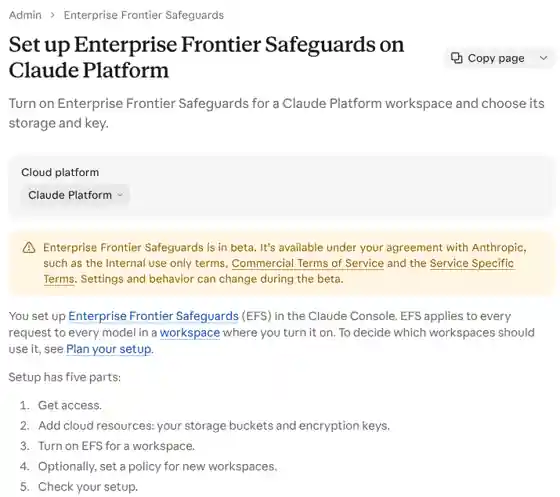
Warning: Some choices are permanent. You cannot turn Access Transparency off yourself after accepting the terms, and attaching a customer-managed key cannot be undone. Read the setup guide before you click.
- Accept the terms. In the Console, open Programs (
platform.claude.com/settings/programs) and click Accept terms on the Enterprise Frontier Safeguards card. If the button is missing, try the Verification Portal at portal.anthropic.com, then your account team. - Add your bucket. Go to Data retention (
platform.claude.com/settings/privacy), select Organization, and connect your S3 or GCS bucket using the provider guide. Wait until Test setup passes. - Register a key (optional). Create a key in your KMS and add it under Encryption keys.
- Pick a workspace. Switch the Data retention page to a non-default workspace, or create a new one under Workspaces and select Enterprise Frontier Safeguards while creating it. Legacy ZDR users must create a new workspace.
- Choose storage. Select the EFS card, set Sealed Safety Data storage to your bucket (required), and optionally set Safety Case and Transcript storage and your key. Save.
- Check the Compliance API is on. Without it, requests have no Transcript and your team gets no Safety Cases.
- Test before real traffic. Send test requests with no sensitive data. Wait 10 minutes after the first object appears under
slab/orsafeguards-data/slab/.
Tip: In AWS CloudTrail (Event history in us-east-2), every AssumeRole call into your EFS roles should come from Anthropic’s AWS account 804820989669. Any other caller is worth raising with your account team.
You can also set a Policy for new workspaces at the Organization level, for example requiring customer-owned storage. Register the bucket or key first, or nobody will be able to create a compliant workspace.
How to Enable EFS on Amazon Bedrock (Trusted Access API)
The new Trusted Access API (GA) is one place to discover, request and enroll in model-provider programs such as EFS. Statuses are eligible (enroll now) or requestable (follow the steps in statusReason).
EFS and EDC on Bedrock are in public preview, enrolled through your AWS account team. AWS says the preview is aimed at customers already on EFS ZDR. There is no console page during preview, so setup is by API.
- Check your status. Run
aws bedrock list-trusted-access-programs --region us-east-1. - Create a KMS key and S3 bucket in each Region you call. Use a full, single-Region, symmetric key ARN (not an alias). The policies must grant access only to the
bedrock.amazonaws.comservice principal, scoped withaws:SourceAccount. - Give your role permission. It needs actions such as
bedrock:PutAccountDataRetentionStorageandbedrock:PutAccountDataRetention. - Save the storage configuration. Call
PUT /v1/data_retention/storage/anthropicwith"storageDestination": "customer_managed", your key ARN and bucket ARN. Bedrock validates both. - Set the retention mode. Call
PUT /data-retentionwith{"mode": "aws_review"}. - Verify. Call a Claude Fable model and confirm in CloudTrail that Bedrock is using your key.
For EDC, skip the key and bucket steps and choose amazon_managed storage. Automated review runs in us-east-1 and eu-west-1, covering US, EU and global cross-Region inference profiles.
{
  "storageDestination": "customer_managed",
  "storageConfiguration": {
    "kmsKeyArn":     "<key-arn>",
    "s3BucketArn":   "arn:aws:s3:::<bucket-name>",
    "s3BucketOwner": "<account-id>"
  }
}
Warning: Joining the Bedrock preview turns ZDR off for the enrolled accounts. AWS advises a test account and test traffic only, with no PII or PHI.
Covered Bedrock models are Claude Fable 5, 5.1 and 5.2, Claude Mythos 5, 5.1 and 5.2, plus Opus 5.5 and Sonnet 5.5 when used through the Cyber Verification Program. If Bedrock loses access to your key or bucket for more than 24 hours, it stops serving covered models.
Handling Safety Cases
Anthropic expects Safety Cases to be rare. Each one is a JSON file with the case ID, a policy category such as cyber or bio, the flagged message IDs, where to find each Transcript, and the workspace involved.
There is no automatic notification. You need to watch the bucket, poll the API, or wire alerts into your SIEM or ticketing tool.
| What you find | What to do | Verdict |
|---|---|---|
| Authorized work, like a sanctioned pen test | Confirm with the owning team | no_violation |
| Employee acting against policy | Remove access, follow internal process | violation |
| External user or stolen API key | Block the user or rotate the key | violation |
| False positive | Nothing else needed | no_violation |
- S3 response file:
review-responses/<case_id>.json - GCS response file:
<organization ID>/review-responses/<case_id>.json - API: one request to the Safety Cases API respond endpoint (Claude Platform, beta).
The first valid response is final. If you do not answer within 7 days, the case closes, and repeated silence can lead to suspended access. Log each response id (msg_...) next to your own user ID, and set metadata.user_id to an opaque value, so investigations are quick.
Pricing and Costs
- Anthropic fee: none. Anthropic says it does not charge for EFS.
- Model pricing: unchanged. See my Claude API pricing guide for per-token rates.
- Cloud bills: your provider bills storage, reads, writes and data egress. On Bedrock that means normal S3 and KMS charges.
- EDC on Bedrock: AWS lists storage cost as not applicable, since Amazon manages it.
Transcripts and review summaries expire after 30 days on Bedrock, which keeps storage growth in check. AWS expects about one GenerateDataKey call per day per key, so KMS costs stay small.
My Take
This is a smart compromise. Anthropic keeps its misuse detection for Mythos-class models, and enterprises get custody, audit trails and their own reviewers.
The trade-off is real work for your security team. Someone must own a 7-day case queue, guard the bucket and key, and accept that a broken key policy can halt covered models within 24 hours. Small teams will be happier on EDC or default retention.
For a general look at how Claude handles your data, my Is Claude safe? explainer is a good companion read.
Troubleshooting: Common Problems and Fixes
- No “Accept terms” button on the Programs page: your organization is not yet eligible. Try the Verification Portal, then the account team or the request form.
- EFS card shows “Ineligible”: the workspace is the Default Workspace or a Legacy ZDR workspace. Create a new workspace and pick EFS during creation.
- No Safety Cases or Transcripts: check that the Compliance API is on and that a Safety Case and Transcript bucket is selected.
- Bedrock save returns
ConflictException(HTTP 400): the account is not enrolled in the preview. Confirm with AWS. - HTTP 400 about the key: use the full single-Region symmetric key ARN in the same Region, not an alias. Do not add
kms:ViaService-only conditions, because Bedrock calls KMS directly. - Covered model calls fail on Bedrock: the mode is not
aws_review, or Bedrock lost key or bucket access for over 24 hours. - Bucket health alerts: on Claude Platform, the new
external_storage.failedandexternal_storage.recoveredorganization webhooks (beta) tell you when the daily check fails or recovers.
Frequently Asked Questions
What is Anthropic Enterprise Frontier Safeguards?
It is zero data retention for Claude’s most capable models, where encrypted safety data is stored in your own cloud bucket and automated monitoring flags serious misuse to your team.
Does Anthropic keep my prompts with EFS?
No. Anthropic does not retain prompts and responses for EFS workspaces. Sealed Safety Data goes to your bucket, and even your team cannot read it.
Does Anthropic train on EFS data?
Anthropic says it has never trained on enterprise data without explicit permission. AWS also states that EFS inputs and outputs on Bedrock are not used for training.
How much does EFS cost?
Anthropic charges nothing for EFS, and API prices and rate limits do not change. You pay your cloud provider for storage, reads, writes, egress and keys.
Which models does EFS cover?
The Covered Models are Claude Fable 5, 5.1 and 5.2 and Claude Mythos 5, 5.1 and 5.2. On Bedrock, Opus 5.5 and Sonnet 5.5 are also covered when used through the Cyber Verification Program.
What is the difference between EFS and Enterprise Data Controls?
EFS stores safety data in your bucket with no retention by Anthropic. Enterprise Data Controls keep data in Anthropic- or Amazon-managed storage but let you use your own key or turn off Anthropic Human Review.
What happens if we ignore a Safety Case?
The case closes after 7 calendar days without a valid response. If cases keep going unanswered, Anthropic or AWS may suspend access.
Sources
- AWS Machine Learning Blog: Introducing the Amazon Bedrock Trusted Access API with EFS and EDC
- Amazon Bedrock User Guide: Anthropic EFS and Enterprise Data Controls
- Anthropic: Developing Enterprise Frontier Safeguards with our customers
- Claude Platform Docs: Enterprise Frontier Safeguards overview
- Claude Platform Docs: Set up EFS on Claude Platform
- Claude Platform Docs: Safety Cases
- Claude Platform release notes
- Claude Help Center: Covered Models
- Help Net Security: Anthropic’s Enterprise Frontier Safeguards lets your Claude logs stay in your cloud