Want to stop paying for Claude? You can cancel a Pro, Max or Ultra plan at any time, but where you cancel depends on where you first paid. This guide shows every route, step by step.
I also cover refunds (including the 14-day EU and UK rule), what happens to your chats and Claude Code, and how to downgrade instead of quitting. Every menu path below was checked on Anthropic’s help centre on 28 November 2026.
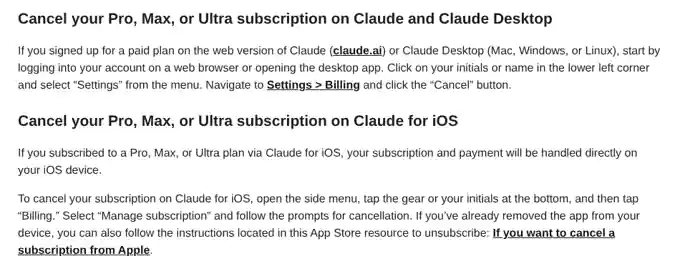
- Paid on the web or desktop app: Settings > Billing > Cancel.
- Paid in the iPhone app: Apple bills you. Cancel in the app’s Billing screen or in iPhone Settings > your name > Subscriptions.
- Paid in the Android app: Google Play bills you. Cancel in the app’s Billing screen or in Play Store subscriptions.
- Timing: cancel at least 24 hours before your renewal date. You keep paid access until the period ends.
- Refunds: payments are normally non-refundable, but EEA and UK users can get a prorated refund within 14 days of purchase.
- Deleting your account is different: it wipes your chats. Cancel first, wait for the plan to lapse, then delete.
First: Find Out Where You Subscribed
This is the step most people skip. Anthropic says you must cancel “on the platform you signed up on”. A web subscription cannot be cancelled from the App Store, and an Apple subscription cannot be cancelled from claude.ai.
| Where you paid | Who bills you | Where to cancel | Who handles refunds |
|---|---|---|---|
| claude.ai or Claude Desktop (Mac, Windows, Linux) | Anthropic | Settings > Billing > Cancel | Anthropic support |
| Claude for iOS (iPhone, iPad) | Apple App Store | App: Billing > Manage subscription, or iPhone Settings > your name > Subscriptions | Apple only |
| Claude for Android | Google Play | App: Billing > Manage subscription, or Play Store subscriptions | Anthropic support checks eligibility |
| Team plan | Anthropic | Organization settings > Billing (Owner only) | Anthropic support |
Tip: Search your inbox for “Your receipt from Anthropic”. Anthropic emails every web invoice with that subject line, so a hit means you paid on the web.
Which Claude Plans This Covers (Pro, Max, Ultra)
Anthropic’s consumer line-up changed recently. The old Max 20x plan is now called Ultra, and existing Max 20x subscribers were moved over with no price change. The cancel steps are the same for all three plans.
| Plan | Web price (checked 28 November 2026) | Usage | Billing options |
|---|---|---|---|
| Pro | $20/month (US), local pricing elsewhere | More than Free, 5-hour and weekly limits | Monthly or annual |
| Max | $100/month | 5x Pro, every 5 hours and every week | Monthly only |
| Ultra (formerly Max 20x) | $200/month | 10x Pro every week, no 5-hour limit for verified accounts | Monthly only |
Mobile prices can differ because Apple and Google set their own pricing. For a full feature comparison, see my Claude Free vs Pro vs Max vs Ultra guide.
How to Cancel on the Web or Claude Desktop
Use this route if you signed up on claude.ai or in the Claude Desktop app. It works the same on Mac, Windows and Linux.
- Sign in. Open claude.ai in a browser, or open Claude Desktop. Use the same email you paid with.
- Open Settings. Click your initials or name in the lower left corner, then choose “Settings”.
- Go to Billing. Select the Billing tab. You can also go straight to claude.ai/settings/billing.
- Click “Cancel”. Follow the prompts to confirm.
- Check the end date. Billing should now show when your paid plan ends. Keep the confirmation email.
Warning: Cancel at least 24 hours before your next billing date. Anthropic says this is needed “to avoid being charged for your next billing period”.
How to Cancel on iPhone or iPad (Apple App Store)
If you upgraded inside the Claude iOS app, Apple handles the subscription and payment. Anthropic cannot cancel or refund it for you.
Option 1: From inside the Claude app
- Open the side menu. Launch Claude and open the side menu.
- Open settings. Tap the gear or your initials at the bottom.
- Tap “Billing”. Then tap “Manage subscription”.
- Confirm. Follow Apple’s prompts to cancel.
Option 2: From iPhone Settings (works even if the app is deleted)
- Open Settings. Tap your name at the top.
- Tap “Subscriptions”. Find Claude in the list.
- Tap “Cancel Subscription”. You may need to scroll down to see it.
On a Mac, open the App Store, click your name at the bottom of the sidebar, then Subscriptions. Apple says that if there is no Cancel button or you see an expiry message in red, the subscription is already cancelled.
How to Cancel on Android (Google Play)
If you subscribed in the Claude Android app, Google Play bills you. You can cancel from the app or from the Play Store.
- Open Claude for Android. Tap your initials in the top right corner.
- Tap “Billing”. Then tap “Manage subscription”.
- Cancel in Google Play. Follow the prompts to finish.
- No app? Open the Play Store, go to your subscriptions, pick Claude, then tap “Cancel subscription”.
Note: Google says plainly that uninstalling an app does not cancel its subscription. Also make sure you are signed in to the Google account that holds the subscription.
How to Cancel a Team or Enterprise Plan
Team plan (Owners only)
Only an Owner or Primary Owner can cancel a Team plan. Regular members do not see this option and need to ask an Owner.
- Switch to your organisation. Sign in to claude.ai as an Owner.
- Open Organization settings > Billing. The direct path is claude.ai/admin-settings/billing.
- Cancel the plan. Your organisation will not be charged for the next cycle.
Your team keeps access until the end of the current billing cycle. After you cancel, you can no longer remove members from Organization settings > Members, so tidy up seats first. Removing a member mid-cycle does not give a credit or refund.
Enterprise plan
Enterprise seats are priced per user per month but billed annually. On self-serve Enterprise plans, seats cannot be removed mid-term. For sales-assisted contracts, talk to your Anthropic account manager or support about ending at renewal.
If you are just a member of a Team or Enterprise organisation, you have nothing to cancel. Your admin controls the seat.
What Happens After You Cancel
- You keep paid access until the period ends: the cancellation “will take effect at the end of your current billing period”.
- Your account stays: cancelling is not deleting. Your account drops back to the Free plan and your conversations stay, because only account deletion removes them.
- Usage credits stay but go idle: purchased usage credits are not refunded. The balance stays on your account but only works with an active paid plan.
- Monthly API credits stop: Max, Ultra and Team include monthly Claude API credits. New ones stop after cancelling, and existing ones work until they expire.
- Personal Finance closes: you can’t open it after your plan ends, and your banks stay linked until you unlink them. Unlink first if you won’t return.
Tip: Want a copy of your chats anyway? Export your data from Settings on the web or desktop app before you change anything big.
Cancelling When You Use Claude Code
Pro, Max and Ultra include Claude Code in one subscription. There is no separate Claude Code subscription to cancel: cancelling your plan also ends subscription access in the terminal and IDE once the period ends.
- Shared limits: Claude Code and Claude chat share the same usage limits, so cancelling affects both together.
- Check for an API key: if an
ANTHROPIC_API_KEYenvironment variable is set, Claude Code bills your API account instead of your plan. That keeps charging after you cancel the subscription. - Switch accounts cleanly: run
/logoutinside Claude Code to sign out of your subscription.
To compare costs before you quit, see Claude Code pricing.
Downgrade Instead of Cancelling (Ultra to Max, Max to Pro)
If the price is the problem, a smaller plan may be enough. Max costs $100 and Pro costs $20, so dropping from Max to Pro saves $80 a month.
Anthropic’s help centre documents upgrades in detail, but it has no separate downgrade article as of 28 November 2026. Here is the safe approach:
- Look in Settings > Billing. If you see an option to change or adjust your plan, pick the cheaper one.
- No option shown? Cancel your current plan and keep using it until the period ends.
- Resubscribe to the smaller plan. Once your account shows Free, upgrade to Pro (or Max) from the same Billing page.
Not sure which tier fits? My Is Claude Max worth it? post breaks down who really needs the higher limits.
Refunds: The Official Policy and the 14-Day Rule
Anthropic’s refund article is clear: except where its Consumer Terms say otherwise, “where required by law, or in cases of fraud, all payments are non-refundable”. So a normal cancellation just stops the next charge.
The 14-day refund in the EEA and UK
If you live in the European Economic Area or the United Kingdom, you “may receive a refund within 14 days of purchase”. Anthropic says this option may appear in your Settings, and refunds are prorated by how much you used. Outside these regions, there is no general 14-day refund.
How to request a refund (web subscriptions)
- Open help. Click your initials or name in the lower left corner, then “Get help”.
- Start a message. Click “Send us a message”, then “Accept”.
- Pick “Claude Refund Request”. Choose your reason.
- Check eligibility. Follow the prompts. If eligible, you can cancel and refund in the same chat.
Refunds for Apple and Google Play purchases
- Apple: only Apple can refund. Go to reportaproblem.apple.com, choose “I’d like to” > “Request a refund”, pick the reason and your Claude subscription. Refunds are at Apple’s discretion.
- Google Play (active plan): contact Anthropic support. They check your eligibility first.
- Google Play (inactive plan): contact support with your Google Play email or your GPA order number from the receipt.
Warning: A refund request does not cancel an Apple subscription. Cancel it as well, or you will be charged again. Also, Anthropic cannot refund while a bank dispute is open.
Cancel vs Delete Your Claude Account
These are two different actions. Cancelling stops payments. Deleting is permanent: you lose your conversations, projects and any remaining usage credits, and the account cannot be recovered.
| Cancel subscription | Delete account | |
|---|---|---|
| Stops future charges | Yes | Only after the plan is cancelled |
| Chats and projects | Kept | Lost |
| Can come back later | Yes, just upgrade again | No, the account is gone |
| Where | Settings > Billing (or app store) | Settings > Account > Delete account |
Anthropic’s order for paid users is: cancel, wait until the period ends, then delete. Full steps for web, iOS and Android are in my guide to deleting your Claude account.
API Console Credits Are Billed Separately
The Claude API runs through the Claude Console, which is a separate product from your chat plan. Cancelling Pro, Max or Ultra does not touch prepaid API credits or API keys you created there.
- Prepaid API credits: managed in the Console under Settings > Billing, not in claude.ai.
- Included monthly API credits: the ones bundled with Max, Ultra and Team cannot be refunded and stop renewing when you cancel.
- Still paying for API use? Revoke unused keys and turn off auto-reload in the Console.
For how API billing works, see Claude API pricing.
Troubleshooting: Common Problems and Fixes
There is no Cancel button in Billing
You most likely paid through Apple or Google Play. Those plans can only be cancelled in the store, so check your iPhone Subscriptions list or the Play Store. If you are a Team member rather than an Owner, you will not see billing controls at all.
I cancelled but was still charged
- Too late: you may have cancelled less than 24 hours before renewal.
- Two subscriptions: you may have both a web plan and an app store plan. Check claude.ai Billing and your Apple or Google subscriptions.
- API charges: a Console account or an
ANTHROPIC_API_KEYin Claude Code bills separately. - Old saved card: a saved card may be charged if your default card is declined, so remove cards you don’t want used.
I can’t find the paid plan: wrong account
If claude.ai shows Free but you are being charged, you are probably signed in with another email. Anthropic suggests trying any other email you might have used. Also check Billing for a failed payment, which downgrades the account.
I can’t log in to the paid account
Contact Anthropic support from another email and cc the address tied to the paid account. Ask them to cancel the plan and, if eligible, refund it.
I subscribed via Apple but want to manage it on the web
Apple handles App Store billing, and Anthropic’s support team can’t access those charges. Cancel it in Apple, let it run out, then subscribe again on claude.ai if you prefer web billing.
Frequently Asked Questions
Can I cancel Claude Pro at any time?
Yes. You can cancel Pro, Max or Ultra at any time, and you keep paid access until the end of the current billing period.
Does Claude give a refund within 14 days?
Only in the EEA and UK, where you may get a prorated refund within 14 days of purchase. Elsewhere, payments are non-refundable except where the law requires it or in cases of fraud.
Will I lose my chats if I cancel Claude?
No. Cancelling only stops billing and moves you back to the Free plan. Your chats are removed only if you delete your account.
How do I cancel a Claude subscription bought on iPhone?
Open iPhone Settings, tap your name, tap Subscriptions, choose Claude and tap Cancel Subscription. You can also start from the Claude app’s Billing screen.
Does cancelling Claude also cancel Claude Code?
Yes, for subscription access. Claude Code uses your Pro, Max or Ultra plan, so it stops when the plan ends. API key billing is separate and continues.
Can I downgrade from Max to Pro instead?
Check Settings > Billing for a plan change option. If none appears, cancel Max, wait until it ends, then subscribe to Pro.
Does deleting the Claude app cancel my subscription?
No. Removing the app from your phone does not cancel anything. Cancel through Apple, Google Play or claude.ai, depending on where you paid.
Leaving ChatGPT as well? Here is how to cancel a ChatGPT subscription.
Sources
- Claude Help Center: Cancel your Pro, Max, or Ultra subscription
- Claude Help Center: Request a refund for a paid Claude plan
- Claude Help Center: Cancel your organization’s Team plan subscription
- Claude Help Center: What is the Ultra plan?
- Claude Help Center: What is the Max plan?
- Claude Help Center: What is the Pro plan?
- Claude Help Center: Delete your Claude account
- Claude Help Center: Use Claude Code with your Pro, Max, or Ultra plan
- Claude Help Center: Paid plan billing FAQs
- Claude Help Center: How am I billed for my Enterprise plan?
- Apple Support: If you want to cancel a subscription from Apple
- Google Play Help: Cancel, pause, or change a subscription