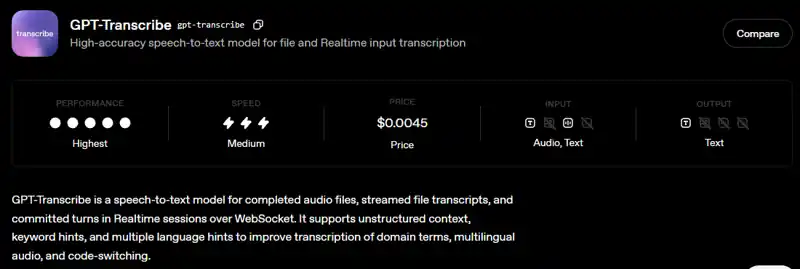
OpenAI’s speech-to-text API turns audio files into text for $0.0045 per minute with the new gpt-transcribe model. It also streams text while a file is processed, and it has a separate live model for microphones and calls.
This guide shows the current models, working Python code, response formats, timestamps, speaker labels, long files, translation, pricing and real errors.
One big change matters right now: Whisper and the GPT-4o transcribe models shut down on February 26, 2027. Plan your migration early.
- Files: use
gpt-transcribeon/v1/audio/transcriptions. It costs $0.0045 per minute, so a 1-hour podcast is about $0.27. - Live audio: use
gpt-live-transcribein a Realtime transcription session at $0.017 per minute. - Names and jargon: pass
prompt,keywordsandlanguages. - Limits: 25 MB per upload. Split or compress bigger files.
- Not in gpt-transcribe yet: word timestamps, SRT/VTT, speaker labels and English translation. Those still need deprecated models until Feb 26, 2027.
What the Speech-to-Text API Is and When to Use It
The speech-to-text API is the part of the OpenAI API that listens to audio and returns text. You send a recording, and you get a transcript back as JSON.
OpenAI now splits the job into two workflows:
- File transcription: a finished recording such as a meeting, podcast, interview or voice note. You upload it to
/v1/audio/transcriptions. - Realtime transcription: audio that is still arriving from a microphone, phone call or stream. You open a WebSocket or WebRTC session.
Streaming output and live input are separate choices. You can stream the text of a finished file without opening a Realtime session at all.
client.audio.transcriptions.create(model="gpt-transcribe", file=...). For a live microphone, use gpt-live-transcribe over the Realtime API.Current Transcription Models (November 2026)
OpenAI launched GPT-Transcribe and GPT-Live-Transcribe on July 29, 2026. On August 26, 2026, it gave notice that the older speech models will shut down on February 26, 2027.
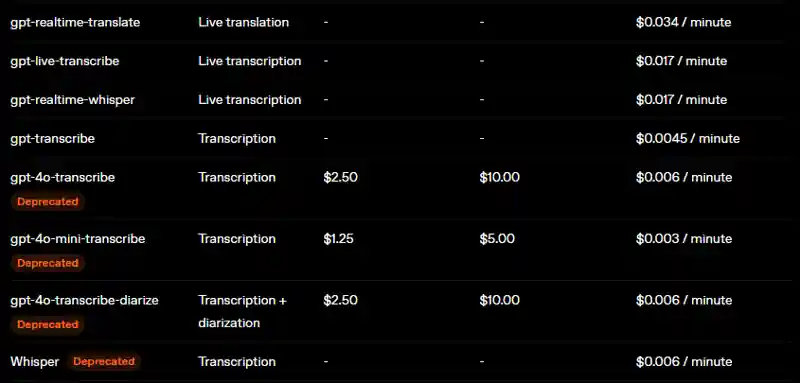
| Model | Best for | Price | Status |
|---|---|---|---|
gpt-transcribe |
Recorded files, streamed file transcripts, committed Realtime turns | $0.0045 / min | Recommended |
gpt-live-transcribe |
Live captions, calls, voice apps | $0.017 / min | Recommended |
gpt-realtime-whisper |
Existing live integrations only | $0.017 / min | Not for new projects |
gpt-4o-transcribe |
Files (JSON only, logprobs) | $0.006 / min | Shuts down Feb 26, 2027 |
gpt-4o-mini-transcribe |
Cheap file transcription | $0.003 / min | Shuts down Feb 26, 2027 |
gpt-4o-transcribe-diarize |
Speaker labels | $0.006 / min | Shuts down Feb 26, 2027 |
whisper-1 |
Word timestamps, SRT/VTT, translation | $0.006 / min | Shuts down Feb 26, 2027 |
For new apps, start with gpt-transcribe. Keep the old models only for the features GPT-Transcribe does not have yet, and plan a replacement before the shutdown date.
Prerequisites and Setup
You need three things before running any example:
- An OpenAI API key: see how to get an OpenAI API key. The Free tier does not support
gpt-transcribe, so add billing first. - Python 3.10 or newer with the official
openaipackage. I checked every parameter here against openai 3.60.0 (released 26 Nov 2026). - ffmpeg (optional): only needed for splitting long files.
- Install or upgrade the SDK. Run
pip install -U openai. Older versions may not know thekeywordsandlanguagesparameters. - Set your key as an environment variable. On macOS or Linux run
export OPENAI_API_KEY="sk-...". On Windows PowerShell runsetx OPENAI_API_KEY "sk-..."and open a new terminal. - Get a test file. Use any flac, mp3, mp4, mpeg, mpga, m4a, ogg, wav or webm file under 25 MB.
- Run Example 1 below. If you see a transcript, your setup works.
Tip: new to the SDK? Our OpenAI API Python tutorial covers the client, keys and the Responses API from scratch.
Example 1: Transcribe a File With gpt-transcribe
This is the smallest working script. The client reads OPENAI_API_KEY from the environment, so no key appears in the code.
from openai import OpenAI

client = OpenAI()  # reads OPENAI_API_KEY

with open("meeting.mp3", "rb") as audio:
    result = client.audio.transcriptions.create(
        model="gpt-transcribe",
        file=audio,
        response_format="json",
    )

print(result.text)
print(result.languages)  # e.g. [{"code": "en"}] or [] if unsure
The JSON response has text and a languages list. If the model cannot reliably detect the language, languages comes back empty.
Note: always open the file with a real extension such as .mp3. The API uses the filename and content type to work out the format.
Prompting for Names, Keywords and Languages
Product names, people’s names and acronyms are where transcripts go wrong. GPT-Transcribe gives you three inputs to fix that:
prompt: free-form context, such as “A customer support call about billing.”keywords: a list of exact terms you expect to hear. They are hints, not forced output.languages: a list of expected input languages, like["en", "fr"]. It replaces the older singlelanguagefield.
from openai import OpenAI

client = OpenAI()

with open("support_call.wav", "rb") as audio:
    result = client.audio.transcriptions.create(
        model="gpt-transcribe",
        file=audio,
        prompt="A support call between Priya Raman and an agent about the Premium Plus plan.",
        keywords=["AC-42", "Premium Plus", "Priya Raman"],
        languages=["en", "fr"],
    )

print(result.text)
On older SDK versions, pass keywords and languages inside extra_body={...} instead. OpenAI’s own migration cookbook shows that form.
Warning: do not send language and languages together. Each keyword must sit on one line, with no <, > or line breaks, or the whole request is rejected.
Language codes can be ISO 639-1 (en, fr), selected ISO 639-3 codes (eng, cmn), or the regional codes zh-cn, zh-tw and zh-hk. Unsupported codes are rejected.
For whisper-1, the prompt is limited to 224 tokens. A classic trick there is to include correctly spelled names in the prompt, or the last sentence of the previous chunk.
Example 2: Stream the Transcript as It Is Processed
Set stream=True to get text events while a long file is being processed. This is great for showing progress in a UI.
from openai import OpenAI

client = OpenAI()

with open("podcast.m4a", "rb") as audio:
    stream = client.audio.transcriptions.create(
        model="gpt-transcribe",
        file=audio,
        stream=True,
    )
    for event in stream:
        if event.type == "transcript.text.delta":
            print(event.delta, end="", flush=True)
        elif event.type == "transcript.text.done":
            print()
            print("Final:", event.text)
            print("Usage:", event.usage)
You get transcript.text.delta events with partial text, then one transcript.text.done event. The done event includes the full text, languages and usage.
Streaming is ignored for whisper-1. No Realtime session is needed for this kind of streaming.
Response Formats and Timestamps
The response_format parameter accepts json, text, srt, verbose_json, vtt and diarized_json. Each model supports only some of them.
| Model | Formats | Timestamps |
|---|---|---|
gpt-transcribe |
json (documented) |
No word timestamps yet |
gpt-4o-transcribe / mini |
json only |
No |
gpt-4o-transcribe-diarize |
json, text, diarized_json |
Segment start/end in diarized_json |
whisper-1 |
All, including srt, vtt, verbose_json |
Word and segment |
For subtitles or word timings today, you need whisper-1 with verbose_json and timestamp_granularities. Segment timestamps add no extra latency, but word timestamps do.
from openai import OpenAI

client = OpenAI()

with open("lecture.mp3", "rb") as audio:
    result = client.audio.transcriptions.create(
        model="whisper-1",  # deprecated: shuts down Feb 26, 2027
        file=audio,
        response_format="verbose_json",
        timestamp_granularities=["word", "segment"],
    )

for seg in result.segments:
    print(f"[{seg.start:.2f}s - {seg.end:.2f}s] {seg.text}")

for w in result.words[:10]:
    print(w.word, w.start, w.end)
For ready-made subtitle files, set response_format="srt" or "vtt" on whisper-1. The SDK then returns the subtitle text as a string.
Note: OpenAI’s migration guide says to keep Whisper for SRT, VTT and timestamps for now. Developers on the OpenAI forum asked in November 2026 for a replacement path, and no successor had been named when I checked.
Example 3: Speaker Diarization
Diarization means labelling who spoke when. GPT-Transcribe does not support it. The only option is gpt-4o-transcribe-diarize, which shuts down on February 26, 2027.
Key rules for the diarize model:
- Format: set
response_format="diarized_json"to get speaker labels. - Long audio: for audio over 30 seconds,
chunking_strategyis required. Use"auto". - Known speakers: map up to 4 people with
known_speaker_namesandknown_speaker_references. Each reference clip is 2 to 10 seconds, sent as a data URL. - Not supported:
prompt,logprobs, timestamp granularities, and Realtime sessions.
import base64
from openai import OpenAI

client = OpenAI()

def to_data_url(path, mime="audio/wav"):
    with open(path, "rb") as f:
        return f"data:{mime};base64," + base64.b64encode(f.read()).decode()

with open("interview.wav", "rb") as audio:
    result = client.audio.transcriptions.create(
        model="gpt-4o-transcribe-diarize",
        file=audio,
        response_format="diarized_json",
        chunking_strategy="auto",
        known_speaker_names=["host", "guest"],
        known_speaker_references=[
            to_data_url("host_sample.wav"),
            to_data_url("guest_sample.wav"),
        ],
    )

for seg in result.segments:
    print(f"{seg.speaker} [{seg.start:.1f}-{seg.end:.1f}]: {seg.text}")
If you skip the known speaker fields, the model still splits the transcript into speaker segments with its own labels. Matching those labels to real names is then up to your code.
Example 4: Files Over 25 MB (Splitting)
Uploads are capped at 25 MB. Above that you get a 413 error, so you have two choices:
- Compress: re-encode to a smaller format, for example mono mp3 at 64 kbps. One hour then fits in about 29 MB, so speech files under about 50 minutes fit in one request.
- Split: cut the audio into chunks under 25 MB and transcribe each one.
OpenAI’s guide warns against splitting mid-sentence, because it can hurt accuracy. The script below cuts 10-minute chunks with ffmpeg, then passes the end of each chunk’s text as the prompt for the next.
import glob
import os
import subprocess
from openai import OpenAI

client = OpenAI()
SRC = "long_podcast.mp3"
os.makedirs("chunks", exist_ok=True)

# 1) Re-encode to mono 64 kbps mp3 and cut into 600-second pieces
subprocess.run([
    "ffmpeg", "-y", "-i", SRC,
    "-ac", "1", "-b:a", "64k",
    "-f", "segment", "-segment_time", "600",
    "chunks/part_%03d.mp3",
], check=True)

# 2) Transcribe each piece, carrying context forward
full_text = []
previous_tail = ""
for path in sorted(glob.glob("chunks/part_*.mp3")):
    with open(path, "rb") as audio:
        result = client.audio.transcriptions.create(
            model="gpt-transcribe",
            file=audio,
            prompt=("Podcast episode. Previous text: " + previous_tail).strip(),
        )
    full_text.append(result.text)
    previous_tail = result.text[-300:]
    print("done", path)

with open("transcript.txt", "w", encoding="utf-8") as f:
    f.write(" ".join(full_text))
Tip: for cleaner cuts, use ffmpeg’s silencedetect filter to find pauses, then split at the nearest silence instead of an exact 600 seconds.
OpenAI’s own example uses the pydub library. OpenAI notes it makes no guarantees about third-party tools like pydub and ffmpeg.
The Same Request With curl
The endpoint takes multipart form data. Array fields use the [] suffix.
curl https://api.openai.com/v1/audio/transcriptions \
  -H "Authorization: Bearer $OPENAI_API_KEY" \
  -F model="gpt-transcribe" \
  -F file="@meeting.mp3" \
  -F prompt="Weekly product sync for the AC-42 launch." \
  -F "keywords[]=AC-42" \
  -F "languages[]=en"
The response is the same JSON you get in Python, with text, languages and usage.
Realtime and Live Transcription
For audio that is still happening, use a Realtime transcription session with gpt-live-transcribe. It streams deltas as people talk and sends a final transcript for each committed turn.
- Connect (server): WebSocket to
wss://api.openai.com/v1/realtime?intent=transcription, with no model in the URL. - Connect (browser): use WebRTC.
- Audio: the docs examples send mono PCM16 at 24 kHz (
audio/pcm, rate 24000). - Delay: pick
minimal,low,medium,highorxhigh. Lower is faster, and higher can be more accurate. - Turn detection: set it to
null.gpt-live-transcribedoes not supportserver_vadorsemantic_vad.
You configure the session with a session.update event:
{
  "type": "session.update",
  "session": {
    "type": "transcription",
    "audio": {
      "input": {
        "format": {"type": "audio/pcm", "rate": 24000},
        "transcription": {
          "model": "gpt-live-transcribe",
          "prompt": "A support call about a plan.",
          "keywords": ["AC-42", "Premium Plus"],
          "languages": ["en", "fr"],
          "delay": "low"
        },
        "turn_detection": null
      }
    }
  }
}
Then send audio with input_audio_buffer.append and input_audio_buffer.commit. Listen for conversation.item.input_audio_transcription.delta and .completed, and match them by item_id, because turns can finish out of order.
The live model does not return word timestamps, speaker labels or confidence scores. For the full WebSocket walkthrough, see our OpenAI Realtime API guide.
Translating Audio to English
The classic way was client.audio.translations.create(model="whisper-1", file=...). It turns speech in another language into English text.
That endpoint, /v1/audio/translations, is deprecated and shuts down on February 26, 2027. GPT-Transcribe does not translate.
The replacement is Realtime translation with gpt-realtime-translate at /v1/realtime/translations. It needs a translation session and streamed audio, so you cannot just swap the model name. It handles 70+ input languages and 13 output languages for $0.034 per minute.
A cheap alternative for files is two steps: transcribe with gpt-transcribe, then translate the text with a normal text model.
Pricing per Minute With a Worked Example
Speech-to-text is billed by audio length. These prices come from OpenAI’s official pricing page.
| Model | Per minute | 1 hour | 1,000 hours |
|---|---|---|---|
gpt-transcribe |
$0.0045 | $0.27 | $270 |
gpt-4o-mini-transcribe (deprecated) |
$0.003 | $0.18 | $180 |
gpt-4o-transcribe / diarize (deprecated) |
$0.006 | $0.36 | $360 |
whisper-1 (deprecated) |
$0.006 | $0.36 | $360 |
gpt-live-transcribe |
$0.017 | $1.02 | $1,020 |
gpt-realtime-translate |
$0.034 | $2.04 | $2,040 |
Worked example: a podcast network
Say you publish 40 episodes a month, each 45 minutes long. That is 1,800 minutes of audio.
- gpt-transcribe: 1,800 x $0.0045 = $8.10 per month.
- whisper-1: 1,800 x $0.006 = $10.80 per month.
- gpt-live-transcribe (if you captioned them live): 1,800 x $0.017 = $30.60 per month.
The pricing page lists no Batch discount for transcription. For the rest of the price list, see our OpenAI API pricing guide.
Limits at a Glance
| Limit | Value |
|---|---|
| Max upload size | 25 MB (26,214,400 bytes) |
| File formats | flac, mp3, mp4, mpeg, mpga, m4a, ogg, wav, webm |
| gpt-transcribe rate limits | Free: not supported. Build: 5,000 RPM. Launch: 10,000 RPM. Grow: 30,000 RPM |
| gpt-live-transcribe rate limits | Free: not supported. Build: 2,000 RPM. Launch and Grow: 10,000 RPM |
| whisper-1 prompt | 224 tokens |
| Known speakers (diarize) | Up to 4, clips of 2 to 10 seconds |
| Diarize chunking | Required for audio over 30 seconds |
| Temperature | 0 to 1 |
| Old model shutdown | February 26, 2027 |
Rate limits come from each model’s page and depend on your usage tier. See LLM API rate limits and tiers for how tiers work.
Troubleshooting Common Errors
| Error | Cause | Fix |
|---|---|---|
413 Maximum content size limit (26214400) exceeded |
File is over 25 MB | Compress to mono 64 kbps mp3 or split (Example 4) |
Audio file might be corrupted or unsupported (400, invalid_value, param file) |
Extension or content type does not match the real audio, or a broken file | Use the correct extension, send plain audio/webm without codecs=, or re-encode with ffmpeg |
401 AuthenticationError |
Missing or wrong API key | Check OPENAI_API_KEY is set in the same terminal |
429 RateLimitError |
Too many requests, or no credit | Add retries with backoff, check billing. Free tier cannot use gpt-transcribe |
400 BadRequestError on languages |
Sent both language and languages, or an unsupported code |
Send only languages with valid codes |
400 on keywords or prompt |
A keyword has <, > or a line break, or the prompt is too long |
Clean keywords and shorten the prompt |
400 on timestamp_granularities or srt |
The model does not support that format | Use whisper-1 with verbose_json, srt or vtt |
| 400 on diarize without chunking | Audio longer than 30 seconds | Add chunking_strategy="auto" |
| Words wrong or names misspelled | Model guessed unknown terms | Add keywords and a short prompt |
The Python SDK raises these as openai.BadRequestError, openai.AuthenticationError, openai.RateLimitError and openai.APIStatusError. Wrap your call like this:
import openai
from openai import OpenAI

client = OpenAI(max_retries=3)

try:
    with open("meeting.mp3", "rb") as audio:
        result = client.audio.transcriptions.create(model="gpt-transcribe", file=audio)
    print(result.text)
except openai.BadRequestError as e:
    print("Bad request:", e.message)
except openai.RateLimitError:
    print("Rate limited or out of credit. Try again later.")
except openai.APIStatusError as e:
    print("API error", e.status_code, e.message)
For a wider list of OpenAI error codes, see OpenAI API errors and fixes.
Frequently Asked Questions
What is the best OpenAI model for speech to text in 2026?
For recorded files, use gpt-transcribe at $0.0045 per minute. For live audio, use gpt-live-transcribe at $0.017 per minute.
Is Whisper still available in the OpenAI API?
Yes, whisper-1 still works, but it is deprecated. It shuts down on February 26, 2027, along with the GPT-4o transcribe models and the translations endpoint.
Does gpt-transcribe support timestamps or SRT subtitles?
Not yet. OpenAI’s docs say to keep whisper-1 with verbose_json, srt or vtt for timestamps and subtitles until the shutdown date.
Can the OpenAI API tell who is speaking?
Only gpt-4o-transcribe-diarize with response_format="diarized_json" does that today. It is deprecated, and GPT-Transcribe and the live model do not return speaker labels.
How do I transcribe a file bigger than 25 MB?
Compress it to a mono low-bitrate mp3, or split it into chunks under 25 MB with ffmpeg. Pass the end of the previous chunk as the prompt to keep context.
How much does it cost to transcribe one hour of audio?
About $0.27 with gpt-transcribe, $0.36 with whisper-1, and $1.02 with gpt-live-transcribe.
Can I use the speech-to-text API on the free tier?
No. The model pages list the Free tier as not supported for gpt-transcribe and gpt-live-transcribe, so you need a paid tier.
Sources
- OpenAI Docs: File transcription guide
- OpenAI Docs: Transcription overview
- OpenAI Docs: Realtime transcription
- OpenAI API reference: Create transcription (Python)
- OpenAI Docs: GPT-Transcribe model page
- OpenAI Docs: GPT-Live-Transcribe model page
- OpenAI API pricing
- OpenAI Docs: Deprecations
- OpenAI Cookbook: Migrate from Whisper to GPT-Transcribe
- OpenAI Developer Community: GPT-Live-Transcribe and GPT-Transcribe announcement
- OpenAI: Advancing voice intelligence with new models in the API
- openai on PyPI (3.60.0)