Tool use (also called function calling) lets Claude ask your Python code to run a function, such as a weather lookup or a database query. Claude picks the tool and the arguments. Your code runs it and sends the result back.
This guide covers the whole loop with the current anthropic Python SDK. You get JSON schemas, tool_choice, parallel calls, strict tools, the SDK tool runner, server tools, token costs and the real error messages.
- The loop: send
tools, get atool_useblock withstop_reason: "tool_use", run it, reply with atool_result, repeat untilend_turn. - Forced tool use is gone on new models:
tool_choiceanyandtoolreturn a 400 on Claude Opus 5.5, Sonnet 5.5 and Fable 5.2. Useautoplusstrict: true. - Parallel calls are on by default: return every
tool_resultin one user message. - Tool runner (beta):
@beta_toolplusclient.beta.messages.tool_runner()writes the loop for you. - Cost: tools add a hidden 286-token system prompt on the 5.5 models, plus your schemas, on every request.
What Claude Tool Use Is and When to Use It
A tool is a function you describe to Claude with a name, a description and a JSON Schema for its inputs. Claude never runs your code itself. It returns a structured request, and your app decides whether to run it.
Use tool use when the model needs something it cannot know or do alone:
- Live data: weather, stock levels, order status, today’s calendar.
- Private data: your database, CRM or internal docs.
- Actions: send an email, create a ticket, write a file.
- Exact maths: hand totals and conversions to real code.
If you only need JSON back and no function runs, structured outputs is simpler. See my structured outputs guide for Claude, OpenAI and Gemini.
Prerequisites and Setup
You need Python 3.10 or newer (the current anthropic package requires it) and a Claude API key. I checked everything here against anthropic 2.14.0 (released 24 Nov 2026) and the official Claude Platform docs.
- Get an API key. Create one in the Claude Console under API keys. New to the API? Start with my Claude API Python tutorial.
- Make a virtual environment. Run
python -m venv .venv, then activate it. - Install the SDK. Run
pip install anthropic. To upgrade an old install, usepip install -U anthropic. - Set your key as an environment variable. On macOS or Linux:
export ANTHROPIC_API_KEY="sk-ant-...". On Windows PowerShell:$env:ANTHROPIC_API_KEY="sk-ant-...". Never paste the key into code. - Pick a model. The examples use
claude-opus-5-5. Swap inclaude-sonnet-5-5orclaude-haiku-5-5to save money.
How to Define a Tool with JSON Schema
Every tool needs three fields. Claude reads all three when it decides whether to call the tool.
name: must match^[a-zA-Z0-9_-]{1,128}$. Use clear names likeget_weather.description: what the tool does, when to call it and what it returns. The docs call this “by far the most important factor in tool performance” and suggest at least 3-4 sentences.input_schema: a JSON Schema object for the arguments.
Optional fields include strict, input_examples, cache_control, defer_loading and allowed_callers.
get_weather_tool = {
    "name": "get_weather",
    "description": (
        "Get the current weather for a city. Call this whenever the user asks "
        "about weather, temperature or rain in a place. Returns temperature "
        "and a short condition such as 'sunny'."
    ),
    "input_schema": {
        "type": "object",
        "properties": {
            "location": {
                "type": "string",
                "description": "City and country, e.g. Paris, France",
            },
            "unit": {
                "type": "string",
                "enum": ["celsius", "fahrenheit"],
                "description": "Temperature unit",
            },
        },
        "required": ["location"],
    },
}
Tip: say when to call a tool, not only what it does. The official troubleshooting page lists vague descriptions as the main reason Claude picks the wrong tool.
Example 1: The tool_use / tool_result Loop
This is the core pattern. It is a complete script you can run as it is. The weather function is fake, so you can test without another API.
The loop works like this:
- Send the user message plus
tools. - If
stop_reasonis"tool_use", run eachtool_useblock. - Append Claude’s full
response.contentas an assistant message. - Append one user message with a
tool_resultper call, matched bytool_use_id. - Call the API again with the same
tools. Stop whenstop_reasonis"end_turn".
import json
import anthropic

client = anthropic.Anthropic()  # reads ANTHROPIC_API_KEY
MODEL = "claude-opus-5-5"

def get_weather(location: str, unit: str = "celsius") -> dict:
    # Replace with a real weather API call
    return {"location": location, "temp": 18, "unit": unit, "condition": "cloudy"}

TOOLS = [{
    "name": "get_weather",
    "description": ("Get the current weather for a city. Call this whenever "
                    "the user asks about weather in a place."),
    "input_schema": {
        "type": "object",
        "properties": {
            "location": {"type": "string", "description": "City and country"},
            "unit": {"type": "string", "enum": ["celsius", "fahrenheit"]},
        },
        "required": ["location"],
    },
}]

FUNCTIONS = {"get_weather": get_weather}

messages = [{"role": "user", "content": "Should I take an umbrella in London today?"}]

for _ in range(10):  # safety cap on loop turns
    response = client.messages.create(
        model=MODEL, max_tokens=16000, tools=TOOLS, messages=messages
    )

    if response.stop_reason != "tool_use":
        break

    # Keep the whole assistant turn, including any thinking blocks
    messages.append({"role": "assistant", "content": response.content})

    results = []
    for block in response.content:
        if block.type == "tool_use":
            output = FUNCTIONS[block.name](**block.input)
            results.append({
                "type": "tool_result",
                "tool_use_id": block.id,
                "content": json.dumps(output),
            })
    messages.append({"role": "user", "content": results})

print(response.stop_reason)
print("".join(b.text for b in response.content if b.type == "text"))
Two details matter here. Always append response.content unchanged, because Opus 5.5 always thinks and the API rejects edited thinking blocks. Also read block.input as a parsed dict, and never string-match the raw JSON, since escaping can differ between model versions.
tool_choice: auto, none, any and tool
tool_choice controls whether Claude must call a tool. This is the part of the API that changed most in 2026, so check your model.
| Value | What it does | Opus 5.5 / Sonnet 5.5 / Fable 5.2 |
|---|---|---|
{"type": "auto"} |
Claude decides. Default when you send tools. | Works |
{"type": "none"} |
No tool calls allowed. | Works |
{"type": "any"} |
Must call some tool. | 400 error |
{"type": "tool", "name": "..."} |
Must call this exact tool. | 400 error |
Forced choice (any or tool) is rejected on Claude Fable 5.2, Mythos 5.2, Opus 5.5, Sonnet 5.5, Fable 5.1 and Mythos 5.1, whatever your thinking settings. Claude Haiku 5.5 and Opus 5 still accept it.
On the newer models, use auto, name the tool in your prompt (“Use the get_weather tool”), and add strict: true. Since auto does not guarantee a call, check for a tool_use block and re-prompt if none came back.
Note: changing tool_choice between requests breaks the prompt cache for your messages. Pick one value per conversation.
Example 2: Parallel Tool Calls and Errors
By default Claude may return several tool_use blocks in one turn, for example the weather in three cities. The API does not set an order, so you can run independent, read-only calls at the same time.
The rule that breaks most code: return every tool_result in a single user message, before any text. Splitting results across messages “teaches” Claude to stop calling tools in parallel.
import json
from concurrent.futures import ThreadPoolExecutor
import anthropic

client = anthropic.Anthropic()

def get_weather(location: str, unit: str = "celsius") -> dict:
    if location.lower().startswith("atlantis"):
        raise ValueError(f"Unknown city: {location}")
    return {"location": location, "temp": 21, "unit": unit}

TOOLS = [{
    "name": "get_weather",
    "description": "Get current weather for one city. Call once per city.",
    "input_schema": {
        "type": "object",
        "properties": {"location": {"type": "string"}},
        "required": ["location"],
    },
}]

def run_one(block):
    try:
        output = get_weather(**block.input)
        return {"type": "tool_result", "tool_use_id": block.id,
                "content": json.dumps(output)}
    except Exception as exc:
        # Never drop a failed call: tell Claude what went wrong
        return {"type": "tool_result", "tool_use_id": block.id,
                "content": f"Error: {exc}. Ask the user for a real city.",
                "is_error": True}

messages = [{"role": "user",
             "content": "Compare the weather in Tokyo, Rome and Atlantis."}]

response = client.messages.create(
    model="claude-opus-5-5", max_tokens=16000, tools=TOOLS, messages=messages
)

while response.stop_reason == "tool_use":
    calls = [b for b in response.content if b.type == "tool_use"]
    print(f"Claude asked for {len(calls)} tool call(s)")
    with ThreadPoolExecutor() as pool:
        results = list(pool.map(run_one, calls))

    messages.append({"role": "assistant", "content": response.content})
    messages.append({"role": "user", "content": results})  # ONE message
    response = client.messages.create(
        model="claude-opus-5-5", max_tokens=16000, tools=TOOLS, messages=messages
    )

print("".join(b.text for b in response.content if b.type == "text"))
To turn parallel calls off, put "disable_parallel_tool_use": True inside tool_choice, not at the top level. With auto that means at most one tool per response.
Tools with side effects or a strict order (write a file, then read it) are safer to run one after another. If you skip a call, still send a tool_result with is_error: true, such as “Not executed: the previous write failed.”
Strict Tools (strict: true)
Yes, strict tools exist, and they are GA. Add "strict": True at the top level of a tool definition, next to name. Claude’s sampling is then limited to inputs that match your schema (grammar-constrained sampling).
What you get:
- Valid input:
inputalways followsinput_schema. Apassengersinteger arrives as2, never"two". - Valid name: the tool name is always one you provided.
- Caching: schemas compile into grammars that stay cached for up to 24 hours after last use.
book_flight = {
    "name": "book_flight",
    "description": "Book a flight. Call only after the user confirms the details.",
    "strict": True,
    "input_schema": {
        "type": "object",
        "properties": {
            "destination": {"type": "string"},
            "date": {"type": "string", "format": "date"},
            "passengers": {"type": "integer", "enum": [1, 2, 3, 4, 5, 6]},
        },
        "required": ["destination", "date", "passengers"],
        "additionalProperties": False,
    },
}
Strict mode uses the structured outputs JSON Schema subset. Set additionalProperties: false on every object. Numeric limits like minimum and string limits like minLength are not supported, so check those rules in your own code.
Warning: strict mode checks the shape of the input, not whether the action is safe. Still validate values and ask a human before tools that spend money, send messages or delete data.
Example 3: The SDK Tool Runner
Writing the loop by hand gets old. The Python SDK ships a tool runner (beta) that calls the API, runs your functions, feeds results back and stops when Claude is done.
The @beta_tool decorator builds the JSON Schema from your type hints and docstring. If a tool raises an exception, the runner sends Claude the exception type and message with is_error: true, and logs the stack trace through Python’s logging.
import json
from anthropic import Anthropic, beta_tool

client = Anthropic()

@beta_tool
def get_weather(location: str, unit: str = "celsius") -> str:
    """Get the current weather for a city.

    Args:
        location: City and country, e.g. Lisbon, Portugal.
        unit: Temperature unit, either 'celsius' or 'fahrenheit'.
    """
    return json.dumps({"location": location, "temp": 24, "unit": unit})

@beta_tool
def convert_currency(amount: float, from_code: str, to_code: str) -> str:
    """Convert money between two ISO currency codes such as EUR and USD.

    Args:
        amount: The amount to convert.
        from_code: Source currency code.
        to_code: Target currency code.
    """
    rate = 1.08  # replace with a real rates API
    return json.dumps({"result": round(amount * rate, 2), "to": to_code})

runner = client.beta.messages.tool_runner(
    model="claude-opus-5-5",
    max_tokens=16000,
    max_iterations=10,  # hard stop for the loop
    tools=[get_weather, convert_currency],
    messages=[{"role": "user",
               "content": "Weather in Lisbon, and what is 250 EUR in USD?"}],
)

final = runner.until_done()
print("".join(b.text for b in final.content if b.type == "text"))
Want to watch each step? Use for message in runner: instead of until_done(). Inside the loop you can call these helpers:
runner.generate_tool_call_response(): see tool results before they go back, and stop on errors.runner.set_messages_params(): change settings likemax_tokensmid-run.runner.append_messages(): take over the history yourself, for approval gates.
Pass stream=True to stream each turn. For async code, swap in @beta_async_tool and async def. The tool runner is not the Claude Agent SDK; that is a separate package with built-in file and shell tools.
Server Tools vs Client Tools
The official docs split tools by where the code runs. That changes who runs the loop and what you pay.
| Type | Examples | Who runs it | What you do |
|---|---|---|---|
| Client tools (yours) | Any function you define | Your app | Run it, return tool_result |
| Client tools (Anthropic schema) | bash, text_editor, memory, computer use |
Your app | Declare by type, no schema; run it yourself |
| Server tools | web_search, web_fetch, code_execution, tool search, advisor, MCP connector |
Anthropic | Just declare it; results arrive in the same response |
Here is a server tool and a client tool in one request. You only handle the client tool, while web search runs on Anthropic’s side.
import anthropic

client = anthropic.Anthropic()

response = client.messages.create(
    model="claude-opus-5-5",
    max_tokens=16000,
    tools=[
        {"type": "web_search_20260209", "name": "web_search", "max_uses": 3},
        {
            "name": "save_note",
            "description": "Save a short note for the user. Call after research is done.",
            "input_schema": {
                "type": "object",
                "properties": {"text": {"type": "string"}},
                "required": ["text"],
            },
        },
    ],
    messages=[{"role": "user",
               "content": "Find this week's top AI news and save a 2-line note."}],
)

for block in response.content:
    print(block.type)  # server_tool_use, web_search_tool_result, text, tool_use...
print(response.stop_reason)
Server tools have their own stop reason. If the server loop hits its limit (10 iterations by default), you get stop_reason: "pause_turn". Send the assistant content back as it is, with no extra “continue” message, and the server resumes. The tool runner handles this for you in recent SDK versions.
The Same Call with curl
Raw HTTP is handy for debugging. This sends one tool and returns the tool_use block.
curl https://api.anthropic.com/v1/messages \
  -H "x-api-key: $ANTHROPIC_API_KEY" \
  -H "anthropic-version: 2026-10-21" \
  -H "content-type: application/json" \
  -d '{
    "model": "claude-opus-5-5",
    "max_tokens": 1024,
    "tools": [{
      "name": "get_weather",
      "description": "Get the current weather for a city.",
      "input_schema": {
        "type": "object",
        "properties": {"location": {"type": "string"}},
        "required": ["location"]
      }
    }],
    "messages": [{"role": "user", "content": "Weather in Oslo?"}]
  }'
The response has "stop_reason": "tool_use" and a content block like {"type": "tool_use", "id": "toolu_...", "name": "get_weather", "input": {"location": "Oslo"}}.
Token Cost of Tools (With a Worked Example)
Client tools have no extra fee. You pay normal input and output tokens, but tools add more tokens than people expect:
- Tool system prompt: a hidden prompt added whenever you send
tools. - Your definitions: names, descriptions and schemas, sent on every request.
- Blocks:
tool_useblocks (output, then input next turn) andtool_resultblocks (input). - Server tools: usage fees on top, such as web search.
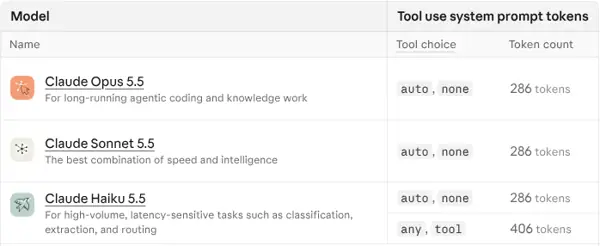
| Model | Input / output (per 1M tokens) | Tool system prompt (auto/none) |
|---|---|---|
| Claude Opus 5.5 | $4 / $20 | 286 tokens |
| Claude Sonnet 5.5 | $2 / $10 | 286 tokens |
| Claude Haiku 5.5 (prompts up to 100K) | $0.10 / $0.50 | 286 tokens (406 with any/tool) |
| Claude Fable 5.2 | $8 / $40 | Not listed |
| Web search (server tool) | $10 per 1,000 searches, plus tokens | |
| Web fetch (server tool) | No extra fee, tokens only | |
| Code execution (server tool) | 1,550 free hours per org per month, then $0.05 per hour per container; free when used with the 20260209 web search or fetch tools | |
Worked example: one weather question on Opus 5.5
Assume 3 tools at about 250 tokens each, a 50-token question and one tool round trip. These are example sizes, so measure your own with client.messages.count_tokens().
- Request 1 input: 286 + 750 + 50 = about 1,086 tokens. Output (the
tool_use) about 80. - Request 2 input: 1,086 + 80 + a 150-token
tool_result= about 1,316. Output (the answer) about 120. - Totals: 2,402 input x $4/1M = $0.0096, plus 200 output x $20/1M = $0.0040.
- Result: about $0.014 per question, or roughly $14 per 1,000 questions.
The same flow on Haiku 5.5 is about $0.00034, or roughly $0.34 per 1,000. Opus 5.5 always thinks, and thinking bills as output, so real output is often higher. Full rate cards are in my Claude API pricing guide.
Tip: your tool list sits at the start of every request, so it caches well. Put a cache_control breakpoint after the tools and keep the list in a fixed order to pay cache-read rates ($0.20/1M on Opus 5.5) instead of full input. Short prefixes below the model’s minimum cacheable length will not cache.
Limits to Know
| Item | Limit or rule |
|---|---|
| Tool name | ^[a-zA-Z0-9_-]{1,128}$ |
Forced tool_choice |
400 on Opus 5.5, Sonnet 5.5, Fable 5.2/5.1, Mythos 5.2/5.1 |
| Forced choice + manual extended thinking | Not supported (older models using budget_tokens) |
| Parallel calls | On by default; disable_parallel_tool_use inside tool_choice |
| Strict schema subset | No recursion, no minimum/maximum, no minLength/maxLength; additionalProperties: false |
| Strict grammar cache | Up to 24 hours since last use |
input_examples cost |
About 100 tokens each (flat) or 200 (nested) |
| Server tool loop | 10 iterations, then pause_turn |
| Tool runner | Beta; cap it with max_iterations |
| Request size | 128 MB for Messages (raised from 32 MB on 28 Oct 2026) |
Troubleshooting: Common Problems and Fixes
These are real messages and symptoms from the official docs. For rate limits and overload errors, see my Claude 429 and 529 fix guide.
| Error or symptom | Cause | Fix |
|---|---|---|
tool_use ids were found without tool_result blocks immediately after |
A tool_use has no matching result, or text comes before the results |
Return one tool_result per tool_use, first in the next user message |
tool_choice: type "tool" and "any" are not supported for this model. |
Forced choice on Opus 5.5, Sonnet 5.5 or Fable 5.2 | Use auto, name the tool in the prompt, add strict: true |
`thinking` or `redacted_thinking` blocks in the latest assistant message cannot be modified |
You edited or rebuilt the assistant turn | Append response.content unchanged |
Unsupported regex feature in pattern field: ... |
A strict tool’s pattern uses backreferences or big {n,m} ranges |
Simplify the regex |
Invalid regex in pattern field: ... |
Lookahead, lookbehind or a syntax error | Remove them and fix the syntax |
All tools have defer_loading: true |
No tool is visible with tool search | Load at least one tool up front |
stop_reason: "max_tokens" with a tool_use last |
The tool call was cut off | Do not run it; retry with a higher max_tokens |
| Claude calls tools one by one | Results sent in separate user messages | Send all results in one message |
| Claude invents parameters | No strict mode | Add strict: true and additionalProperties: false |
| Claude flags a tool result as prompt injection | Your instructions are inside the tool_result |
Keep results to data; put instructions in a user turn |
For HTTP errors, the SDK raises typed exceptions: BadRequestError (400), AuthenticationError (401), RateLimitError (429), InternalServerError (500) and OverloadedError (529). Since 4 Nov 2026 some errors also carry an error.details.error_code with its own class, such as EnforcedSpendLimitReachedError, so catch narrow classes first.
Frequently Asked Questions
Is Claude tool use the same as function calling?
Yes. Anthropic’s docs say “tool use (also called function calling)”. The idea matches OpenAI and Gemini, but the message shapes differ; compare with my Gemini function calling tutorial.
Does Claude run my Python function?
No. For client tools, Claude only returns the tool name and arguments. Your code runs the function and sends back a tool_result. Only server tools like web search run on Anthropic’s side.
Why does tool_choice any return a 400 error?
Claude Opus 5.5, Sonnet 5.5, Fable 5.2, Fable 5.1 and the Mythos 5.x models reject forced tool use. Use auto with a clear instruction and strict: true, or switch to structured outputs if you only wanted JSON.
Is the tool runner production ready?
It is in beta in the Python SDK, under client.beta.messages.tool_runner. You can use it today, but pin your SDK version and set max_iterations so a loop can never run forever.
How many tokens do tools add?
On the 5.5 models the hidden tool system prompt is 286 tokens with auto or none. Your own definitions add more, often a few hundred tokens per tool, and they are resent on every request.
Can I use tools and structured outputs together?
Yes. You can set strict: true on tools and also pass output_config with a JSON schema for the final answer in the same request.
How do I return an error from a tool?
Send a normal tool_result with "is_error": true and a clear message, such as “City not found, ask the user to check the spelling”. Claude will usually retry or ask the user, so cap retries in your loop.
Sources
- Claude Docs: Tool use with Claude (overview and pricing)
- Claude Docs: Define tools and tool_choice
- Claude Docs: Handle tool calls
- Claude Docs: Parallel tool use
- Claude Docs: Strict tool use
- Claude Docs: Tool runner (SDK)
- Claude Docs: Troubleshooting tool use
- Claude Docs: Pricing
- Claude Docs: Stop reasons
- Claude Docs: Errors
- PyPI: anthropic 2.14.0