
Gemini CLI and Codex CLI used to be the obvious free-vs-paid pair of terminal coding agents. That changed on June 18, 2026, when Google moved free and Google AI Pro/Ultra users from Gemini CLI to a new tool, Antigravity CLI (agy).
So in November 2026 this comparison has three players: Codex CLI from OpenAI, the old Gemini CLI (now for enterprise and API keys), and its consumer successor Antigravity CLI. This guide covers install, limits, plans, models, sandboxing, MCP, config files and which one to pick.
- Gemini CLI is no longer the consumer tool: since June 18, 2026, free and Google AI Pro/Ultra users must use Antigravity CLI (
agy). Gemini CLI now targets Code Assist Standard/Enterprise and API keys. - Codex CLI: open source (Apache 2.0), needs ChatGPT Plus ($20) or higher, or an API key. The Free and Go plans only get Codex in the desktop app.
- Antigravity CLI: free weekly quota with a Google account, more on AI Pro and Ultra. Gemini 4 Hydrogen is the core model on every plan.
- Models: Codex defaults to GPT-6.2 Sol (with GPT-6.2 Astra for hard tasks). Gemini CLI tops out at Gemini 3 models and is not tuned for Gemini 4.
- Config: Codex reads
AGENTS.md. Gemini CLI readsGEMINI.md. Antigravity CLI reads both. - Pick: Antigravity CLI if you want free. Codex CLI if you already pay for ChatGPT. Gemini CLI only for enterprise Code Assist or API-key scripting.
Is Gemini CLI Now Antigravity CLI?
Mostly, yes. Google announced the move on May 19, 2026, the day Antigravity CLI became available to everyone. On June 18, 2026, Gemini CLI stopped serving requests for these groups:
- Free users: people on Gemini Code Assist for individuals at no cost.
- Google AI Pro and Ultra subscribers: their CLI access now lives in Antigravity CLI.
- Code Assist for GitHub (consumer): no new installs from June 18, with existing requests stopping in the weeks after.
Gemini CLI did not disappear. The open source repo is still active, with weekly releases. Organizations with a Code Assist Standard or Enterprise license keep using it, and it still works with paid Gemini API keys.
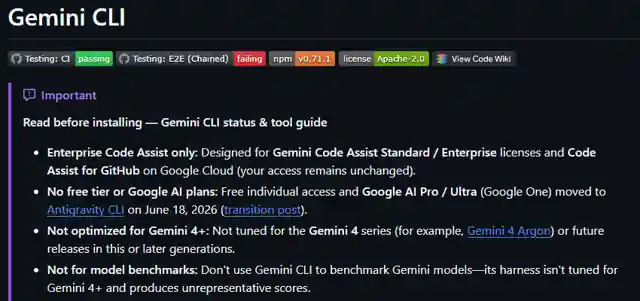
Note: The README also says Gemini CLI is not optimized for Gemini 4 models and should not be used to benchmark them. Google points Gemini 4 users to Antigravity CLI.
That is why the rest of this guide compares Codex CLI with both Google tools. If you are an individual developer, Antigravity CLI is the real rival to Codex. For the full story of the switch, see my Gemini CLI free limits and Antigravity CLI guide.
Side-by-Side Comparison Table
| Feature | Codex CLI | Gemini CLI | Antigravity CLI |
|---|---|---|---|
| Maker | OpenAI | ||
| Command | codex |
gemini |
agy |
| Who it is for now | ChatGPT Plus and higher, API keys | Code Assist Standard/Enterprise, API keys | Personal Google accounts (Free to Ultra), Google Cloud |
| Free use in the CLI | No (Free plan gets the desktop app only) | Free API key: 250 requests/day, Flash only | Yes, weekly quota |
| Paid entry | Plus $20/month | Pay per token, or Code Assist license | Google AI Pro $19.99/month |
| Default or core model | GPT-6.2 Sol | Auto (Gemini 3 Pro / Flash previews) | Gemini 4 Hydrogen |
| Open source | Yes, Apache 2.0 | Yes, Apache 2.0 | Public repo, licence not shown |
| Instructions file | AGENTS.md |
GEMINI.md |
AGENTS.md or GEMINI.md |
| Main config | ~/.codex/config.toml |
~/.gemini/settings.json |
~/.gemini/antigravity-cli/settings.json |
| Sandbox | On by default (workspace-write, no network) | Opt-in (Seatbelt, Docker, Podman and more) | Opt-in, or on in auto mode |
| MCP | STDIO and Streamable HTTP | STDIO, SSE and HTTP | STDIO and Streamable HTTP |
| Windows | Native, with Windows sandbox | Windows 11 24H2+ | Native, AppContainer sandbox on Windows 11 24H2+ |
Want a wider view of the chat apps behind these tools? My ChatGPT vs Claude vs Gemini vs Grok comparison covers the four big assistants. This post goes deeper on the two terminal agents only.
How to Install on Windows, macOS and Linux
Codex CLI install
OpenAI ships a standalone installer, plus npm and Homebrew options. The installer command also updates Codex later.
- macOS or Linux. Run
curl -fsSL https://chatgpt.com/codex/install.sh | shin your terminal. - Windows. In PowerShell, run
powershell -ExecutionPolicy ByPass -c "irm https://chatgpt.com/codex/install.ps1 | iex". Codex runs natively in PowerShell with its own Windows sandbox, or inside WSL2. - Or use a package manager.
npm install -g @openai/codexworks on all three systems. On a Mac,brew install --cask codexalso works. - Sign in. Run
codexinside a project folder and choose “Sign in with ChatGPT”, or use an OpenAI API key. - Check the model. Type
/modelto pick the model and reasoning effort, and/statusto see your remaining allowance.
More on every Codex surface (app, IDE, web) is in my OpenAI Codex guide.
Antigravity CLI install
- macOS or Linux. Run
curl -fsSL https://antigravity.google/install.sh | bash. - Windows (PowerShell). Run
irm https://antigravity.google/install.ps1 | iex. - Windows (winget). Or run
winget install Google.AntigravityCLIfrom Command Prompt. - Verify. Run
agy --version. - Sign in. Run
agy. It opens a browser for Google sign-in and saves the token in your OS keyring. Over SSH, it prints a URL and you paste the code back. - Migrate old settings. If you used Gemini CLI, the first run offers to import your settings. You can also run
agy plugin import geminilater.
Gemini CLI install
Gemini CLI needs Node.js 20 or newer. Google lists macOS 15+, Windows 11 24H2+ and Ubuntu 20.04+ as supported systems.
- Any OS with Node. Run
npm install -g @google/gemini-cli, or try it without installing vianpx @google/gemini-cli. - macOS or Linux with Homebrew. Run
brew install gemini-cli. MacPorts users can runsudo port install gemini-cli. - Start it. Run
geminiand sign in with your Code Assist account, or set aGEMINI_API_KEY.
Warning: Signing into Gemini CLI with a personal Google account or a Google AI Pro/Ultra plan no longer works. Use Antigravity CLI for those accounts.
Free Limits and Paid Plans
Codex CLI plans
Codex usage comes with ChatGPT plans. OpenAI says Codex shares one allowance and credit pool with ChatGPT Work, ChatGPT for Excel and Workspace Agents where your plan has them.
| Plan | Price | Codex CLI? | Notes |
|---|---|---|---|
| Free | $0 | No | Quick tasks with GPT-6 Luna in the desktop app only |
| Go | $8/month | No | Lightweight tasks with GPT-6 Luna in the desktop app |
| Plus | $20/month | Yes | Web, CLI, IDE and iOS. Buy credits to keep going |
| Pro | $100, $200 or $500/month | Yes | No five-hour limit right now. Ultrafast mode on $500 |
| Business | $20/user/month yearly, $25 monthly | Yes | 2+ users, Plus-like limits on Standard seats |
| API key | Pay per token | Yes | CLI, SDK and IDE only. No cloud features |
For Plus and Standard Business, OpenAI publishes these estimated messages per five hours. They are ranges, because a big task uses more than a small one, and weekly limits can also apply:
- GPT-6.2 Astra: 6 to 50 messages.
- GPT-6.2 Sol: 17 to 180 messages.
- GPT-6.1 Terra: 35 to 285 messages.
- GPT-6 Luna: 350 to 3,000 messages.
For plan-by-plan detail, see my ChatGPT and Codex usage limits guide.
Antigravity CLI plans
Antigravity plans apply to personal Google accounts. Google Workspace plans do not include them. CLI access is a baseline feature on every plan.
| Plan | US price | Quota |
|---|---|---|
| Free | $0 | A quota that refreshes weekly, plus a weekly rate limit |
| Google AI Plus | $4.99/month | Same weekly model as Free |
| Google AI Pro | $19.99/month | Higher quota, refreshed every 5 hours up to a weekly limit |
| Google AI Ultra | $100 or $200/month | Highest quota, refreshed every 5 hours. Google says 5x and 20x the Pro limits |
Google does not publish a fixed prompt count. Simple tasks give you more prompts than complex ones. Pro and Ultra users can also buy AI credits for use above the quota, controlled by the “AI Credit Overages” setting (Never or Always).
Gemini CLI limits
- Free Gemini API key: 250 requests per user per day, Flash model only (per the Gemini CLI quota docs).
- Paid API key: billed per token, limits depend on your tier.
- Code Assist Standard: 1,500 model requests per user per day.
- Code Assist Enterprise: 2,000 model requests per user per day.
- Vertex AI express mode: free for 90 days, then you need billing.
Models You Get
Codex CLI models
Codex CLI 0.171.0 (released November 20, 2026) added GPT-6.2 Sol and GPT-6.2 Astra and made Sol the default. The full Codex list on the pricing page:
- GPT-6.2 Astra: OpenAI’s strongest model. API price $8 input, $0.40 cached, $40 output per million tokens.
- GPT-6.2 Sol: the everyday default. API price $2 input, $0.10 cached, $10 output.
- Older options: GPT-6 Astra, GPT-6.1 Sol, GPT-6.1 Terra, GPT-6 Sol and the fast GPT-6 Luna.
OpenAI’s launch post says Sol scores within 0.5 points of Astra on FrontierCode 2.0 at about one fifth of the cost. That is why Sol is a sensible default for most coding.
Antigravity CLI models
- All plans: Gemini 4 Hydrogen is the core agent model.
- Free and Plus: Hydrogen, plus Gemini 3.8 Flash until November 30, 2026.
- Paid Pro: Gemini 4 Neon, Carbon, Argon and Hydrogen, plus paid third-party models.
- Ultra: full access to frontier Gemini models and partner models.
Google launched Hydrogen on November 12, 2026 with a 1 million token context window. Its API price is $1.50 input and $7.50 output per million tokens, flat across the window. Google reports 57% on Terminal-Bench 4.1, against 18.2% for Gemini 3.8 Flash.
Gemini CLI models
Gemini CLI’s /model menu offers “Auto (Gemini 3)”, which switches between gemini-3-pro-preview and gemini-3-flash-preview, and “Auto (Gemini 2.5)”. You can also set a model manually. Google’s docs say Gemini CLI has not been optimized for Gemini 4 Argon.
Tip: Benchmarks shift weekly. Check my November 2026 AI model leaderboard before you pick a model for a big refactor.
Sandboxing and Approval Modes
This is where the tools differ most. Codex sandboxes by default. Gemini CLI and Antigravity CLI make you opt in, although Antigravity’s auto mode turns the sandbox on for you.
Codex CLI: sandbox modes and approval policies
With no flags, Codex uses the Auto preset in Git folders: workspace-write plus on-request approvals. Network access is off. In folders without version control it suggests read-only.
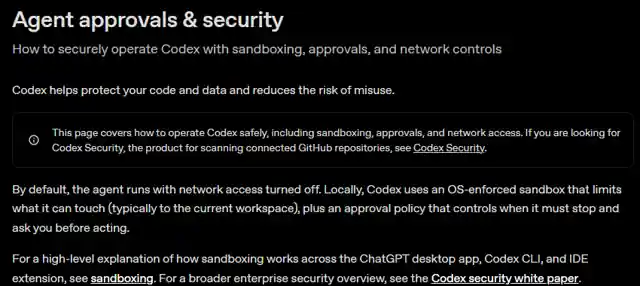
- Sandbox modes:
read-only,workspace-writeanddanger-full-access. - Approval policies:
on-requestandnever. The olduntrustedvalue is retired and can stop Codex from starting. - Auto review: set
approvals_reviewertoauto_reviewand a reviewer agent handles eligible prompts. - Full access:
--yolo(alias of the long “bypass approvals and sandbox” flag) removes both. OpenAI labels it not recommended. - How it isolates: Seatbelt on macOS, bubblewrap on Linux, and a native sandbox on Windows.
To let commands reach the internet inside the sandbox, add this to ~/.codex/config.toml:
sandbox_mode = "workspace-write"
approval_policy = "on-request"

[sandbox_workspace_write]
network_access = true
Antigravity CLI: modes and permission rules
Switch modes with --mode, the agentMode setting, or Shift+Tab:
- auto: the default for personal accounts. It approves workspace edits and runs commands in the sandbox. Only risky commands that must leave the sandbox pause.
- accept-edits: approves file edits, but shell commands still follow your rules.
- default: shows a diff before each change. Commands need review.
Rules go in ~/.gemini/antigravity-cli/settings.json under permissions as allow, ask and deny lists. Deny beats Ask, and Ask beats Allow. Example rules from Google’s docs:
{
  "permissions": {
    "allow": ["command(git)", "read_url(google.com)"],
    "deny": ["command(rm -rf)", "command(sudo)", "write_file(.git/)"]
  }
}
The sandbox uses Seatbelt on macOS, kernel namespaces on Linux, and an AppContainer on Windows (Windows 11 24H2 with the August 2026 update or later). Turn it on with enableTerminalSandbox or agy --sandbox. Sandboxed commands have no network by default, and files like ~/.ssh and .env are blocked.
Gemini CLI: approval modes and sandbox
- Approval modes:
default(prompt for each tool),auto_edit,yoloandplan(read-only), set with--approval-mode. - YOLO limit: YOLO can only be turned on from the command line, not saved as the default.
- Sandbox: off unless you pass
-s, setGEMINI_SANDBOX, or settools.sandboxin settings. - Sandbox types: macOS Seatbelt (default profile permissive-open), Docker, Podman, gVisor, LXC and a native Windows mode.
MCP Support
All three tools support the Model Context Protocol, so you can plug in GitHub, databases, docs search and more. The setup differs.
Codex CLI MCP
# local STDIO server
codex mcp add context7 -- npx -y @upstash/context7-mcp

# remote Streamable HTTP server, then OAuth login
codex mcp add example --url https://mcp.example.com
codex mcp login example
Servers are saved under [mcp_servers.NAME] in config.toml. You can limit tools with enabled_tools and disabled_tools. Run codex mcp list, or type /mcp in the TUI to see active servers.
Antigravity CLI MCP
Antigravity uses JSON files with an mcpServers map:
- Global:
~/.gemini/config/mcp_config.json. - Per project:
.agents/mcp_config.json. - Remote servers: use
serverUrl. The legacy SSE transport and thehttpUrlkey are not supported. - Manage: type
/mcpto open the MCP Manager, see status and reload.
Gemini CLI MCP
Gemini CLI keeps servers inline in ~/.gemini/settings.json under mcpServers. Each entry uses command, url or httpUrl. When you move to Antigravity, rename url/httpUrl to serverUrl, or let agy plugin import gemini do it.
Need ideas for servers? See my list of the best MCP servers.
Config Files: GEMINI.md vs AGENTS.md
Each agent reads a Markdown file of project rules at the start of a session. The names differ, but you can make one file work for all three.
| Item | Codex CLI | Gemini CLI | Antigravity CLI |
|---|---|---|---|
| Project rules | AGENTS.md (or AGENTS.override.md) |
GEMINI.md |
AGENTS.md, GEMINI.md, .agents/rules/*.md |
| Global rules | ~/.codex/AGENTS.md |
~/.gemini/GEMINI.md |
~/.gemini/AGENTS.md or GEMINI.md |
| Size limit | 32 KiB combined by default | Not stated | 24 KB per file, 20,000-token shared budget |
| Rename option | project_doc_fallback_filenames |
context.fileName |
Reads both names |
| Settings file | ~/.codex/config.toml, .codex/config.toml |
~/.gemini/settings.json, .gemini/settings.json |
~/.gemini/antigravity-cli/settings.json |
Codex walks from the Git root down to your current folder and takes at most one file per directory. Files closer to where you work come later, so they win. Antigravity combines every rule it finds instead of replacing them.
Use one rules file for all three
- Write
AGENTS.mdat the repo root. Codex and Antigravity CLI read it with no setup. - Point Gemini CLI at it. In
.gemini/settings.json, setcontext.fileNameto["AGENTS.md", "GEMINI.md"]. The setting accepts a list of names. - Or point Codex at GEMINI.md. If your repo already has
GEMINI.md, addproject_doc_fallback_filenames = ["GEMINI.md"]to~/.codex/config.tomland restart Codex. - Move skills for Antigravity. Rename
.gemini/skills/to.agents/skills/so the agent finds them.
For a full template and best practices, read my AGENTS.md guide.
How to Try Both for Free
You can test Google’s agent fully free. Codex is harder, because the CLI is not on the Free plan.
- Install Antigravity CLI. Use the install command for your OS from the section above, then run
agyand sign in with any personal Google account. You get the free weekly quota with Gemini 4 Hydrogen. - Try Codex in the desktop app. ChatGPT Free and Go include quick Codex tasks with GPT-6 Luna in the desktop app (subject to rollout). This shows you how Codex plans and edits, without the CLI.
- Use the CLI with a small API budget. Install Codex CLI and sign in with an OpenAI API key. You pay only per token, so a short trial on GPT-6.2 Sol costs little.
- Or try Gemini CLI on a free key. A free Gemini API key gives 250 Flash requests a day in Gemini CLI. It is fine for scripting tests, but it does not show Google’s newest models.
- Run the same task in both. Give each agent one real bug from your repo, with the same
AGENTS.md, and compare the diffs.
Which One Should You Pick?
| Use case | Best pick | Why |
|---|---|---|
| Coding on a budget | Antigravity CLI | Free weekly quota with Gemini 4 Hydrogen |
| Coding, already on ChatGPT Plus | Codex CLI | Included in your $20 plan, GPT-6.2 Sol by default |
| Hardest tasks | Codex CLI (Astra) or Antigravity on Pro/Ultra | Frontier models on both sides; compare on your repo |
| Writing docs and READMEs | Either | Both edit Markdown well; pick the one you already pay for |
| Research and web lookups | Codex CLI | Built-in web search (cached by default, live under full access) |
| Images | Neither | These are coding agents; use the Gemini or ChatGPT apps for images |
| Voice | Antigravity CLI | Its changelog lists a voice feature for Google sign-ins; it is not a Codex CLI focus |
| Strict safety by default | Codex CLI | Sandbox and network-off are on out of the box |
| Enterprise with Code Assist | Gemini CLI | Your licence keeps working unchanged |
| Fully open source | Codex CLI or Gemini CLI | Both are Apache 2.0 |
If you also want to weigh Anthropic’s agent, see Claude Code vs Gemini CLI and Codex vs Claude Code.
Troubleshooting: Common Problems and Fixes
- Gemini CLI says your account is not supported: personal and Google AI Pro/Ultra logins stopped on June 18, 2026. Install Antigravity CLI and run
agy plugin import gemini. - Codex will not start after an update: check
config.tomlforapproval_policy = "untrusted". Replace it withsandbox_mode = "read-only"andapproval_policy = "on-request". - Codex starts in read-only: the folder is not trusted yet. Accept the onboarding prompt or change it with
/permissions. - npm install or curl fails inside Codex: network is off in
workspace-write. Enablenetwork_accessas shown above, or approve the request. - Antigravity sandbox does nothing: Windows 10, older Windows 11 builds and Linux hosts that block unprivileged user namespaces cannot run it. Auto mode is not offered there.
- agy ignores GEMINI_API_KEY: the variable alone has no effect. Also set
"modelProvider": "gemini"in the settings file. - Remote MCP server fails in Antigravity: rename
urlorhttpUrltoserverUrl. Legacy SSE servers are not supported. - Skills vanished after migrating: move
.gemini/skills/to.agents/skills/. - Codex hit a usage limit: run
/statusto see which allowance ran out and when it resets, or buy credits on Plus and Pro.
Still stuck with Codex? My Codex not working fix guide covers sign-in and update errors.
Frequently Asked Questions
Is Gemini CLI still free?
Not with a personal Google login. Since June 18, 2026, free users must use Antigravity CLI. Gemini CLI’s quota docs still list a free Gemini API key at 250 Flash requests per day.
Is Gemini CLI the same as Antigravity CLI?
No. They are separate tools with different commands (gemini and agy). Antigravity CLI replaced Gemini CLI for consumer accounts, and it can import Gemini CLI settings, extensions and MCP servers.
Can I use Codex CLI for free?
Not on the ChatGPT Free plan, which only offers Codex in the desktop app. The CLI needs Plus ($20/month) or higher, or an OpenAI API key billed per token.
Which is safer, Codex CLI or Antigravity CLI?
Codex CLI has the safer defaults, with a workspace sandbox and no network out of the box. Antigravity CLI also blocks network and sensitive files once its sandbox is on, and auto mode enables it for personal accounts.
Do Codex CLI and Gemini CLI both read AGENTS.md?
Codex reads AGENTS.md by default. Gemini CLI reads GEMINI.md unless you set context.fileName to include AGENTS.md. Antigravity CLI reads both names.
Does Gemini CLI support Gemini 4?
Google says Gemini CLI is not optimized for the Gemini 4 series and should not be used to benchmark it. Use Antigravity CLI for Gemini 4 Hydrogen, Neon, Carbon and Argon.
Which models does Codex CLI use by default?
Since version 0.171.0 (November 20, 2026), the default is GPT-6.2 Sol. You can switch to GPT-6.2 Astra or older models with /model.
Sources
- Google Developers Blog: Transitioning Gemini CLI to Antigravity CLI
- Gemini CLI on GitHub
- Gemini CLI installation docs
- Gemini CLI quotas and pricing
- Gemini CLI configuration reference
- Gemini CLI sandboxing
- Antigravity plans
- Antigravity agent permissions
- Antigravity terminal sandbox
- Antigravity MCP docs
- Antigravity: migrating from Gemini CLI
- Flutter docs: Antigravity CLI install
- Google: Google AI subscriptions after I/O 2026
- Google: Introducing Gemini 4 Hydrogen
- Codex CLI on GitHub
- OpenAI Codex pricing
- Codex agent approvals and security
- Codex sandboxing
- Codex MCP docs
- Codex: custom instructions with AGENTS.md
- OpenAI: Introducing GPT-6.2 Astra and Sol
- OpenAI Help: Codex usage limits