
A looped video that never jumps is one of the most useful things you can make with MiniMax H3. Think of rain on a window, a misty lake, steam from a mug or blinking LED lights, playing forever as a website header, a stream background or a wallpaper.
The catch is that raw H3 loops are rarely truly still. The camera creeps, the light breathes, and the join from the last frame to the first gives itself away.
This guide shows the workflow I built and tested on my RTX 5080: a proper seamless loop from the ComfyUI-MiniMaxH3-Loop nodes, plus a still lock that freezes everything except the parts you choose to move.
- Loop nodes: pxl-pshr/ComfyUI-MiniMaxH3-Loop v1.1.0 (10 Nov 2026) wraps the end of the video around to its start while sampling, so the seam is generated, not faked with a crossfade.
- Still lock (my addition): paint a mask of what may move (rain, water, sky, steam, LEDs). Core ComfyUI nodes paste frame 0 over everything else, so the room, trees and mountains never move.
- My tests: flicker in the frozen area fell from 0.27 to 0.003 (rain scene) and from 5.0 to 0.02 (lake). Camera drift on the lake fell from 7.2 to 0.05.
- Speed: about 13 minutes per 6.4-second loop on a 16 GB RTX 5080, 8 steps with the Turbo v1.1 LoRA.
- Prompt rule: describe a state that keeps going: “Locked-off static camera, no pan, no zoom”, constant light, and no “then”, “begins” or “slowly brightens”.
This post is part of our MiniMax H3 ComfyUI guide, which links every H3 workflow, file and fix in one place.
See the Results First
Both clips below play on repeat. Watch the edges: the room, the window frame, the trees and the mountains never move. Only the rain, steam, LEDs, water, mist and clouds do.
The seed images and motion masks
Both seed stills came from Qwen Image 2.1 at 1344×768 (seed 4242). The red overlay shows the only areas allowed to move.
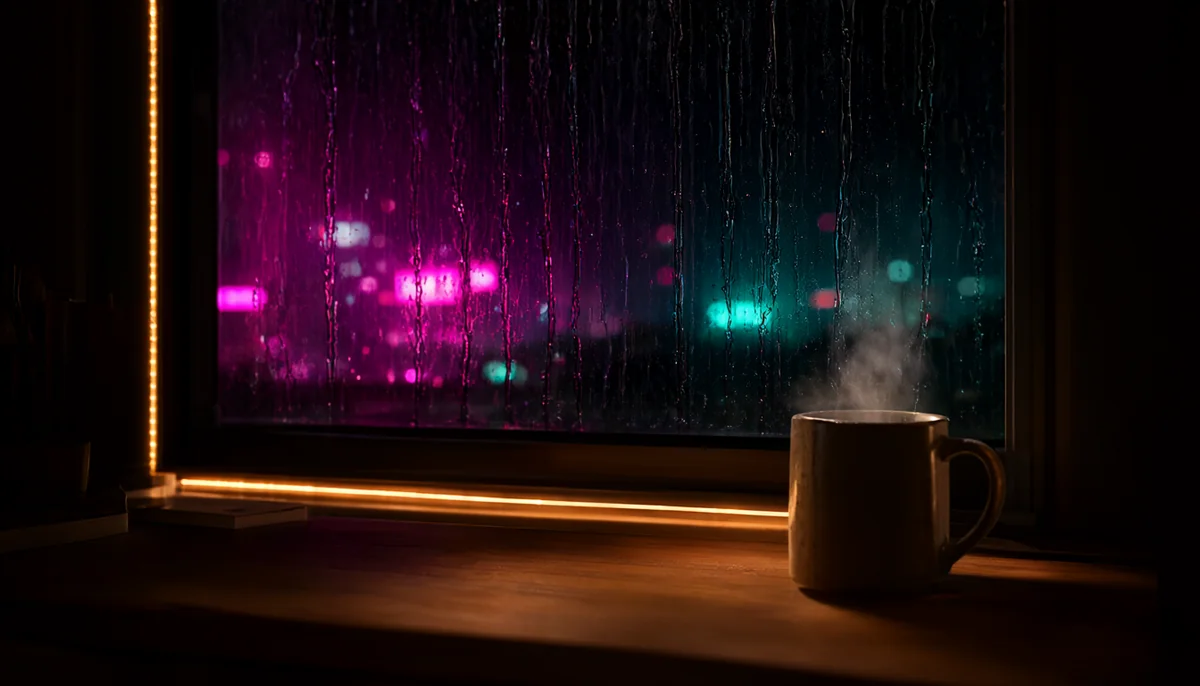
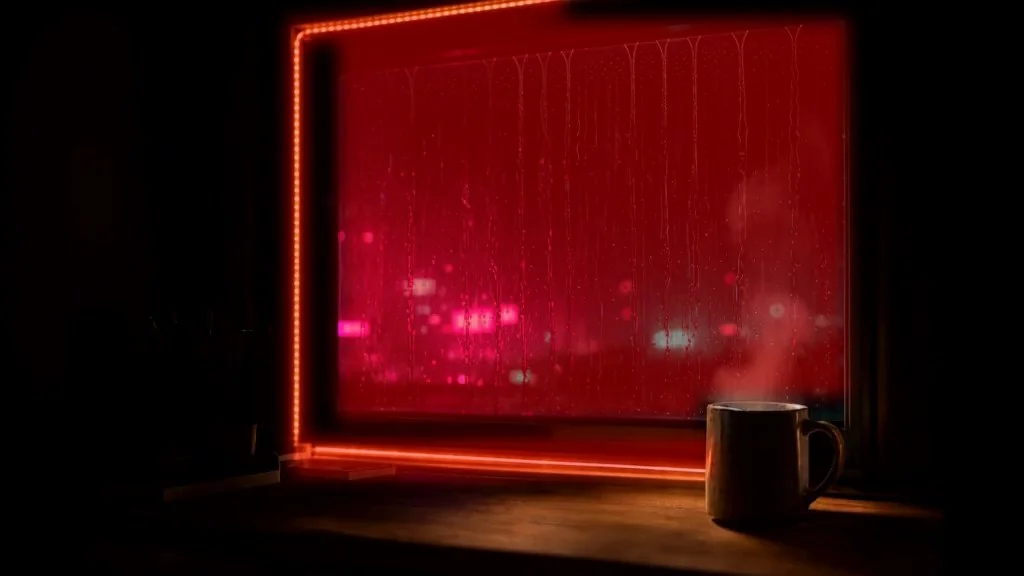


The finished loops
And here is what the still lock changes. Left is straight out of the loop nodes; right is the locked version. Watch the window frame and the mug.
Why Normal H3 Clips Don’t Loop
MiniMax H3 makes video plus stereo audio in one pass. A normal clip has a beginning and an end, and nothing tells the model the end must match the start.
The obvious trick, putting the same image in as both first and last frame, doesn’t work well. Those frames are guidance, not pixels:
- The ends don’t match. The model paints its own version of each end, so the jump at the seam can be as big as the motion itself.
- Motion dies. Telling the model to finish where it started often makes it barely move.
- Exposure drifts. The loop pack’s author also found that first/last anchors can cause a jump and a slow brightness drift at the loop point.
So we need two things: a sampler that treats the video as a circle, and a way to keep everything you don’t want moving perfectly still.
How the Loop Nodes Work
The ComfyUI-MiniMaxH3-Loop pack (GPL-3.0) adds four nodes:
| Node | What it does |
|---|---|
| MiniMax H3 Loop | Patches the model so every sampling step sees the end of the video wrapped onto its start (circular padding). The join is denoised like any other part of the clip. |
| MiniMax H3 Loop Decode | Decodes with wrapped context on both sides and returns exactly one loop of frames and audio. |
| Loop Interpolate | FILM or RIFE frame interpolation across the whole loop, including the last-to-first frames. Needs ComfyUI-Frame-Interpolation. |
| MiniMax H3 Loop Control Video | Fits an existing seamless loop (for example a depth pass) as the control video for the H3 Fun ControlNet. |
H3 works in 17-frame chunks. The pad_clips setting adds one or more wrapped chunks on each side while sampling, and the model keeps only the middle.
The views setting matters for sound. With 2 views (the default), it also samples a half-rotated copy and takes the audio near the seam from it. With 1 view, the audio at the seam gets loud and garbled.
Version 1.1.0 added rotate, which moves the wrap point every step when using 1 view and, in the author’s tests, cut seam jumps from a median 4.3x to 1.5x a normal frame change.
Files, Folders and VRAM
The loop pack’s workflows use the Reference-to-Video (Ref2VA) model. These are the files I used. All of them are on Comfy-Org/MiniMax-H3 unless noted.
| File | What it is | Folder |
|---|---|---|
minimax_h3_ref2va_pruned_int8_convrot.safetensors |
Ref2VA diffusion model, pruned int8 | ComfyUI/models/diffusion_models/ |
minimax_h3_ref2v_turbo_8step_v1.1_768p_comfyui_bf16.safetensors |
Turbo LoRA v1.1, 8 steps (from lightx2v/Minimax-h3-Turbo) | ComfyUI/models/loras/ |
qwen3vl_32b_minimax_h3_nvfp4_awq.safetensors |
Official text encoder, 14.6 GB | ComfyUI/models/text_encoders/ |
minimax_h3_video_vae_fp16.safetensors |
Video VAE | ComfyUI/models/vae/ |
minimax_h3_audio_vae_fp32.safetensors |
Audio VAE, 577 MB | ComfyUI/models/vae/ |
fasth3_omniref_8step_pruned_int8_convrot.safetensors (optional) |
FastH3-Omni, 8 steps without a LoRA (from FastVideo/FastH3-Omni-Comfy) | ComfyUI/models/diffusion_models/ |
On 16 GB you can swap the 32B encoder for the 4B INT4 encoder plus ClipProj, as in our H3 out of memory fixes. My PC has 128 GB of RAM, which helps a lot, because H3 streams weights from RAM when they don’t fit in VRAM.
Version check: the loop pack needs ComfyUI 0.42.0 or newer. FastH3-Omni fails with a tensor size mismatch on older builds. See how to update ComfyUI.
Install the Node Packs
- Open a terminal in
ComfyUI/custom_nodes/. - Clone the loop pack:
git clone https://github.com/pxl-pshr/ComfyUI-MiniMaxH3-Loop. It has no extra requirements. It is also listed in ComfyUI-Manager as “ComfyUI-MiniMaxH3-Loop”. - Install ComfyUI-Frame-Interpolation if you don’t have it (Manager, or
git clone https://github.com/Fannovel16/ComfyUI-Frame-Interpolation, then run its install script). Loop Interpolate needs it, and FILM/RIFE weights download on first use. - Restart ComfyUI and refresh the browser. The example workflows appear in the template browser under the pack’s name.
- Download the model files above, or let ComfyUI offer the downloads when you open a template.
The still lock uses only core ComfyUI nodes, so it needs nothing extra.
Build the Loop Workflow
Start from the pack’s MiniMax-H3-Loop-Turbo-v2.json, or load my workflow at the end of the next section, which already includes the still lock.
- Load the model. UNETLoader with the Ref2VA int8 file, then LoraLoaderModelOnly with the Turbo v1.1 LoRA at strength 1.0.
- Add MiniMax H3 Loop after the LoRA:
pad_clips1,views2,rotateon. - Load your image. Connect Load Image to MiniMax H3 Reference to Video along with the CLIP loader, both VAEs and your prompt. In the prompt, call the image
<Picture 1>. - Set size and length. Width and height in multiples of 32 (1344×768 is H3’s native 16:9; drop to 1024×576 or 864×480 on 16 GB). Length 158 gives a 6.4-second loop.
- Sample. RandomNoise (fixed seed), KSamplerSelect
res_multistep, BasicSchedulersimplewith 8 steps, BasicGuider, SamplerCustomAdvanced. - Decode with MiniMax H3 Loop Decode (same
pad_clipsas the Loop node). It outputs IMAGE frames and AUDIO. - Smooth with Loop Interpolate (FILM, x2). It also outputs the new fps (48).
- Save. Create Video with the fps from Loop Interpolate and the audio from Loop Decode, then Save Video.
Don’t just raise the fps. H3 always renders at 24 fps. Typing 48 into Create Video without interpolation only plays the clip twice as fast.
Add the Still Lock
This is my custom part, and it is what makes the loop look like a real cinemagraph. The idea: decide which pixels may move, then copy every other pixel from one frame for the whole clip.
Step 1: make the motion mask
- Run the loop once with the still-lock group bypassed (select it and press Ctrl+B), and save frame 0 with ImageFromBatch (index 0, length 1) into Save Image.
- Open frame 0 in any image editor (GIMP, Photoshop, Krita, even Paint) at the same size as the video.
- Paint white over everything that may move and black over the rest: the window glass, the steam above the mug and the LED strip in my rain scene; the water and the sky band in the lake scene.
- Feather the edge 15 to 25 px (Gaussian blur on the mask), so steam and ripples don’t hit a hard wall. Save it as PNG into
ComfyUI/input/.
Paint on frame 0, not your seed image. The Ref2VA model redraws the scene from your reference. In my rain test it framed the shot wider and moved the window, so a mask drawn on the seed didn’t line up.
Prefer to stay in ComfyUI? Load frame 0 in Load Image, right-click, Open in MaskEditor, paint the moving areas, and use the node’s MASK output directly (skip ImageToMask below). Paint a little wider, because the editor’s edge is hard.
Step 2: wire the lock (core nodes only)
Put these between Loop Decode and Loop Interpolate:
| Node | Settings | Connect |
|---|---|---|
| ImageFromBatch | batch_index 0, length 1 | Loop Decode IMAGE in; its output is the “plate” |
| Load Image | your mask PNG | IMAGE output to ImageToMask |
| ImageToMask | channel red | white areas become 1 (may move) |
| InvertMask | none | now 1 = frozen area |
| ImageCompositeMasked | x 0, y 0, resize_source false | destination = Loop Decode frames, source = plate, mask = InvertMask |
ImageCompositeMasked repeats the single plate frame across the whole batch, so every frame gets the same frozen background. Connect its output to Loop Interpolate, then queue again with the same seed so the frames match the mask.
Step 3 (optional): lock the exposure
The lake clip had one more problem: the moving water and sky slowly brightened and dimmed by about 1.6% over the loop. The still lock can’t fix that, because those pixels are meant to move.
I fixed it with a short Python (numpy) step after the still lock and FILM:
- Measure frame 0. Take the average red, green and blue of frame 0 inside the motion mask.
- Match every frame. For each frame, multiply each colour channel by frame 0’s average divided by that frame’s average, inside the mask.
- Blend through the soft mask, so the frozen pixels are untouched, then encode with ffmpeg (libx264, CRF 12, 48 fps).
That cut the lake’s brightness range from 4.05 to 0.41 luma (about plus or minus 1.6% down to 0.1%) without changing the seam. Most indoor scenes, like the rain window, didn’t need it.
The workflow and screenshots
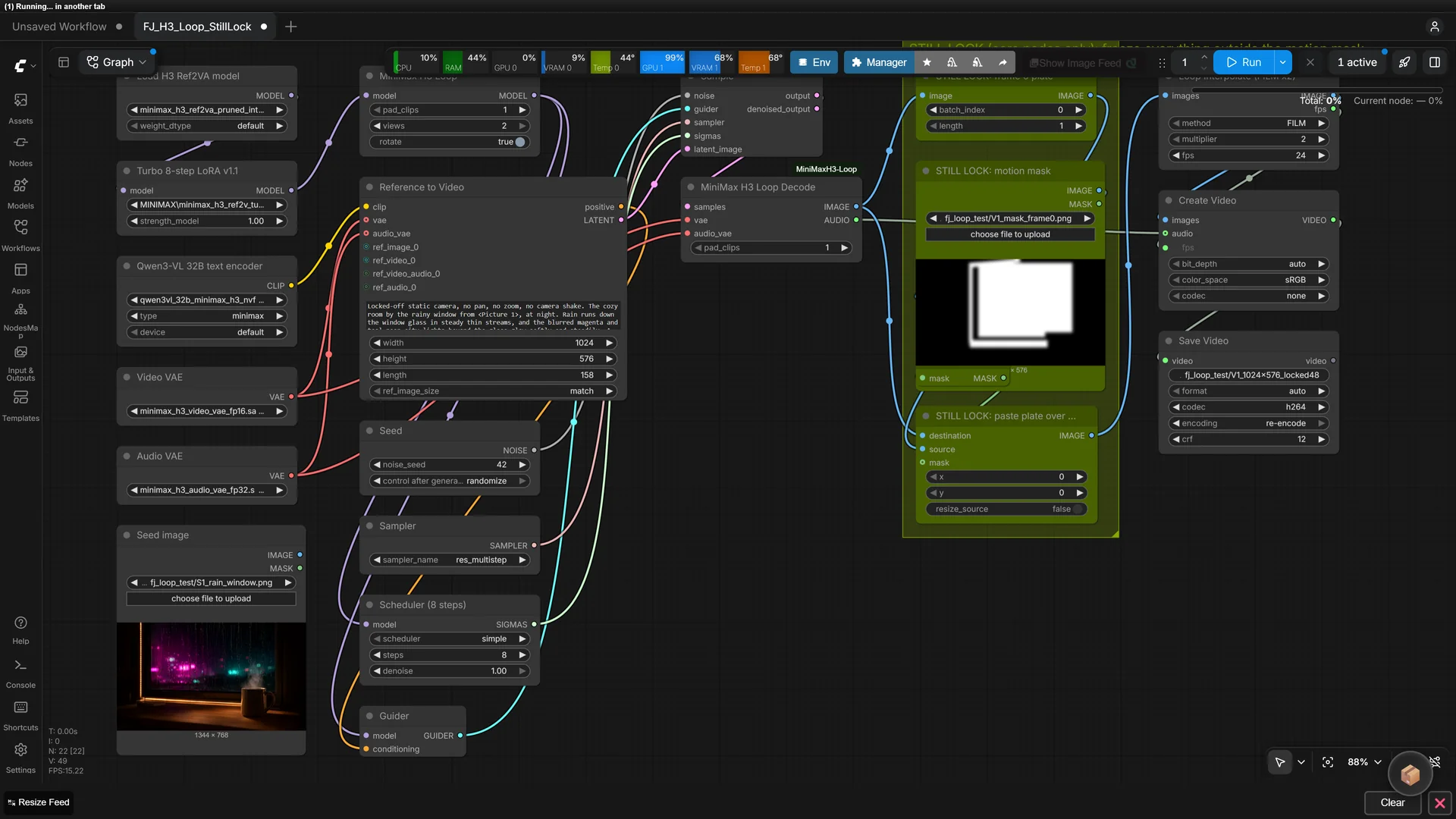
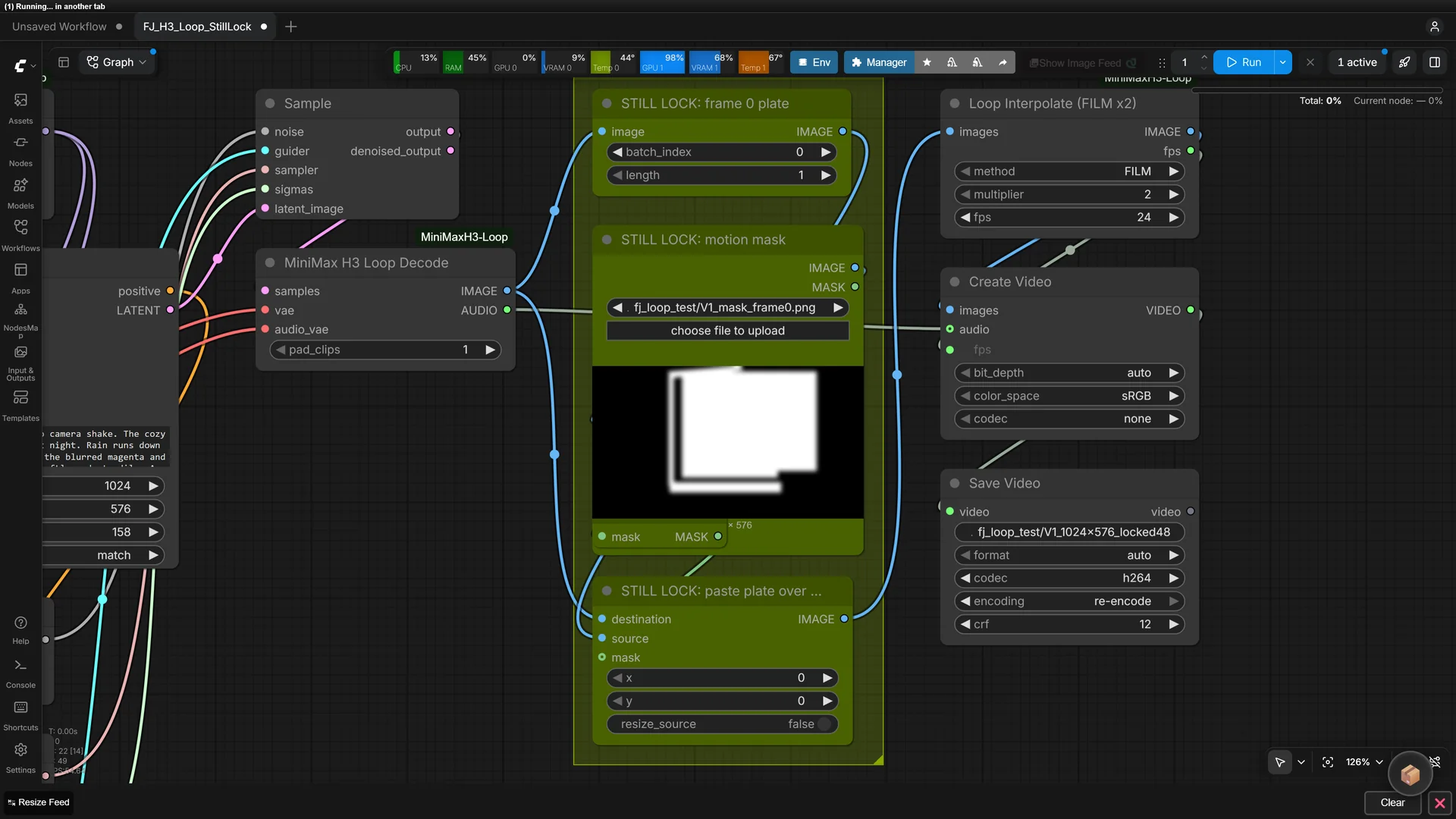
Download my workflow below and drag it onto the canvas. It is the loop pack’s Turbo v2 graph with the still-lock group added, my rain prompt, and the 1024×576 settings I used on 16 GB.
Show the workflow JSON
{"last_node_id":35,"last_link_id":30,"nodes":[{"id":1,"type":"UNETLoader","pos":[500,0],"size":[420,90],"flags":{},"order":0,"mode":0,"inputs":[],"outputs":[{"name":"MODEL","type":"MODEL","links":[1]}],"properties":{"Node name for S&R":"UNETLoader","models":[{"name":"minimax_h3_ref2va_pruned_int8_convrot.safetensors","url":"https://huggingface.co/Comfy-Org/MiniMax-H3/resolve/main/diffusion_models/minimax_h3_ref2va_pruned_int8_convrot.safetensors","directory":"diffusion_models"}]},"widgets_values":["minimax_h3_ref2va_pruned_int8_convrot.safetensors","default"]},{"id":2,"type":"LoraLoaderModelOnly","pos":[500,136],"size":[420,90],"flags":{},"order":1,"mode":0,"inputs":[{"name":"model","type":"MODEL","link":1}],"outputs":[{"name":"MODEL","type":"MODEL","links":[2]}],"properties":{"Node name for S&R":"LoraLoaderModelOnly","models":[{"name":"minimax_h3_ref2v_turbo_8step_v1.1_768p_comfyui_bf16.safetensors","url":"https://huggingface.co/lightx2v/Minimax-h3-Turbo/resolve/main/minimax_h3_ref2v_turbo_8step_v1.1_768p_comfyui_bf16.safetensors","directory":"loras"}]},"widgets_values":["minimax_h3_ref2v_turbo_8step_v1.1_768p_comfyui_bf16.safetensors",1.0]},{"id":3,"type":"MiniMaxH3Loop","pos":[500,272],"size":[420,90],"flags":{},"order":2,"mode":0,"inputs":[{"name":"model","type":"MODEL","link":2}],"outputs":[{"name":"MODEL","type":"MODEL","links":[3,4]}],"properties":{"Node name for S&R":"MiniMaxH3Loop"},"widgets_values":[1,2,true]},{"id":4,"type":"CLIPLoader","pos":[500,408],"size":[420,110],"flags":{},"order":3,"mode":0,"inputs":[],"outputs":[{"name":"CLIP","type":"CLIP","links":[5]}],"properties":{"Node name for S&R":"CLIPLoader","models":[{"name":"qwen3vl_32b_minimax_h3_nvfp4_awq.safetensors","url":"https://huggingface.co/Comfy-Org/MiniMax-H3/resolve/main/text_encoders/qwen3vl_32b_minimax_h3_nvfp4_awq.safetensors","directory":"text_encoders"}]},"widgets_values":["qwen3vl_32b_minimax_h3_nvfp4_awq.safetensors","minimax","default"]},{"id":5,"type":"VAELoader","pos":[500,564],"size":[420,60],"flags":{},"order":4,"mode":0,"inputs":[],"outputs":[{"name":"VAE","type":"VAE","links":[6,17]}],"properties":{"Node name for S&R":"VAELoader","models":[{"name":"minimax_h3_video_vae_fp16.safetensors","url":"https://huggingface.co/Comfy-Org/MiniMax-H3/resolve/main/vae/minimax_h3_video_vae_fp16.safetensors","directory":"vae"}]},"widgets_values":["minimax_h3_video_vae_fp16.safetensors"],"title":"Video VAE"},{"id":6,"type":"VAELoader","pos":[500,670],"size":[420,60],"flags":{},"order":5,"mode":0,"inputs":[],"outputs":[{"name":"VAE","type":"VAE","links":[7,18]}],"properties":{"Node name for S&R":"VAELoader","models":[{"name":"minimax_h3_audio_vae_fp32.safetensors","url":"https://huggingface.co/Comfy-Org/MiniMax-H3/resolve/main/vae/minimax_h3_audio_vae_fp32.safetensors","directory":"vae"}]},"widgets_values":["minimax_h3_audio_vae_fp32.safetensors"],"title":"Audio VAE"},{"id":7,"type":"LoadImage","pos":[500,776],"size":[420,330],"flags":{},"order":6,"mode":0,"inputs":[],"outputs":[{"name":"IMAGE","type":"IMAGE","links":[8]},{"name":"MASK","type":"MASK","links":[]}],"properties":{"Node name for S&R":"LoadImage"},"widgets_values":["S1_rain_window.png","image"],"title":"Seed image (<Picture 1>)"},{"id":8,"type":"PrimitiveStringMultiline","pos":[960,0],"size":[460,300],"flags":{},"order":7,"mode":0,"inputs":[],"outputs":[{"name":"STRING","type":"STRING","links":[9]}],"properties":{"Node name for S&R":"PrimitiveStringMultiline"},"widgets_values":["Locked-off static camera, no pan, no zoom, no camera shake. The cozy room by the rainy window from <Picture 1>, at night. Rain runs down the window glass in steady thin streams, and the blurred magenta and teal neon city lights beyond the glass glow softly and steadily. A thin wisp of steam rises gently and continuously from the mug on the desk. The warm LED strip along the window frame glows at a constant, even brightness. The room, furniture and light stay exactly the same; lighting and exposure are constant, nothing switches on or off. Continuous, smooth, unbroken motion throughout.\n\noverall_soundscape: steady rain pattering on glass, soft distant city hum, quiet room tone.\n\nnon_diegetic_music: N/A"],"title":"Prompt"},{"id":9,"type":"MiniMaxH3ReferenceToVideo","pos":[960,346],"size":[460,350],"flags":{},"order":8,"mode":0,"inputs":[{"name":"clip","type":"CLIP","link":5},{"name":"vae","type":"VAE","link":6,"shape":7},{"name":"audio_vae","type":"VAE","link":7,"shape":7},{"name":"ref_images.ref_image_0","type":"IMAGE","link":8,"shape":7,"label":"ref_image_0"},{"name":"prompt","type":"STRING","link":9,"widget":{"name":"prompt"}}],"outputs":[{"name":"positive","type":"CONDITIONING","links":[10]},{"name":"LATENT","type":"LATENT","links":[11]}],"properties":{"Node name for S&R":"MiniMaxH3ReferenceToVideo"},"widgets_values":["",1024,576,158,"match"]},{"id":10,"type":"RandomNoise","pos":[1460,0],"size":[320,90],"flags":{},"order":9,"mode":0,"inputs":[],"outputs":[{"name":"NOISE","type":"NOISE","links":[12]}],"properties":{"Node name for S&R":"RandomNoise"},"widgets_values":[42,"fixed"]},{"id":11,"type":"KSamplerSelect","pos":[1460,136],"size":[320,60],"flags":{},"order":10,"mode":0,"inputs":[],"outputs":[{"name":"SAMPLER","type":"SAMPLER","links":[14]}],"properties":{"Node name for S&R":"KSamplerSelect"},"widgets_values":["res_multistep"]},{"id":12,"type":"BasicScheduler","pos":[1460,242],"size":[320,110],"flags":{},"order":11,"mode":0,"inputs":[{"name":"model","type":"MODEL","link":3}],"outputs":[{"name":"SIGMAS","type":"SIGMAS","links":[15]}],"properties":{"Node name for S&R":"BasicScheduler"},"widgets_values":["simple",8,1.0]},{"id":13,"type":"BasicGuider","pos":[1460,398],"size":[320,50],"flags":{},"order":12,"mode":0,"inputs":[{"name":"model","type":"MODEL","link":4},{"name":"conditioning","type":"CONDITIONING","link":10}],"outputs":[{"name":"GUIDER","type":"GUIDER","links":[13]}],"properties":{"Node name for S&R":"BasicGuider"}},{"id":14,"type":"SamplerCustomAdvanced","pos":[1460,494],"size":[320,110],"flags":{},"order":13,"mode":0,"inputs":[{"name":"noise","type":"NOISE","link":12},{"name":"guider","type":"GUIDER","link":13},{"name":"sampler","type":"SAMPLER","link":14},{"name":"sigmas","type":"SIGMAS","link":15},{"name":"latent_image","type":"LATENT","link":11}],"outputs":[{"name":"output","type":"LATENT","links":[16]},{"name":"denoised_output","type":"LATENT","links":[]}],"properties":{"Node name for S&R":"SamplerCustomAdvanced"}},{"id":15,"type":"MiniMaxH3LoopDecode","pos":[1820,0],"size":[300,120],"flags":{},"order":14,"mode":0,"inputs":[{"name":"samples","type":"LATENT","link":16},{"name":"vae","type":"VAE","link":17},{"name":"audio_vae","type":"VAE","link":18}],"outputs":[{"name":"IMAGE","type":"IMAGE","links":[24,25]},{"name":"AUDIO","type":"AUDIO","links":[22]}],"properties":{"Node name for S&R":"MiniMaxH3LoopDecode"},"widgets_values":[1]},{"id":20,"type":"CreateVideo","pos":[2860,380],"size":[300,150],"flags":{},"order":16,"mode":0,"inputs":[{"name":"images","type":"IMAGE","link":20},{"name":"audio","type":"AUDIO","link":22,"shape":7},{"name":"fps","type":"FLOAT","link":21,"widget":{"name":"fps"}}],"outputs":[{"name":"VIDEO","type":"VIDEO","links":[23]}],"properties":{"Node name for S&R":"CreateVideo"},"widgets_values":[48,"auto","sRGB","none"]},{"id":21,"type":"SaveVideo","pos":[3200,200],"size":[800,600],"flags":{},"order":17,"mode":0,"inputs":[{"name":"video","type":"VIDEO","link":23}],"outputs":[{"name":"video","type":"VIDEO","links":[]}],"properties":{"Node name for S&R":"SaveVideo"},"widgets_values":["video/FJ_H3_Loop_StillLock","auto","auto"]},{"id":22,"type":"MarkdownNote","pos":[0,0],"size":[460,790],"flags":{},"order":18,"mode":0,"inputs":[],"outputs":[],"properties":{"Node name for S&R":"MarkdownNote"},"widgets_values":["## MiniMax H3 Loop (turbo v2) + still lock\n\nBased on pxl-pshr/ComfyUI-MiniMaxH3-Loop example MiniMax-H3-Loop-Turbo-v2.json (GPL-3.0).\n\nLength must be 17k+5 (107, 158, 209, 260, 311). Start the prompt with 'Locked-off static camera, no pan, no zoom.' Keep light steady. Prompting guide: PROMPTING.md in the pack.\n\nModels: diffusion_models/minimax_h3_ref2va_pruned_int8_convrot.safetensors, loras/minimax_h3_ref2v_turbo_8step_v1.1_768p_comfyui_bf16.safetensors, text_encoders/qwen3vl_32b_minimax_h3_nvfp4_awq.safetensors, vae/minimax_h3_video_vae_fp16.safetensors, vae/minimax_h3_audio_vae_fp32.safetensors"],"title":"Note: MiniMax H3 Loop"},{"id":23,"type":"LoopInterpolate","pos":[2860,200],"size":[300,130],"flags":{},"order":15,"mode":0,"inputs":[{"name":"images","type":"IMAGE","link":30}],"outputs":[{"name":"IMAGE","type":"IMAGE","links":[20]},{"name":"fps","type":"FLOAT","links":[21]}],"properties":{"Node name for S&R":"LoopInterpolate"},"widgets_values":["FILM",2,24.0]},{"id":30,"type":"ImageFromBatch","pos":[2160,200],"size":[300,90],"flags":{},"order":20,"mode":0,"title":"STILL LOCK: frame 0 plate","inputs":[{"name":"image","type":"IMAGE","link":24}],"outputs":[{"name":"IMAGE","type":"IMAGE","links":[26]}],"properties":{"Node name for S&R":"ImageFromBatch"},"widgets_values":[0,1]},{"id":31,"type":"LoadImage","pos":[2160,330],"size":[320,330],"flags":{},"order":21,"mode":0,"title":"STILL LOCK: motion mask (white = moves)","inputs":[],"outputs":[{"name":"IMAGE","type":"IMAGE","links":[27]},{"name":"MASK","type":"MASK","links":[]}],"properties":{"Node name for S&R":"LoadImage"},"widgets_values":["V1_mask_frame0.png","image"]},{"id":32,"type":"ImageToMask","pos":[2520,330],"size":[260,60],"flags":{},"order":22,"mode":0,"inputs":[{"name":"image","type":"IMAGE","link":27}],"outputs":[{"name":"MASK","type":"MASK","links":[28]}],"properties":{"Node name for S&R":"ImageToMask"},"widgets_values":["red"]},{"id":33,"type":"InvertMask","pos":[2520,430],"size":[260,30],"flags":{},"order":23,"mode":0,"title":"1 = frozen area","inputs":[{"name":"mask","type":"MASK","link":28}],"outputs":[{"name":"MASK","type":"MASK","links":[29]}],"properties":{"Node name for S&R":"InvertMask"},"widgets_values":[]},{"id":34,"type":"ImageCompositeMasked","pos":[2520,520],"size":[300,150],"flags":{},"order":24,"mode":0,"title":"STILL LOCK: paste plate over frozen area","inputs":[{"name":"destination","type":"IMAGE","link":25},{"name":"source","type":"IMAGE","link":26},{"name":"mask","type":"MASK","link":29}],"outputs":[{"name":"IMAGE","type":"IMAGE","links":[30]}],"properties":{"Node name for S&R":"ImageCompositeMasked"},"widgets_values":[0,0,false]},{"id":35,"type":"MarkdownNote","pos":[2160,700],"size":[620,300],"flags":{},"order":25,"mode":0,"inputs":[],"outputs":[],"properties":{},"widgets_values":["## Still lock (freakyjolly.com)\n\nFreezes everything outside the motion mask so the camera, room and light never move.\n\n1. Run once with this group bypassed (Ctrl+B) and save frame 0.\n2. Make a mask PNG at the video size: **white = may move** (rain, water, sky, steam, LEDs), black = frozen. Feather the edge 15-25 px.\n3. Load it here, un-bypass the group and queue again with the **same seed**.\n\nRef2VA can reframe your seed image, so draw the mask on frame 0, not on the seed.\n\nGuide: https://freakyjolly.com/minimax-h3-seamless-loop-video-comfyui/"]}],"links":[[1,1,0,2,0,"MODEL"],[2,2,0,3,0,"MODEL"],[3,3,0,12,0,"MODEL"],[4,3,0,13,0,"MODEL"],[5,4,0,9,0,"CLIP"],[6,5,0,9,1,"VAE"],[7,6,0,9,2,"VAE"],[8,7,0,9,3,"IMAGE"],[9,8,0,9,4,"STRING"],[10,9,0,13,1,"CONDITIONING"],[11,9,1,14,4,"LATENT"],[12,10,0,14,0,"NOISE"],[13,13,0,14,1,"GUIDER"],[14,11,0,14,2,"SAMPLER"],[15,12,0,14,3,"SIGMAS"],[16,14,0,15,0,"LATENT"],[17,5,0,15,1,"VAE"],[18,6,0,15,2,"VAE"],[20,23,0,20,0,"IMAGE"],[21,23,1,20,2,"FLOAT"],[22,15,1,20,1,"AUDIO"],[23,20,0,21,0,"VIDEO"],[24,15,0,30,0,"IMAGE"],[25,15,0,34,0,"IMAGE"],[26,30,0,34,1,"IMAGE"],[27,31,0,32,0,"IMAGE"],[28,32,0,33,0,"MASK"],[29,33,0,34,2,"MASK"],[30,34,0,23,0,"IMAGE"]],"groups":[{"title":"STILL LOCK (core nodes)","bounding":[2140,120,700,900],"color":"#3f789e","font_size":24}],"config":{},"extra":{"ds":{"scale":0.8,"offset":[40,40]}},"version":0.4}Prompts for Still-Camera Loops
The loop pack’s PROMPTING.md has one rule: the last frame must flow straight back into the first. Describe a state that keeps going, not a sequence of events.
- Open with the camera: “Locked-off static camera, no pan, no zoom, no camera shake.”
- Fix the light: “lighting and exposure are constant, nothing switches on or off.”
- Name each moving element with a steady verb: runs, drifts, glows, ripples, rises gently and continuously.
- Say what stays still: “The trees, mountains and shoreline stay completely still.”
- Close with “Continuous, smooth, unbroken motion throughout.”
- Avoid timelines, “then”, “begins”, “gradually”, “slowly brightens”, sunrises, and anything that appears or leaves.
My rain window prompt
Locked-off static camera, no pan, no zoom, no camera shake. The cozy room by the rainy window from <Picture 1>, at night. Rain runs down the window glass in steady thin streams, and the blurred magenta and teal neon city lights beyond the glass glow softly and steadily. A thin wisp of steam rises gently and continuously from the mug on the desk. The warm LED strip along the window frame glows at a constant, even brightness. The room, furniture and light stay exactly the same; lighting and exposure are constant, nothing switches on or off. Continuous, smooth, unbroken motion throughout.

overall_soundscape: steady rain pattering on glass, soft distant city hum, quiet room tone.

non_diegetic_music: N/A
My lake prompt
Locked-off static camera, no pan, no zoom, no camera shake. The alpine lake at dawn from <Picture 1>. Gentle ripples move slowly and evenly across the calm water surface. Soft low clouds drift slowly and steadily across the sky, and thin mist drifts slowly over the water. The trees, mountains and shoreline stay completely still. The light is soft, even and constant; nothing brightens or darkens. Continuous, smooth, unbroken motion throughout.

overall_soundscape: soft lapping water, faint steady breeze, distant bird calls far away.

non_diegetic_music: N/A
The sound lines matter too. A steady bed (rain, wind, room tone) loops invisibly, while one-off sounds repeat every loop. non_diegetic_music: N/A asks H3 not to add a score. Want looping music instead? See our MiniMax Music 3 seamless loop guide.
Length, Views and Other Settings
Length must be 17k+5 frames. These values also keep the audio loop exact:
| length | Loop frames | Seconds at 24 fps | Good for |
|---|---|---|---|
| 107 | 102 | 4.25 | Quick tests, small cards |
| 158 | 153 | 6.4 | Most loops (what I used) |
| 209 | 204 | 8.5 | Slow clouds and mist |
| 260 | 255 | 10.6 | Less obvious repetition |
| 311 | 306 | 12.75 | Longest that fits with pad_clips 1 |
| Setting | Value I used | Notes |
|---|---|---|
pad_clips |
1 | Adds about 34% sampling time at 209 frames. Length 362 plus padding goes past H3’s 362-frame maximum |
views |
2 | Clean audio at the seam, about 1.8x sampling time. Use 1 (with rotate) only with the Fun ControlNet or when you mute the audio |
rotate |
on | Only affects views 1 |
| Steps | 8 | With the Turbo v1.1 LoRA or FastH3-Omni. Use 25 without a LoRA for fast motion |
| Sampler / scheduler | res_multistep / simple | As in the pack’s workflows |
| Loop Interpolate | FILM x2 | 24 to 48 fps, including the wrap frames |
My Test Numbers
I ran everything on the second RTX 5080 (16 GB) in my PC, with 128 GB of system RAM, at 1024×576 with the 32B nvfp4 text encoder. Each 6.4-second loop took about 13 minutes at 8 steps with views 2.
The pack’s author reports about 7 minutes on an RTX 4090 at 1280×704 and length 107.
| Check | Raw H3 loop | With still lock |
|---|---|---|
| Rain scene: flicker in the frozen area | 0.27 | 0.003 |
| Rain scene: camera drift (frame 0 vs frame 76) | 0.29 | 0.005 |
| Lake: flicker in the frozen area | 5.0 | 0.02 |
| Lake: camera drift | 7.2 | 0.05 |
| Lake: brightness range over the loop (luma) | 4.9 | 0.4 (with exposure lock) |
Flicker is the average frame-to-frame change of pixels that should be frozen, and drift is the difference between frame 0 and frame 76 in those pixels, both on a 0 to 255 scale. The seams measured clean too: 1.34x a normal frame change on the lake, and inside the normal range on the rain scene.
Why I didn’t use image-to-video
I also ran the rain scene through the first-frame route (FL2VA image-to-video with the loop patch). It kept the seed’s framing exactly, but the brightness ramped up and back down across the loop, and the LED strip and rain popped at the loop point.
The Ref2VA route loops more cleanly, which matches the loop pack’s own advice.
Faster drafts: views 1 with rotate on roughly halved the sampling time for the same picture in my test. The pack warns that 1 view garbles H3’s own audio near the seam, so use it for muted web loops or drafts.
Export for Web and Streams
- Website header: a muted H.264 MP4 under 4 MB, played with
autoplay loop muted playsinlineand a poster image of frame 0. - Stream background (OBS): Media Source with Loop ticked. Keep the audio if you like the ambience; it loops with the picture.
- Bigger and sharper: upscale after the loop with the methods in our H3 1080p 60 fps guide, but check the seam again afterwards.
A muted re-encode with ffmpeg: ffmpeg -i loop.mp4 -an -c:v libx264 -crf 24 -pix_fmt yuv420p -movflags +faststart loop_web.mp4.
Grain at the restart: on very dark scenes, H.264 can make the grain pop slightly where the file restarts, because frame 0 is a key frame. Use a lower CRF, add a touch of blur in the darkest areas, or brighten the scene a little.
Troubleshooting
| Problem | Cause | Fix |
|---|---|---|
| Visible jump where the loop restarts | A one-way event in the prompt, or a fixed wrap point | Remove “then”, “begins”, “brightens”; try another seed; with views 1 keep rotate on |
| Background or camera still moves slightly | H3 never holds perfectly still | Add the still lock |
| Soft halo around moving areas after the lock | Mask edge too sharp or too tight | Paint wider and blur the mask 12 to 20 px |
| Moving areas end up frozen | Mask painted on the source photo, but Ref2VA reframed the shot | Paint the mask on the generated frame 0 |
| Whole picture slowly brightens and dims | Exposure drift in H3 | Constant-light wording plus the exposure lock |
| Rain or smoke “pops” at the loop point | Fine turbulent textures are the hardest case (the pack’s author notes this too) | Keep them subtle, try 2 or 3 seeds, or a longer length |
| Rain moves in steps every few frames | H3’s latent covers 4 frames per step, which shows on fine streaks | Keep Loop Interpolate on; it smooths across the seam too |
| Loud, garbled audio at the seam | views set to 1 | Use views 2 |
| Error that MiniMax H3 Loop must come before the Fun ControlNet | Wrong node order | Put MiniMax H3 Loop first |
| Tensor size mismatch with FastH3-Omni | ComfyUI older than 0.42.0 | Update ComfyUI |
| Out of memory | 32B encoder or too large a size on 16 GB | 4B encoder + ClipProj, 1024×576 or less; see H3 OOM fixes |
FAQ
Can MiniMax H3 make a seamless loop on its own?
Not reliably. Using the same first and last frame tends to jump or kill the motion. The ComfyUI-MiniMaxH3-Loop nodes fix this by sampling the clip as a circle.
Why use Ref2VA instead of image-to-video?
The loop pack recommends the reference route, because first/last frame anchors can cause a jump and brightness drift at the loop point. The cost is that Ref2VA redraws your scene, so paint the still-lock mask on its output.
Will the background really stay perfectly still?
With the still lock, yes. Every frozen pixel is copied from one frame, so the only change left is video compression noise.
How long can a loop be?
Up to 362 frames (14.9 s) in theory, but with pad_clips 1 the longest safe value is 311 frames (12.75 s).
Does the audio loop too?
Yes. With views 2 the sound at the seam is blended cleanly, and the lengths in the table keep the audio loop exact.
Can I loop a video with people in it?
Breathing, blinking or hair in the wind can work, but faces are harder to keep stable. For still-camera ambient loops, scenes without people are much easier.
How much VRAM do I need?
I used a 16 GB card with 128 GB of system RAM. 16 GB works with the int8 model and offloading; more VRAM is faster.
Final Thoughts
The loop pack solves the hard part, the seam, and a simple mask composite solves the rest. Together they turn H3 into a reliable cinemagraph maker: still camera, steady light, and only the elements you pick move.
Next, add a matching endless soundtrack with the MiniMax Music 3 seamless loop guide, write better prompts with the H3 prompt guide, or explore every H3 workflow in the MiniMax H3 ComfyUI guide.
Sources
- pxl-pshr/ComfyUI-MiniMaxH3-Loop (README, PROMPTING.md, CHANGELOG v1.1.0)
- Comfy-Org/MiniMax-H3 (model files)
- lightx2v/Minimax-h3-Turbo (Turbo LoRA)
- Violinet-tech/seamless-loop-video (measurements on first/last frame loops)
- ComfyUI-Frame-Interpolation